
Picking the wrong internal link tool costs you more than the subscription fee. It costs you the time spent running audits that surface the wrong data, and it costs you the ranking improvements you could have made if the tool had shown you what actually matters. With dozens of options ranging from free browser extensions to enterprise-grade site audit platforms, the choice is genuinely confusing.
This guide cuts through the noise. It explains what an internal link tool actually needs to do, which features separate useful software from glorified link counters, and how Linki is approaching the problem differently for teams that need ongoing, automated analysis rather than a one-time crawl report.
Key Takeaways
- 82% of internal linking opportunities are missed across typical websites.[1] A good tool closes that gap systematically.
- Look for orphan page detection, broken link identification, authority flow analysis, anchor text auditing, and GSC integration as minimum requirements.
- Pages with 40-44 internal links receive 4x more Google search clicks than pages with 0-4 links.[2]
- Linki is pre-launch with a focus on automated, persistent internal link analysis without JavaScript dependency issues.
What Is an Internal Link Tool?
Definition
An internal link tool is software that crawls a website's internal hyperlinks and analyses their quality, distribution, and SEO impact. At minimum, a capable tool maps which pages link to which other pages, flags technical issues like broken links and redirect chains, identifies pages with no inbound links (orphan pages), and surfaces opportunities to add links that would improve authority distribution and crawlability.
"Internal linking is super critical for SEO. It's one of the biggest things you can do on a website."
John Mueller, Senior Search Analyst, Google
The tools in this category exist because doing that work manually at any meaningful scale is impractical. A 500-page site can have tens of thousands of internal links. No spreadsheet can keep that current.
Why Use an Internal Linking Tool? (The Stats)
The case for using dedicated tooling comes down to scale and systematic coverage. Manual internal link reviews miss too much.
82%
of internal linking opportunities are missed across 5,000+ sites analysed by InLinks
Source: InLinks Internal Linking Case Study
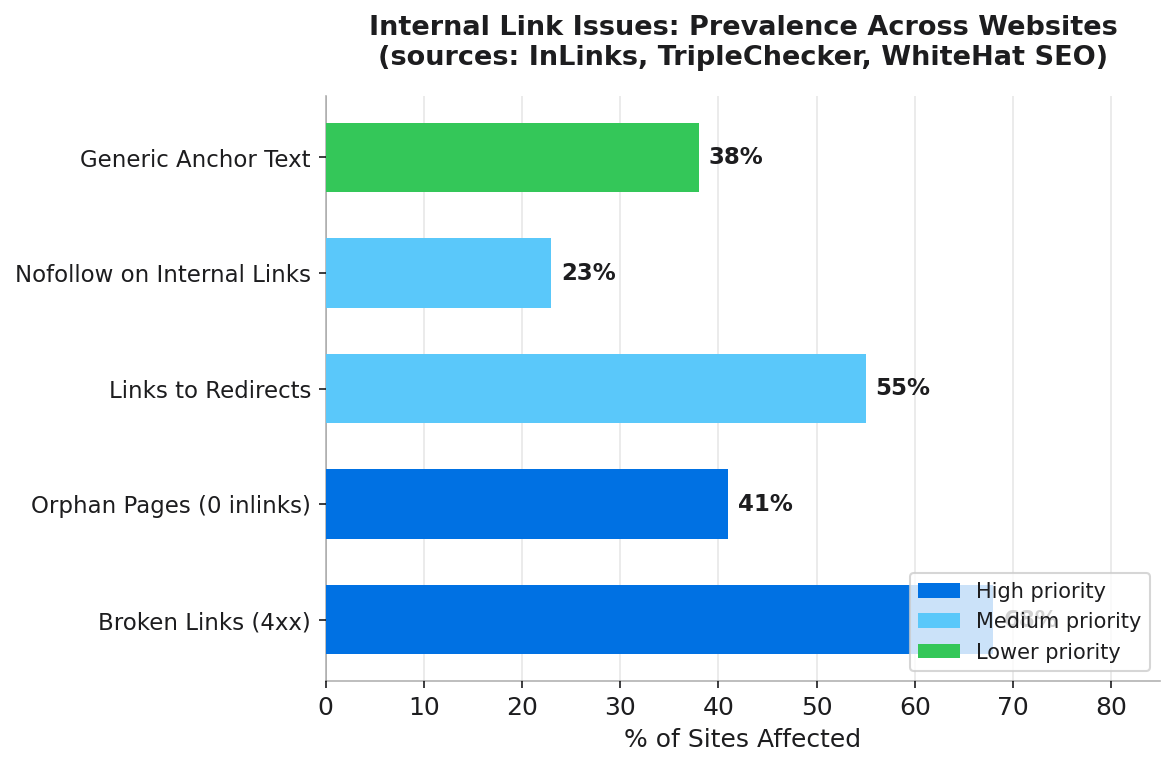
A study of over 5,000 websites by InLinks found that 41% of sites have target pages with zero contextual internal links pointing to them.[1] These are pages that have been published and indexed but receive no authority from the rest of the site. No tool checking them; no one noticing; no equity flowing in.
Separately, 66.2% of all pages on the web have only a single internal link pointing to them, according to data from WhiteHat SEO.[4] A single link is rarely sufficient for pages targeting competitive keywords. The tool's job is to find these underserved pages before they become ranking problems.
4x
More Google search clicks for pages with 40-44 internal links compared to pages with 0-4 internal links
Source: Zyppy, 23 Million Internal Links Study
Key Features to Look For in an Internal Link Tool
Not all internal linking software is equal. Here are the features that distinguish genuinely useful tools from superficial link counters.
1. Broken Internal Link Detection
This is the baseline. Any tool worth considering must find internal links pointing to 404 pages, server error pages, and redirected URLs. Broken internal links waste crawl budget and destroy link equity. They also create terrible user experiences that inflate bounce rates.
Good tools flag not just the broken destination URL, but the source page and anchor text, so you can fix the right link in the right place.
2. Orphan Page Identification
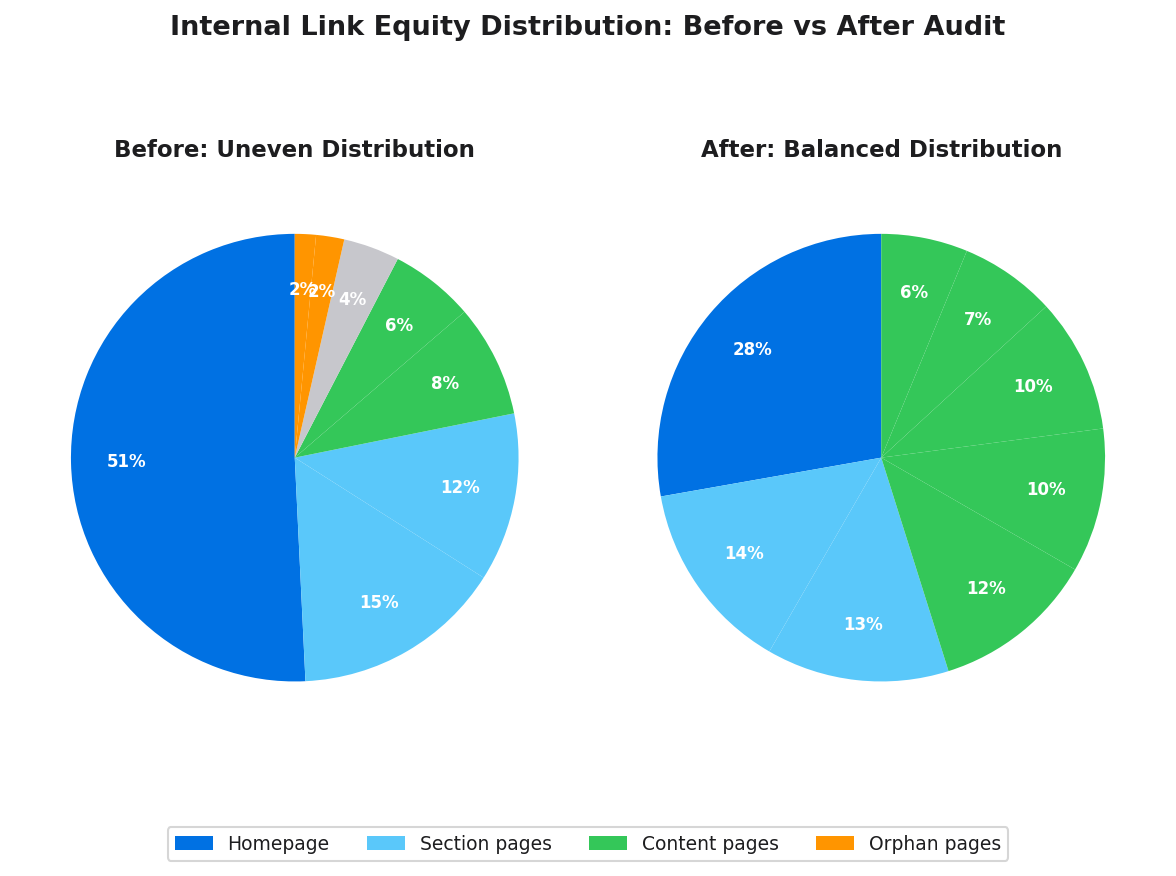
Orphan pages have zero internal inlinks. They receive no equity from the rest of the site and may not be discovered by Googlebot at all, regardless of sitemap submission. A capable tool identifies these pages and cross-references them against traffic data to surface which orphan pages matter most (those with existing backlinks, for instance, that are currently wasting equity they receive).
3. Authority Flow and Equity Distribution Analysis
This is where most tools fall short. Counting links is easy. Modelling how authority flows through those links and identifying where it pools or stagnates requires a more sophisticated approach. Look for tools that provide per-page inlink counts, crawl depth analysis, and some form of URL-level authority scoring (Ahrefs UR or Semrush PA-equivalent metrics).
4. GSC Integration
Google Search Console data transforms a crawl tool into a ranking tool. When you can cross-reference internal link distribution against actual clicks, impressions, and average position from GSC, you can prioritise fixes based on real revenue and traffic impact rather than theoretical SEO scores.
5. Anchor Text Analysis
Anchor text carries topical signals to destination pages. A tool that only counts links without analysing anchor text is missing one of internal linking's most powerful SEO levers. Cyrus Shepard's Zyppy study found that pages with at least one exact-match anchor from an internal link received over 5x more traffic than pages without.[2] You need to see what anchors are being used before you can improve them.
Audits Like Ahrefs Site Audit
Ahrefs Site Audit produces a comprehensive internal link analysis including: orphan pages report, internal URL performance (UR scores), pages with few incoming internal links, internal link opportunities (keyword-matched pages that should link to each other but do not), and a full crawl map showing depth distribution. Chris Haines, SEO Director at Ahrefs, recommends running these audits with a pyramid structure in mind, linking from authoritative pages downward to those that need ranking support.[3]
Suggestions Like Semrush
Semrush's Internal Link Suggestions feature (within Site Audit) automatically identifies pages on your site that share topical relevance and recommends specific links to add between them. This is the closest thing currently available to automated opportunity discovery. The Semrush team flags issues including pages with excessive link counts (over 3,000), internal nofollow usage on important pages, and redirect chains.[5]
Linki: Pre-Launch Features Overview
Linki is being built with a specific gap in mind: teams that need persistent, ongoing internal link analysis rather than a periodic crawl report. Most current tools treat audits as events. You crawl, you get a report, you fix issues, and you wait until next time. New content published between audits creates new orphan pages and new linking opportunities that go undetected.
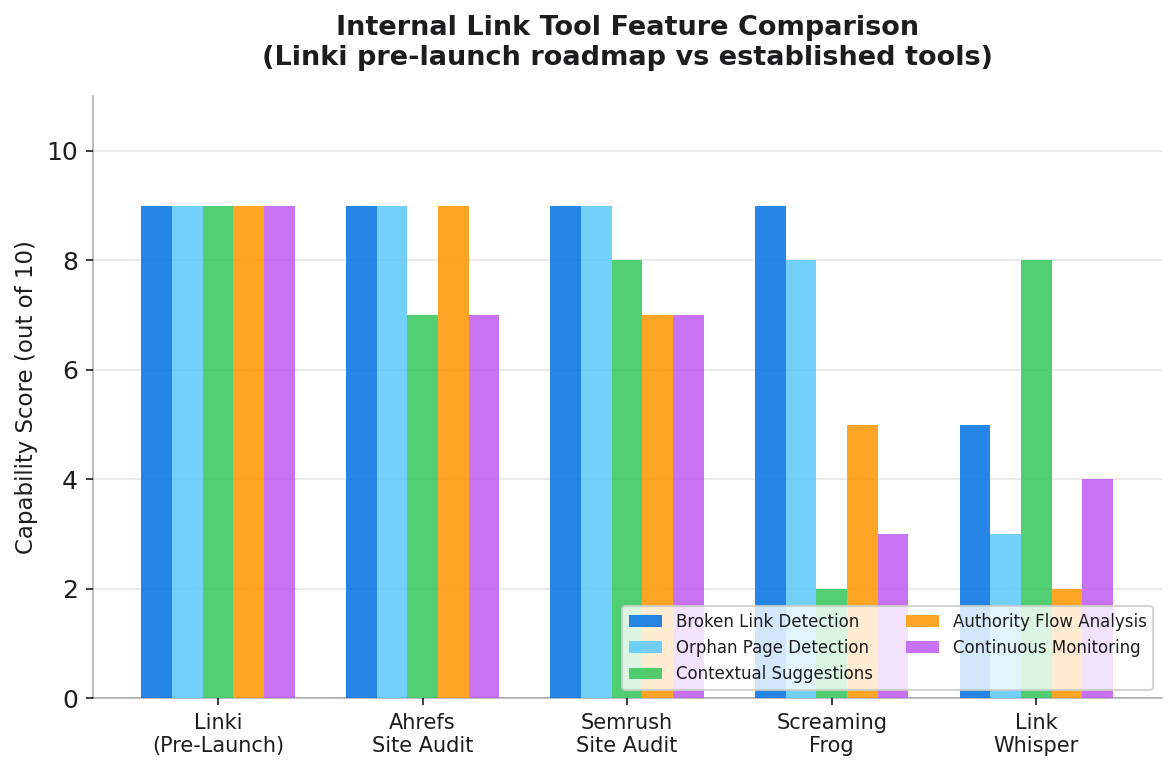
Linki's design approach addresses this with continuous monitoring, a link graph that updates as content is published, and AI-powered suggestions that identify contextual linking opportunities between existing pages. Crucially, it is built without JavaScript rendering dependency issues that affect some cloud crawlers when analysing modern headless CMS and JavaScript-heavy sites.
For teams managing ongoing content programmes, the collaborative audit dashboard will allow multiple team members to see, prioritise, and action internal link recommendations without needing to run separate crawls or merge spreadsheets.
For more context on what to look for in audit tools, see our internal link audit checklist and our guide to internal linking best practices.
Internal Link Tool Comparison
| Feature | Linki (Pre-Launch) | Ahrefs Site Audit | Semrush Site Audit |
|---|---|---|---|
| Broken internal link detection | Yes | Yes | Yes |
| Orphan page identification | Yes | Yes | Yes |
| Contextual link suggestions (AI) | Yes | Limited | Yes |
| GSC integration | Yes | Yes | Yes |
| Persistent/continuous monitoring | Yes | Scheduled | Scheduled |
| Internal-link-first focus | Yes | Feature within broader tool | Feature within broader tool |
Implementation Tips: Getting Value From Any Internal Link Tool
Having the tool is only the start. These practices ensure audits translate into actual SEO improvements rather than a long list of issues that never get actioned.
Start with orphan pages. They are always the highest-priority fix. An orphaned page that has existing backlinks or organic impressions in GSC is leaving authority on the table. Add at least one contextual internal link from a topically relevant, high-equity page immediately.
Cross-reference with GSC data before prioritising. Not every internal link issue matters equally. A broken internal link on a page that receives 50 clicks per month in GSC is urgent. The same issue on a page with zero traffic is lower priority. Always filter your tool output through real traffic data.
Run a fresh crawl after making changes. Some tools cache results for days or weeks. If you fix 20 internal link issues, re-crawl the affected pages to confirm they are resolved. Do not trust the previous report.
Build a recurring cadence. Internal link issues are not a one-time problem. Every new post published creates new linking opportunities and potentially new orphans if it is not woven into existing content immediately. A monthly internal link review cycle catches issues before they compound.
Common Mistakes to Avoid
After running internal link audits, these are the errors that appear most frequently:
Using generic anchor text. "Click here" and "read more" pass no topical signals to the destination page. Every internal link anchor should describe the page it points to, ideally using the target page's primary keyword where it reads naturally.
Adding too many links to a single page. Equity gets divided among all outbound links. A page with 200 internal links passes very little equity via any single one. Semrush flags pages with over 3,000 links as problematic, but the practical threshold for dilution begins much lower.[5]
Fixing broken links with more broken links. When you update a broken internal link, check that the new destination is itself a live, indexable page. Redirecting to another redirect creates a redirect chain, which is a separate audit issue entirely.
Relying solely on WordPress plugins. Plugins like Link Whisper work within the WordPress editor and are convenient for content teams. They are less effective for technical audits of the kind an SEO needs: orphan detection, crawl depth analysis, equity distribution, and broken link discovery across an entire site. Use a dedicated tool for the audit layer, and a plugin (if appropriate) for the suggestion layer.
For guidance on identifying and resolving specific technical issues, see our articles on how to find and fix broken internal links and our orphan pages SEO guide.
5%
Organic traffic uplift achieved from strategic footer internal linking in a SearchPilot A/B test
Source: SearchPilot Internal Linking Case Study
Frequently Asked Questions
What is the best internal linking tool for WordPress?
For ongoing content suggestions within the WordPress editor, Link Whisper is the most popular option. For technical audits of the full site (orphan detection, broken links, authority flow), Ahrefs Site Audit or Semrush Site Audit provide more comprehensive analysis. Linki is launching with a WordPress-compatible approach that combines both functions in a dedicated internal-link-first tool.
How do I find broken internal links?
Use a site crawler such as Screaming Frog (free up to 500 URLs), Ahrefs Site Audit, or Semrush Site Audit. All three crawl every URL on your site and flag any internal links returning 4xx or 5xx status codes. Google Search Console's Coverage report also surfaces 404 errors discovered through crawling, though it does not always show which internal page contains the broken link.
What features should an internal link tool have?
At minimum: broken internal link detection, orphan page identification, crawl depth analysis, anchor text reporting, and inlink/outlink counts per URL. More advanced tools add authority flow modelling, contextual link suggestions, GSC integration, and redirect chain detection. Continuous monitoring (rather than on-demand crawls) is increasingly important for active content sites.
What is an internal link checker and do I need one?
An internal link checker is a tool that crawls your site and audits the health, distribution, and quality of your internal links. Any site with more than 50 pages benefits from one. Manual review becomes impossible beyond that scale, and the ranking impact of systematic internal linking is well-documented. The question for most sites is not whether to use one, but which one fits your workflow and budget.
Can free tools do the job?
For basic broken link detection, yes. Screaming Frog's free version handles up to 500 URLs and is excellent for small sites. Google Search Console is free and surfaces many internal linking issues at no cost. For authority flow analysis, contextual suggestion generation, and persistent monitoring, paid tools provide capabilities that free options do not match.
Sources
- InLinks, Internal Linking Opportunities Case Study
- Zyppy (Cyrus Shepard), 23 Million Internal Links Study
- Ahrefs Blog, Internal Links for SEO: An Actionable Guide
- WhiteHat SEO, Internal Links for SEO: An Ultimate Guide
- Semrush, Site Audit Issues List
- SearchPilot, Impact of Internal Linking on SEO
- Allintitle, Best Internal Linking Tools Tested
- Moz, Link Explorer