Understanding Robots.txt: What to Block and What to Allow
A single file at the root of your domain quietly controls which parts of your site search engines can visit. Get it right and crawlers use their budget efficiently on your best content. Get it wrong and you may accidentally block Googlebot from the pages you most want ranked.
This guide covers robots.txt from syntax to strategy, including the growing challenge of AI crawler management and how your configuration affects internal link discovery.
Definition
Robots.txt is a plain-text file placed at the root of a website (e.g. https://example.com/robots.txt) that instructs search engine crawlers which pages or sections they may or may not access. It follows the Robots Exclusion Protocol and is the first file most crawlers check before visiting any page on a site.
What is Robots.txt and How Does It Work?
When a search engine crawler arrives at your site, it checks /robots.txt before anything else. The file tells it which user agents are addressed and what they can or cannot access. It is a directive system, not an enforcement mechanism: robots.txt politely asks compliant crawlers to stay away from certain paths. Malicious bots ignore it entirely.
94% of the 12 million websites sampled in an HTTP Archive study have a robots.txt file.[1] It is one of the most universally adopted technical standards in web publishing, yet it is also one of the most commonly misconfigured.
"Robots.txt file must be located at the root of the site host to which it applies."
Google Developers, Introduction to robots.txt
The key distinction: robots.txt controls access, not indexing. A page blocked in robots.txt can still appear in search results if other pages link to it and Google deems it indexable from those signals. Conversely, a page allowed by robots.txt can still be excluded from the index via noindex meta tags. These are separate systems with separate jobs.
94%
of websites surveyed have a robots.txt file
Source: HTTP Archive via Paul Calvano, 2025
Robots.txt Syntax and Directives
The file uses a simple key-value syntax. Each record starts with one or more User-agent lines identifying which crawlers the rules apply to, followed by Disallow and/or Allow directives.
User-agent
The User-agent line targets a specific bot or group of bots. User-agent: * applies rules to all crawlers. You can target specific bots individually:
User-agent: Googlebot
Disallow: /private/

User-agent: Bingbot
Disallow: /admin/

User-agent: *
Disallow: /staging/
Disallow and Allow
A blank Disallow: means the crawler can access everything. Disallow: / blocks the entire site. The Allow directive overrides a broader disallow for specific sub-paths:
User-agent: *
Disallow: /admin/
Allow: /admin/public-docs/
Sitemap
Including a Sitemap: directive points crawlers directly to your XML sitemap. This is best practice and helps crawlers discover all your content efficiently. You can include multiple sitemap entries:
Sitemap: https://example.com/sitemap.xml
Sitemap: https://example.com/news-sitemap.xml
Wildcards
Both Googlebot and Bingbot support two wildcard characters. The asterisk (*) matches any sequence of characters. The dollar sign ($) matches the end of a URL. You can use these to block URL patterns rather than fixed paths:
# Block all URLs containing query parameters
Disallow: /*?

# Block printer-friendly versions
Disallow: /*?print=true$
What to Block in Robots.txt
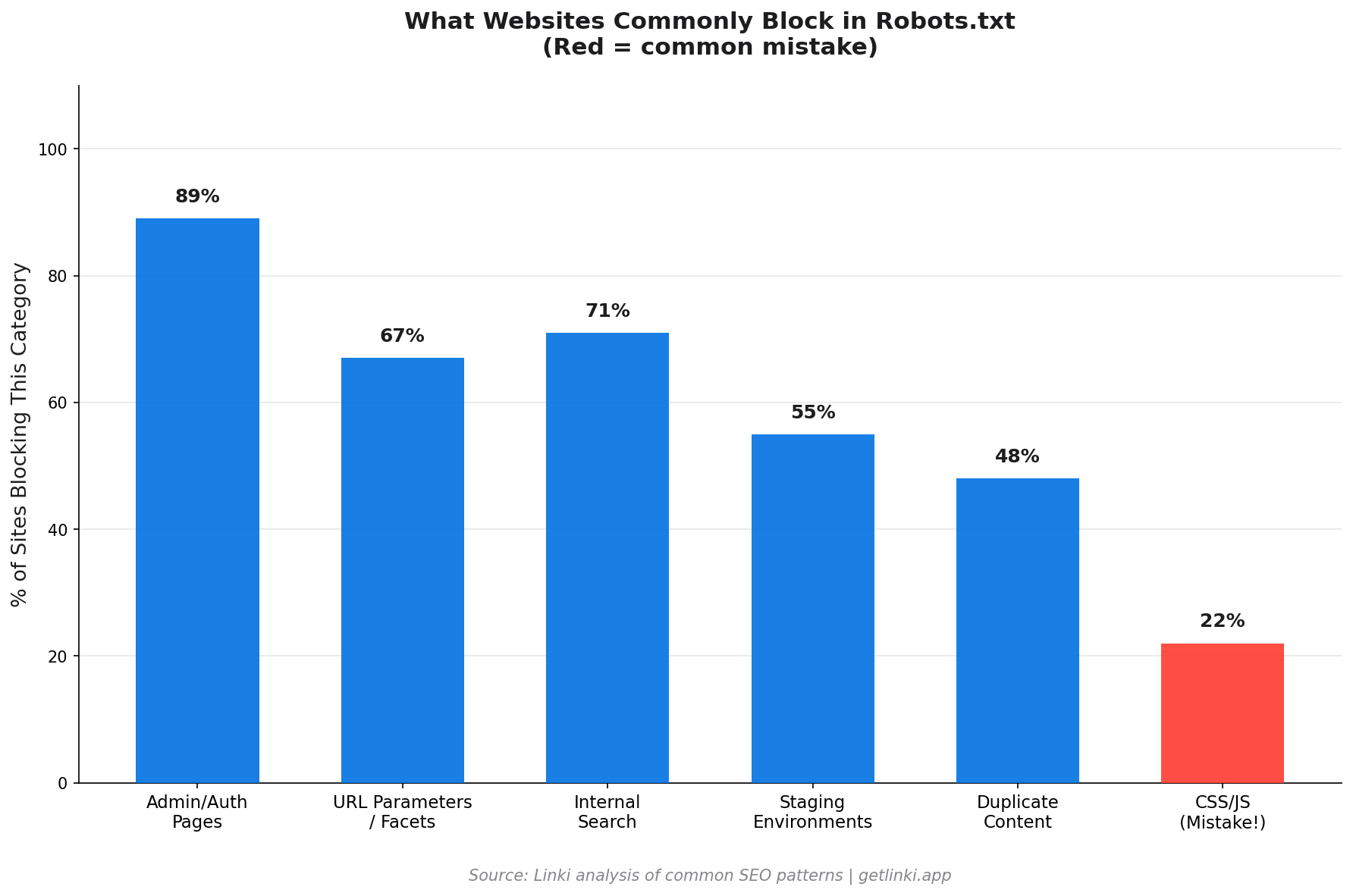
Good robots.txt configuration focuses crawl budget on pages that matter. These categories are candidates for disallowing.
Admin and Authentication Pages
Your CMS admin panel, login pages, and user account sections have no value in search results and should not be crawled. Block them explicitly:
Disallow: /wp-admin/
Disallow: /admin/
Disallow: /login
Disallow: /account/
URL Parameters Creating Duplicate Content
Faceted navigation, session IDs, and tracking parameters can multiply your page count dramatically. Facets like /products?colour=red&size=M create hundreds of near-duplicate pages. Block these patterns to prevent crawl budget waste:
Disallow: /*?sessionid=
Disallow: /*&ref=
Note: For e-commerce faceted navigation, canonical tags are often a better solution than robots.txt blocking, since you may want crawlers to visit some filtered pages.
Internal Search Results
Your site's internal search results pages are low-quality for search engines. They are dynamically generated, change constantly, and often contain no unique content. Blocking them prevents Googlebot from wasting budget on them.
Staging and Development Environments
If a staging subdomain is publicly accessible, block it entirely. Duplicate content between staging and production is a genuine indexing risk.
What to Allow in Robots.txt
Some paths need to be explicitly permitted, particularly when they sit inside a broadly disallowed directory.
CSS and JavaScript Files
This is critical. Blocking CSS and JavaScript prevents Googlebot from rendering your pages correctly. Google needs to fetch your stylesheets and scripts to understand how pages look and function.
"Don't block CSS or JavaScript files in your robots.txt."
Moz, Robots.txt Guide
A common mistake on WordPress sites: blocking the entire /wp-content/ directory blocks plugin CSS and theme JavaScript, which causes Googlebot to see a broken, unstyled page. This affects both rendering quality and Core Web Vitals assessment.
Core Content Pages
Everything that should appear in search results needs to be crawlable. Product pages, blog posts, category pages, landing pages, service pages: these should never appear in a Disallow directive.
XML Sitemaps
Even if you reference your sitemap via the Sitemap: directive, confirm the sitemap file itself is not accidentally blocked by a broader disallow rule.
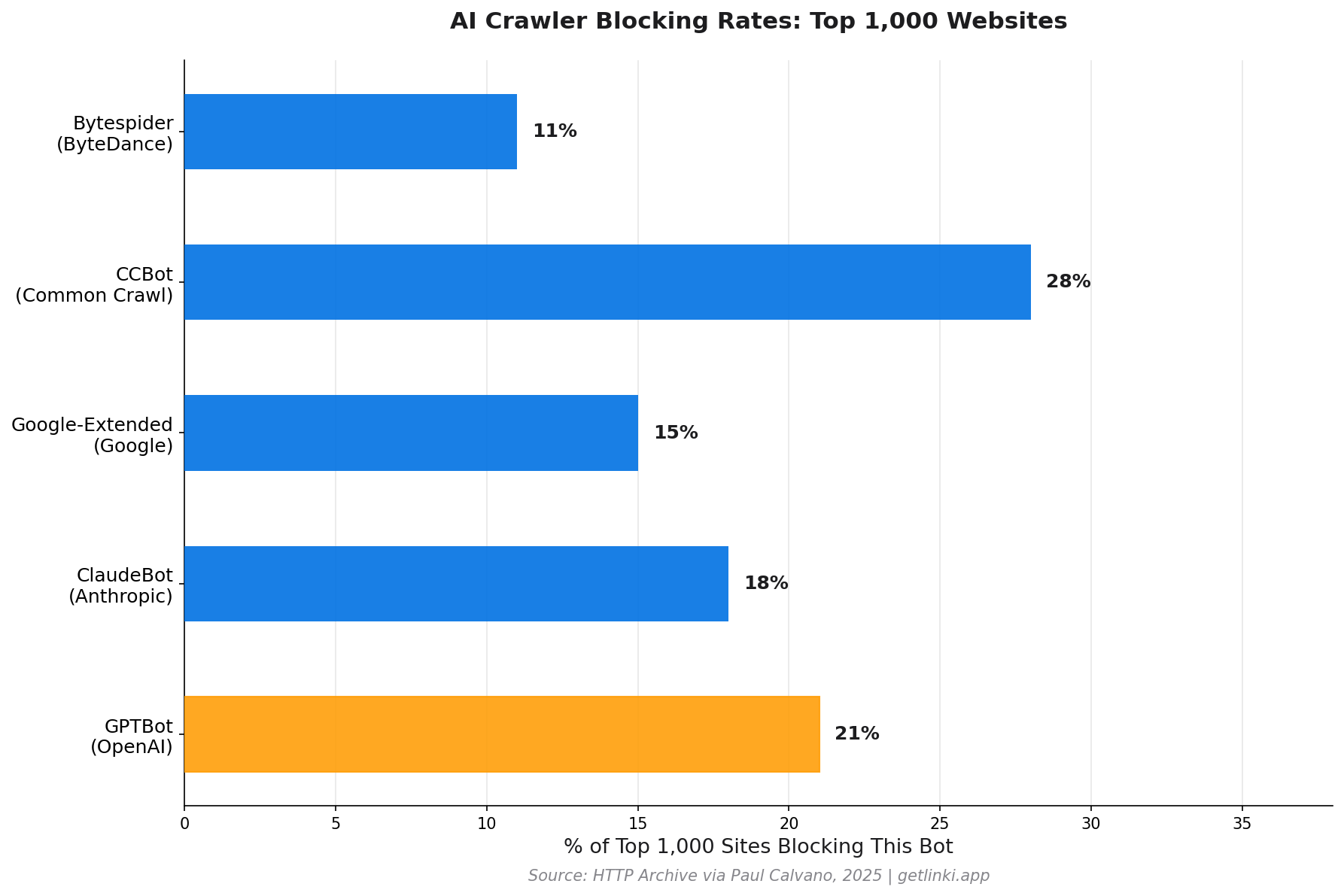
21%
of the top 1,000 websites now block GPTBot in their robots.txt
Source: HTTP Archive via Paul Calvano, 2025
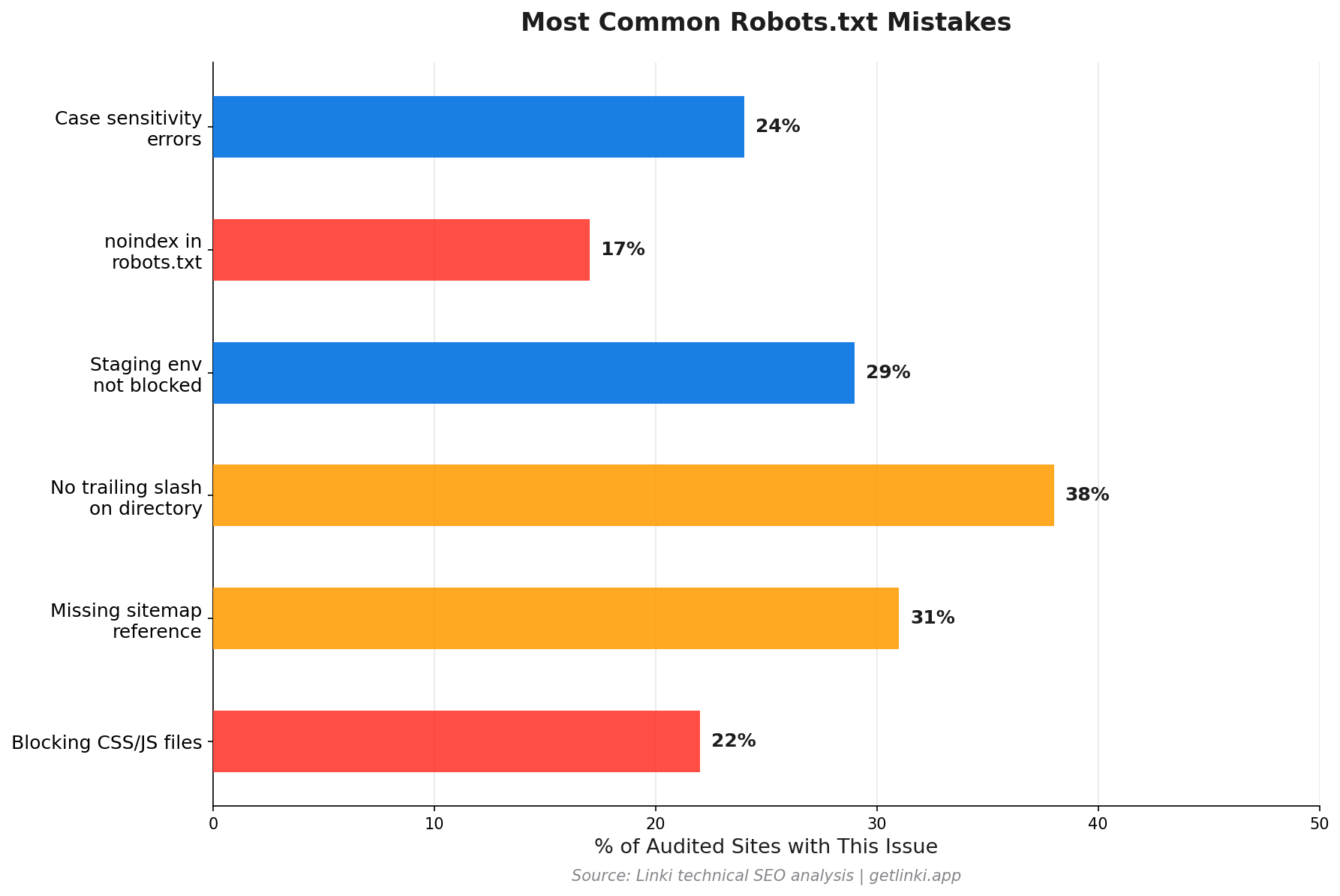
Common Robots.txt Mistakes
These errors appear repeatedly on technical SEO audits.
Blocking the Entire Site
During a site build or migration, developers sometimes add Disallow: / and forget to remove it at launch. This blocks all crawlers from the entire site. Always check robots.txt is the first thing you verify post-launch.
Using Noindex in Robots.txt
Google stopped honouring noindex rules placed inside robots.txt as of September 2019.[2] If you want to exclude a page from the index, use the noindex meta robots tag on the page itself, not a robots.txt directive.
Blocking Pages with Important Internal Links
When you block a section of your site, Googlebot stops following the internal links within it. If your navigation, footer, or a key hub page sits inside a blocked path, the link equity from that section stops flowing to the rest of your site. This is a subtle but significant crawl budget and link equity problem.
Case Sensitivity Errors
Paths in robots.txt are case-sensitive. Disallow: /Admin/ does not block /admin/. Check your actual URL structure against your disallow rules carefully.
Missing Trailing Slash
Disallow: /admin and Disallow: /admin/ behave differently. The former blocks the single URL /admin; the latter blocks the entire directory. In most cases you want the trailing slash to block the full section.
How to Test Your Robots.txt
Google Search Console includes a robots.txt Tester under Settings. It shows you your current file, highlights syntax errors, and lets you test whether specific URLs are blocked or allowed. This is the most accurate way to verify your configuration against Googlebot's actual parsing.
Screaming Frog also respects robots.txt by default and flags any blocked URLs it encounters during a crawl, which helps identify accidental blocks.
Robots.txt and Internal Linking: The Connection Most Sites Miss
Robots.txt has a direct impact on your internal link equity distribution. When Googlebot cannot crawl a section of your site, it cannot follow the internal links within that section. Those links become invisible in terms of passing equity.
Consider a common scenario: a large e-commerce site blocks its faceted navigation pages to manage crawl budget. The faceted pages contain internal links back to category and product pages. By blocking them, the site also inadvertently cuts off some of those link signals. The fix is usually to implement canonical tags on the faceted pages rather than blocking them entirely, which allows Googlebot to crawl and pass equity whilst still consolidating ranking signals to the canonical version.
More critically, if any page in your main navigation or footer is blocked, every page it links to loses those incoming link signals. Auditing which internal links sit on blocked pages is a straightforward but often-skipped step in technical SEO reviews.
For a complete picture of how technical crawl decisions interact with link structure, see our guide on technical SEO fundamentals. Our guide to XML sitemaps explains how sitemap and robots.txt work together to direct crawler behaviour.
Robots.txt and AI Bots in 2025-2026
The robots.txt use case has expanded significantly as AI crawlers multiply. These bots harvest content for training large language models, which raises both legal and commercial questions for publishers.
Data shows a clear divide. 60% of reputable news publishers disallow at least one AI crawler in their robots.txt, compared to only 9% of sites identified as misinformation sources.[3] Quality publishers are actively protecting their content.
| AI Bot | User-agent String | Company | Respects Robots.txt |
|---|---|---|---|
| GPTBot | GPTBot |
OpenAI | Yes |
| ClaudeBot | ClaudeBot |
Anthropic | Yes |
| Google-Extended | Google-Extended |
Yes | |
| CCBot | CCBot |
Common Crawl | Yes |
| Bytespider | Bytespider |
ByteDance | Variable |
To block all major AI training crawlers while keeping search engines:
User-agent: GPTBot
Disallow: /

User-agent: ClaudeBot
Disallow: /

User-agent: Google-Extended
Disallow: /

User-agent: CCBot
Disallow: /

User-agent: Googlebot
Allow: /

User-agent: Bingbot
Allow: /
60%
of reputable news publishers disallow at least one AI crawler in their robots.txt
Source: arXiv AI Study, 2025
Robots.txt for Internal Linking Audit Checklist
Before finalising your robots.txt configuration, verify these points:
- CSS and JavaScript files are accessible to crawlers
- No content pages appear in
Disallowrules - Sitemap URL is referenced and not blocked by another rule
- Your main navigation and footer links are on crawlable pages
- Key hub pages that pass link equity to other sections are not blocked
- AI crawlers are addressed (either allowed or disallowed based on your policy)
- Staging environments are blocked if publicly accessible
Pairing a robots.txt review with an internal link audit via Linki gives you a complete picture of how crawler access decisions flow through your site's link graph. See our guide to running a technical SEO audit for how robots.txt fits into a full audit workflow.
FAQ: Robots.txt
What is robots.txt and how does it work?
Robots.txt is a plain-text file at the root of your website that instructs search engine crawlers which pages they may or may not visit. It follows the Robots Exclusion Protocol and uses User-agent directives to target specific crawlers, with Disallow and Allow rules to control access. Crawlers check this file before visiting any other page on your site. It controls crawler access but does not control indexing: a blocked page can still appear in search results if other sites link to it.
Should you block CSS and JavaScript in robots.txt?
No. Blocking CSS or JavaScript in robots.txt prevents Google from rendering your pages correctly. Googlebot needs to fetch your stylesheets and scripts to understand how your pages look and function. Blocking these resources causes Googlebot to assess a broken, unstyled version of your pages, which negatively affects both indexing quality and Core Web Vitals evaluation. Never add Disallow: /wp-content/ or similar blanket blocks on asset directories.
How do you test your robots.txt file?
Google Search Console provides a built-in robots.txt Tester under Settings. It shows your live robots.txt file, flags syntax errors, and lets you test any URL against your current rules to confirm whether it is blocked or allowed. Screaming Frog also respects robots.txt by default and flags blocked URLs encountered during site crawls.
What happens if a website has no robots.txt file?
If no robots.txt file exists at the root of a domain, crawlers assume all pages are accessible and will crawl the entire site. Google returns a 404 for a missing robots.txt and treats it as if no restrictions apply. This is usually fine for small sites, but larger sites benefit from an explicit robots.txt to direct crawl budget, reference sitemaps, and manage AI crawler access.
Can robots.txt block pages from appearing in Google?
Robots.txt blocks crawlers from accessing pages, but it does not prevent those pages from appearing in Google's index. If a blocked page has external links pointing to it, Google may still index it based on those link signals, showing a result without a snippet. To fully exclude a page from Google's index, use the noindex meta robots tag on the page itself combined with allowing Googlebot to access it, so Google can read the noindex directive.
Sources
- Paul Calvano via HTTP Archive, AI Bots and Robots.txt
- Ahrefs (Joshua Hardwick), Robots.txt: Everything You Need to Know
- arXiv, AI Crawlers and Robots.txt Adoption Study
- Google Developers, Introduction to Robots.txt
- Moz, Robots.txt
- Intoli, Analyzing One Million Robots.txt Files