
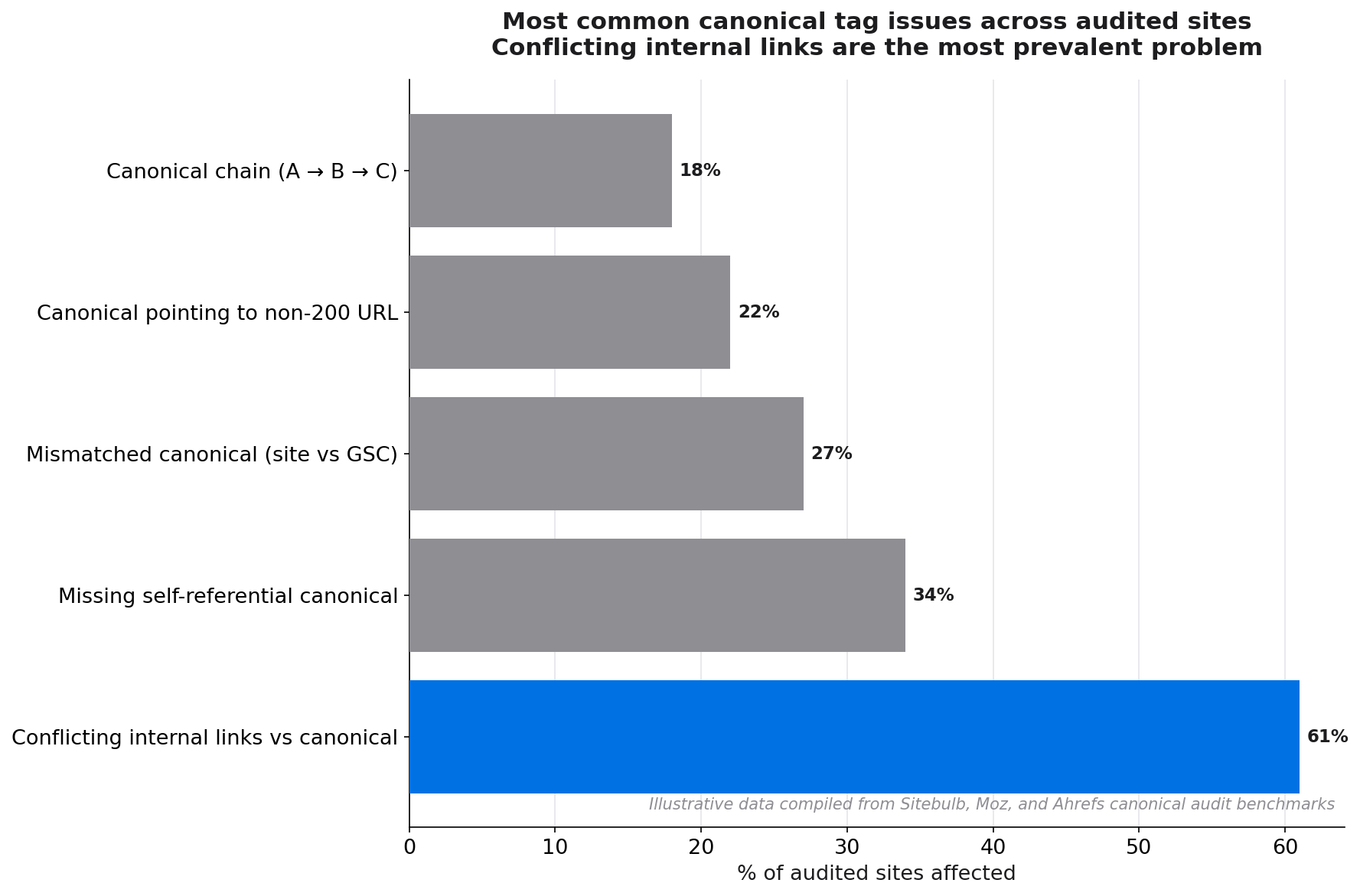
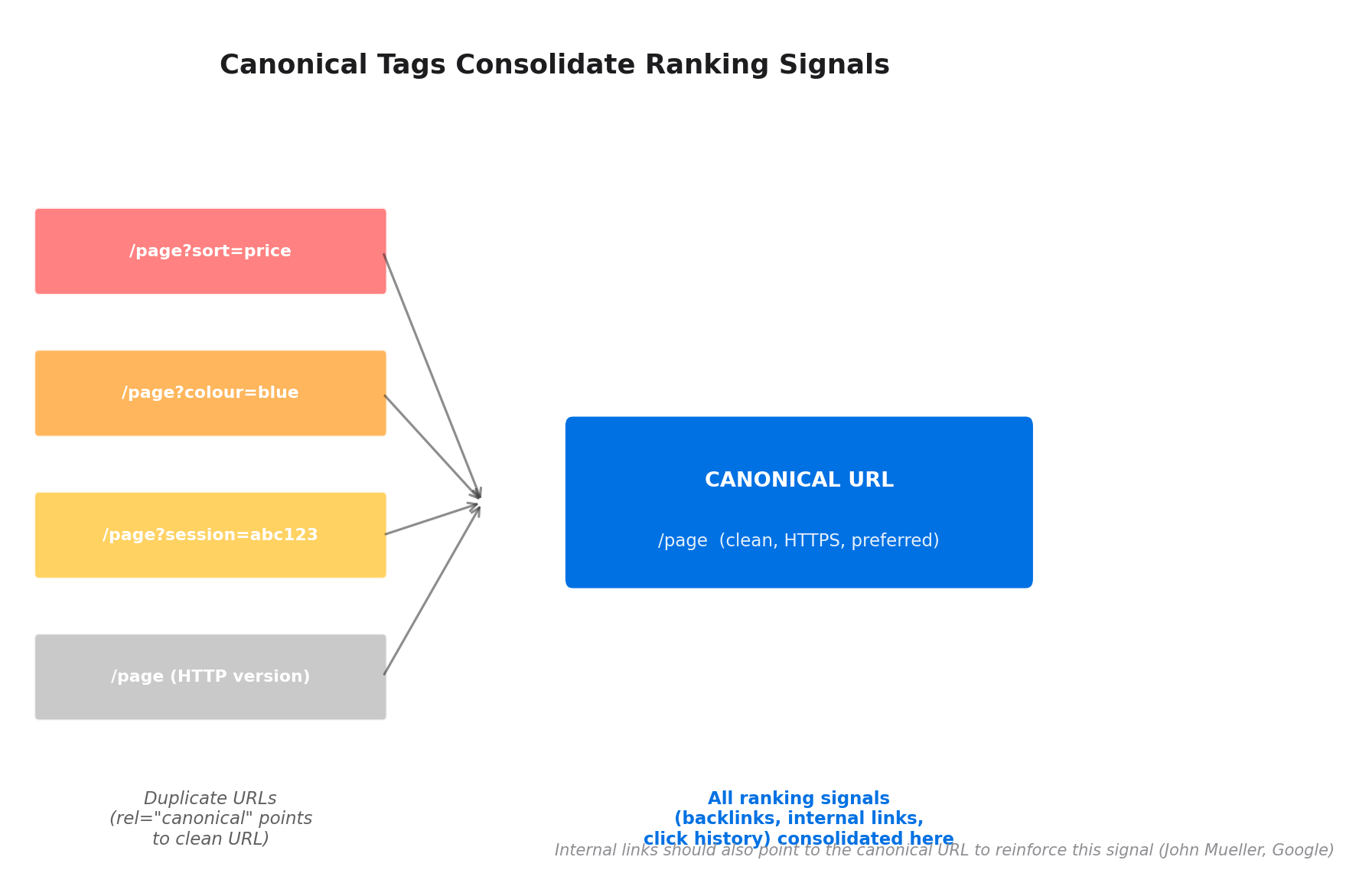
Duplicate content is one of the most persistent technical SEO problems on the web. Parameter URLs, printer-friendly versions, syndicated articles, and pagination variants can leave Google with dozens of near-identical pages competing for the same ranking position. Canonical tags are the cleanest solution. They tell Google which version of a page you consider authoritative, consolidating ranking signals and preventing link equity from leaking across duplicates.
This guide covers everything from the basics of canonical tag syntax to the advanced relationship between canonicalisation and internal linking, plus a full audit process to find and fix canonical issues on your site.
Definition
A canonical tag (technically a rel="canonical" link element) is an HTML signal in a page's <head> that tells search engines which URL is the preferred, authoritative version of that page's content. It is a hint, not a directive: Google may choose to ignore it if contradicting signals (such as internal links) point elsewhere. The canonical URL is the version Google will index and pass ranking signals to.
Why canonical tags matter for SEO
Duplicate content is more common than most teams realise. Research by Ryan Tronier found that 29% of websites face duplicate content issues that affect their SEO performance.[1] The problem has worsened: Sitebulb's analysis of HTTP Archive data found that mismatched canonical tags have doubled since 2022.[2]
Without canonical tags, Google has to guess which version of a page to index. It may choose the wrong one (a parameter URL rather than the clean path), split ranking signals across multiple versions, or waste crawl budget on redundant pages that add no value to its index.
29%
of websites have duplicate content issues that affect SEO performance
Source: Ryan Tronier, duplicate content SEO research
The positive case is compelling too. Sitebulb documented a case where fixing canonical tags resulted in a 320% increase in ranking keywords for the affected site.[2] That is not unusual: consolidating ranking signals from five duplicate versions of a page to one canonical version can produce dramatic improvements in a short time.
+320%
increase in ranking keywords recorded after fixing canonical tag issues
Source: Sitebulb canonical tags case study
How canonical tags work
The rel="canonical" tag sits inside the <head> section of a page's HTML:
<link rel="canonical" href="https://example.com/seo-guide" />When Google crawls a page with this tag, it reads it as: "The preferred URL for this content is https://example.com/seo-guide. Consolidate all ranking signals to that URL."
Canonical tags can be self-referential (a page pointing to itself as canonical) or cross-page (a duplicate pointing to the original). John Mueller recommends the self-referential approach: "I recommend doing this kind of self-referential rel=canonical because it really makes it clear for us which page you want to have indexed."[3]
Beyond the HTML tag, canonical signals can also be sent via HTTP headers (useful for non-HTML files like PDFs) and via the Google Search Console URL inspection tool. Google treats all these as hints and weighs them alongside other signals including your internal links, sitemaps, and external backlinks.
When to use canonical tags
Canonical tags are the right solution in four specific scenarios.
URL parameters generating duplicates
Filtering and sorting parameters (?sort=price&colour=red) create unique URLs for what is effectively the same content. The canonical tag on each parameter variant should point to the clean root URL: https://example.com/shoes.
Paginated content
For blog archives and product category pages with multiple pages (/page/2, /page/3), canonical usage depends on whether each page has unique content value. If page 2 of your blog is essentially a list of posts available elsewhere, it may warrant a canonical to page 1. If each page has genuinely unique content, self-referential canonicals are appropriate.
Syndicated content
If your articles are republished on other sites (or you republish others' content), the syndicated copies should carry a canonical tag pointing to the original source URL. This prevents the syndicated version from competing with or outranking the original.
HTTPS / HTTP and www / non-www variants
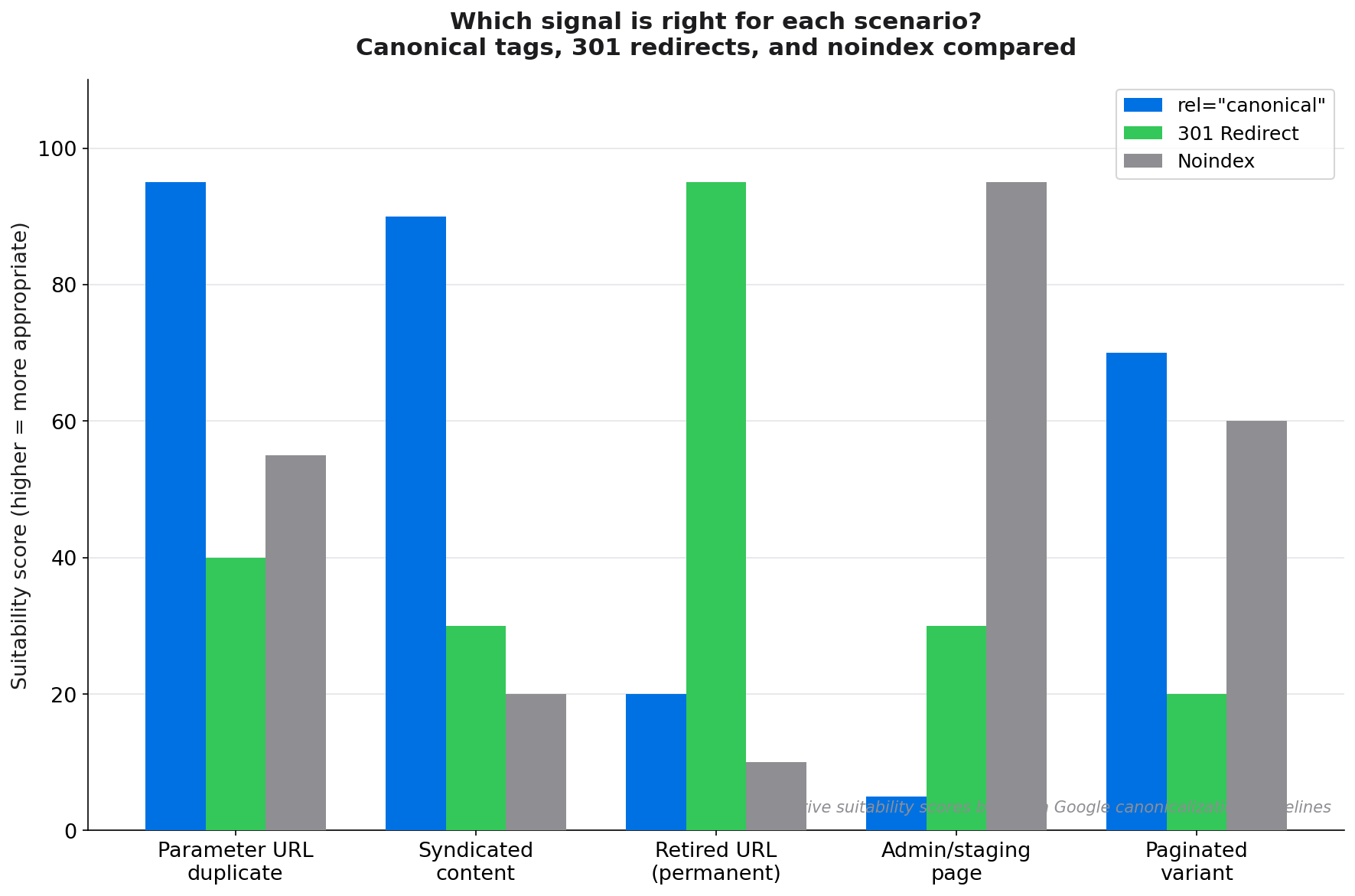
Your preferred URL format (HTTPS vs HTTP, www vs non-www) should be enforced through 301 redirects as the primary fix. Canonical tags serve as a secondary signal confirming your preferred version. Never rely on canonicals alone when redirects can be implemented.
Step-by-step implementation
- Identify your canonical URL format. Decide on your canonical URL format for all page types (HTTPS, www vs non-www, trailing slash vs none). This should match your 301 redirect configuration.
- Add self-referential canonicals to all indexable pages. Every indexable page should have a canonical tag pointing to itself. Most CMS platforms (WordPress with Yoast/RankMath, HubSpot, Shopify) add these automatically, but verify they are correct.
- Add cross-page canonicals to all known duplicates. For parameter variants, pagination, and syndicated pages, add canonical tags pointing to the preferred version.
- Implement via HTTP header for PDFs and non-HTML files. PDF documents and other files cannot contain HTML canonical tags. Use the
LinkHTTP header:Link: <https://example.com/guide.pdf>; rel="canonical". - Verify in GSC. Use the URL Inspection tool in Google Search Console to confirm which URL Google has selected as canonical for each page. If it differs from your intended canonical, investigate contradicting signals.
"When linking within your site, link to the canonical URL rather than a duplicate URL."
Google Developers, Consolidate duplicate URLs
Canonical tags and internal linking: a critical relationship
Most guides treat canonical tags as a purely technical implementation exercise. They miss a crucial interaction: your internal links are themselves a canonicalisation signal.
John Mueller has confirmed this: "Links, both internal and external, are another canonicalization signal."[4] If your canonical tag says one URL is preferred, but your internal links consistently point to a different version (a redirect URL, an HTTP version, a www vs non-www mismatch), Google receives conflicting signals. In cases of conflict, Google may override your canonical tag in favour of the URL that receives the most internal link equity.
Ensure internal links point to canonical URLs
Google's own documentation instructs webmasters: "When linking within your site, link to the canonical URL rather than a duplicate URL."[5] This means every internal link in your body copy, navigation, footer, and related-content modules should point to the exact canonical URL, including the correct protocol, subdomain, and trailing slash convention.
When you implement a URL migration or change your URL format, updating internal links is as important as implementing the 301 redirect. Internal links pointing to redirect-destination variants contradict your canonical signal and dilute link equity across a redirect hop. Linki surfaces these internal links to redirect-chain URLs automatically, making it straightforward to fix them before they create lasting canonicalisation confusion. See: how to create an SEO-friendly URL structure.
Build link equity to your canonical pages
Because internal links are a canonicalisation signal, strategically concentrating internal link equity on your canonical versions reinforces your rel="canonical" declaration. Pages that receive many internal links from trusted, high-authority pages in your site are more likely to be selected as canonical when Google has to adjudicate between competing signals. See: identifying pages with too few internal links.
Best practices and common mistakes
Best practices
- Always use absolute URLs in canonical tags (including protocol and domain), not relative paths.
- Ensure canonical tags are in the HTML
<head>, not the<body>. - Only one canonical tag per page. Multiple canonical tags on one page cause Google to ignore all of them.
- Keep canonical chains short. A canonical pointing to a page that itself has a different canonical creates a chain; Google may follow it or may not. Point directly to the final canonical.
Common mistakes
- Canonicalising paginated pages to page 1: If page 2 of a product category has genuinely unique, indexable content, pointing it to page 1 can hide that content from Google. Use self-referential canonicals for paginated pages with unique content.
- Using canonical tags instead of 301 redirects: Canonical tags are a hint, not a redirect. If you want to permanently consolidate two pages, a 301 redirect is stronger and more reliable. Canonicals are for situations where the duplicate URL must remain accessible to users (e.g., for tracking parameters).
- Inconsistent internal links contradicting canonicals: As covered above, internal links that point to non-canonical URLs undermine your canonical declarations.
- Missing canonicals on paginated pages: Pages without any canonical tag signal leave canonicalisation decisions entirely to Google.
Canonical tags vs 301 redirects vs noindex
| Signal | User accessible? | Google directive? | Best for |
|---|---|---|---|
rel="canonical" |
Yes | Hint | Parameter duplicates, syndication, tracking URLs |
| 301 Redirect | No (redirected) | Directive | Permanently retired URLs, domain migrations |
| Noindex | Yes | Directive (index only) | Admin pages, thank-you pages, staging content |
Auditing canonical tags with tools
A structured audit finds canonical issues before they compound into ranking problems.
- Crawl the site and export the canonical URL column. For every URL returning 200, check whether the canonical tag matches the crawled URL (self-referential) or points elsewhere (cross-page).
- Find canonical conflicts: Identify any URL where the canonical tag points to a page that itself has a different canonical (canonical chains). Find pages where the canonical URL is different from the URL returned in the sitemap.
- Check GSC Coverage report for "Duplicate, submitted URL not selected as canonical" warnings. These indicate Google has overridden your canonical declaration.
- Audit internal links for non-canonical URLs. Export all internal links from your crawl and check whether any destination URL is flagged as non-canonical (i.e., a redirect target, a parameter variant, or an HTTP version of an HTTPS page). Fix these to point to the canonical destination directly.
- Use Linki to cross-reference your canonical declarations with your internal link graph. Linki highlights internal links pointing to non-canonical URLs and flags pages where internal link signals contradict the canonical tag declaration.
Frequently asked questions
What is a canonical tag?
A canonical tag is an HTML element (<link rel="canonical" href="[URL]" />) placed in a page's <head> section that tells search engines which URL is the preferred, authoritative version of that page. It is used to prevent duplicate content issues by consolidating ranking signals to a single canonical URL.
How do you implement a rel=canonical tag?
Add <link rel="canonical" href="https://example.com/your-page-slug" /> inside the <head> section of your HTML. Use the absolute URL of the canonical version. For self-referential canonicals, the href should match the page's own URL exactly. Most CMS platforms (WordPress, HubSpot, Shopify) add canonical tags automatically; verify them in your page source or via a crawl tool.
What is the difference between canonical tags and 301 redirects?
A 301 redirect is a server-level directive that sends both users and crawlers from one URL to another. It is permanent and removes the old URL from user access. A canonical tag is an HTML hint that consolidates ranking signals but leaves the original URL accessible to users. Use 301 redirects for permanently retired URLs and canonical tags for duplicate URLs that need to remain accessible (tracking parameters, syndicated content, filter variants).
When should you use canonical tags?
Use canonical tags when: (1) URL parameters generate near-identical pages, (2) content is syndicated or republished on other domains, (3) pagination creates multiple pages with overlapping content, (4) both HTTP and HTTPS or www and non-www versions of pages are accessible, and (5) as self-referential canonicals on all indexable pages to prevent accidental canonicalisation conflicts.
Can internal links affect which URL Google chooses as canonical?
Yes. John Mueller has confirmed that internal links are a canonicalisation signal. If your internal links consistently point to a non-canonical URL, Google may override your canonical tag declaration and index the linked-to version instead. Always ensure internal links point to the exact canonical URL, including the correct protocol, subdomain, and trailing slash convention.
Sources
- Ryan Tronier, Duplicate content in SEO: statistics and impact
- Sitebulb, 3 case studies showing the power of canonical tags
- Yoast, Rel=canonical: the ultimate guide (John Mueller quote)
- Ahrefs, Canonical Tags: A Simple Guide for Beginners (John Mueller quote)
- Google Developers, Consolidate duplicate URLs
- Moz, Canonicalization: What is a Canonical URL?
- HTTP Archive, Web Almanac 2024: SEO Canonicalization data