
URL structure is one of those SEO elements that rarely gets the credit it deserves. It influences click-through rates in search results, helps crawlers understand site architecture, and shapes how internal link equity flows through your pages. Get it wrong and you create a tangle of redirects, duplicate content, and missed ranking opportunities. Get it right and it becomes a silent asset that supports every other SEO activity you do.
This guide covers every principle you need to create an SEO-friendly URL structure, from Google's own guidelines to practical decisions about hierarchy, hyphens, and parameters, plus how URL choices affect your internal linking.
Definition
An SEO-friendly URL structure is a system of URL conventions across a website that makes pages easy for search engines to crawl, categorise, and rank, and easy for users to read and remember. It includes decisions about slug format, directory hierarchy, parameter handling, protocol (HTTPS), and canonical URL selection.
Why URL structure matters for SEO
URLs serve as signals to both users and search engines. A well-formed URL communicates the topic of a page before the user even clicks. It tells Googlebot where a page sits in your site hierarchy. It makes internal linking more consistent because you can predict canonical paths without checking redirects.
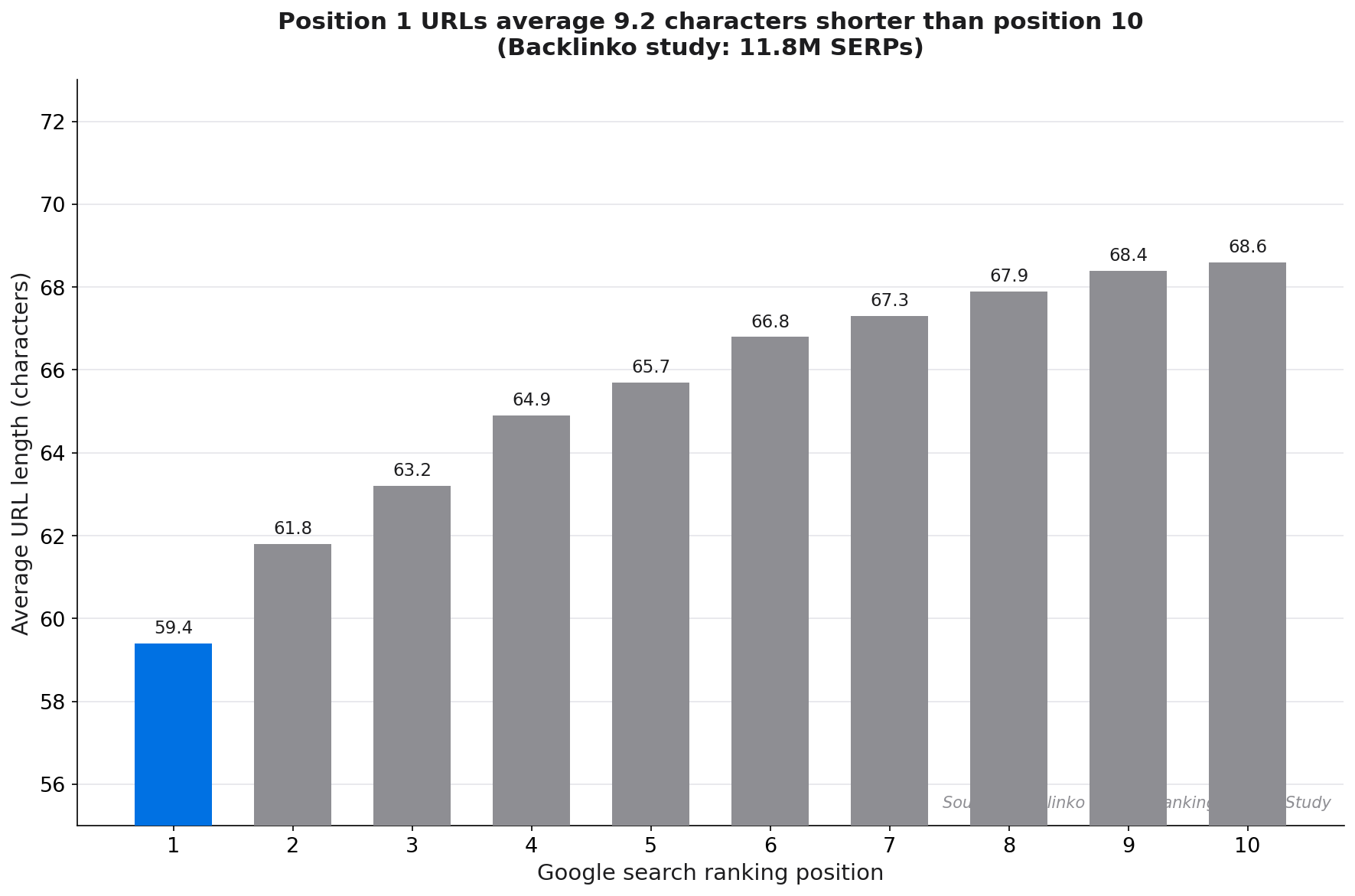
The performance evidence is clear. Backlinko's analysis of millions of Google search results found that the average URL length for a top-10 ranking page is 66 characters, and first-position URLs are 9.2 characters shorter than tenth-position URLs.[1] That correlation between shorter, cleaner URLs and higher rankings reflects multiple signals: shorter URLs tend to be flatter in hierarchy, more topically precise, and less prone to parameter bloat.
45%
higher click-through rate for URLs that match the search query keyword
Source: Backlinko CTR Study
CTR matters too. When a URL slug contains words from the user's search query, those words appear in bold in the search result. Backlinko's CTR research found that keyword-matching URLs receive 45% higher click-through rates than non-matching URLs.[2] That improvement is free: it requires no link building, no content expansion, just a cleaner slug chosen at publication.
Core best practices for SEO-friendly URLs
These guidelines reflect Google's official documentation and are confirmed by independent SEO research.
Use hyphens, not underscores
Google treats hyphens as word separators and underscores as word joiners. So /seo-friendly-urls is parsed as three separate words, while /seo_friendly_urls is read as one combined string. Google's documentation is explicit on this: "We recommend using hyphens (-) instead of underscores (_) to separate words in your URLs."[3]
Keep URLs lowercase
Servers can interpret /Blog/Post-Title and /blog/post-title as two separate URLs. This creates duplicate content problems and splits internal link equity. Enforce lowercase at the server level (via .htaccess or equivalent) and in your CMS slug generator.
Use HTTPS
This is non-negotiable. Google confirmed HTTPS as a ranking signal in 2014. As of recent browser statistics, 90.4% of Firefox page loads use HTTPS compared to just 2.4% via HTTP.[4] Any HTTP URLs should be redirected to their HTTPS equivalents with a 301.
90.4%
of Firefox page loads use HTTPS. HTTP pages are a technical SEO liability.
Source: Briskon SEO research
Include the target keyword in the slug
The slug should describe the page's primary topic using its target keyword. Keep it as short as you can while retaining meaning. Strip stop words (a, the, and, of, for) unless they change the meaning significantly. For example: /blog/internal-linking-guide rather than /blog/a-complete-guide-to-the-art-of-internal-linking-for-seo.
John Mueller of Google has advised against special characters in URLs: "Avoid special characters like commas, semicolons... in URLs."[5] Stick to alphanumeric characters and hyphens.
Use readable words, not IDs
Google's documentation states: "Use readable words rather than long ID numbers in your URLs."[3] A URL like /product/14829371 tells neither the user nor Googlebot anything about the page. /product/blue-leather-wallet tells them both exactly what to expect.
Avoid parameters where possible
URL parameters (anything after a ?) create multiple URLs for what is effectively the same page. This wastes crawl budget, generates duplicate content, and splits link equity. Where possible, use clean URL rewrites instead of parameter strings. If parameters are unavoidable (e-commerce filtering, session IDs), handle them via canonical tags, robots.txt disallow, or Google Search Console's URL parameter settings. See also: canonical tags explained.
URL hierarchy: flat vs deep
Your URL hierarchy reflects your site architecture. A flat structure keeps most pages within 2-3 clicks of the homepage. A deep structure creates many subfolder levels.
| Structure type | Example URL | SEO impact |
|---|---|---|
| Flat (recommended) | /blog/seo-friendly-urls |
Good Short, signals proximity to root |
| Moderate depth | /resources/seo/url-best-practices |
OK Context provided, manageable depth |
| Deep (avoid) | /resources/seo/technical/on-page/url-best-practices-guide-2026 |
Poor Long URL, deep in hierarchy, keyword dilution |
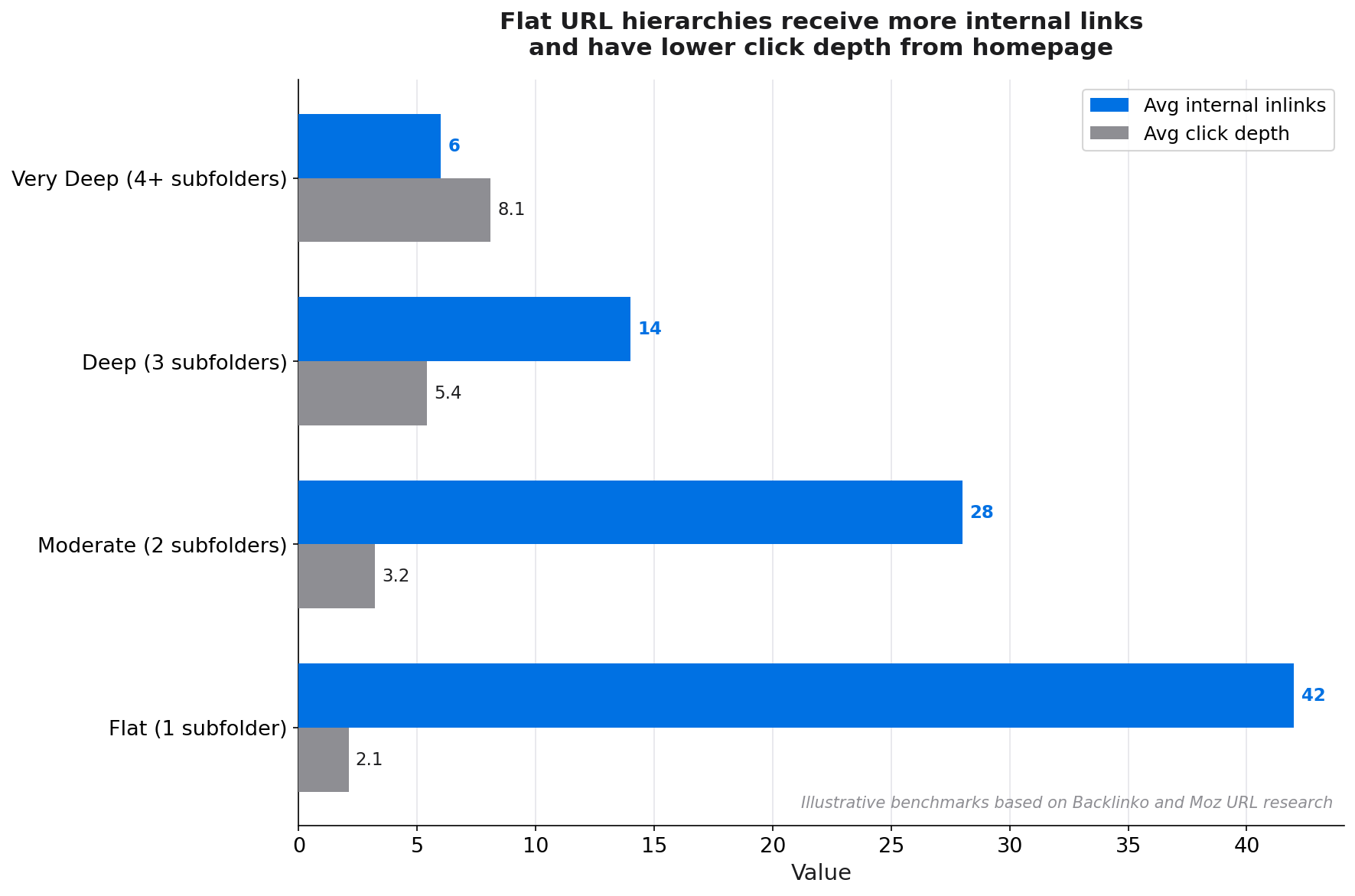
Google has stated that deeply nested URLs are not inherently penalised, but the practical SEO consequences of deep hierarchies are real: pages deep in the structure receive fewer internal links, have higher click depth (harder for Googlebot to reach), and often suffer from diluted topical signals due to multiple subfolder keywords. See: crawl budget and crawlability.
Common URL mistakes and how to fix them
Even experienced teams accumulate URL problems over time. Here are the most damaging mistakes and their remedies.
Trailing slashes
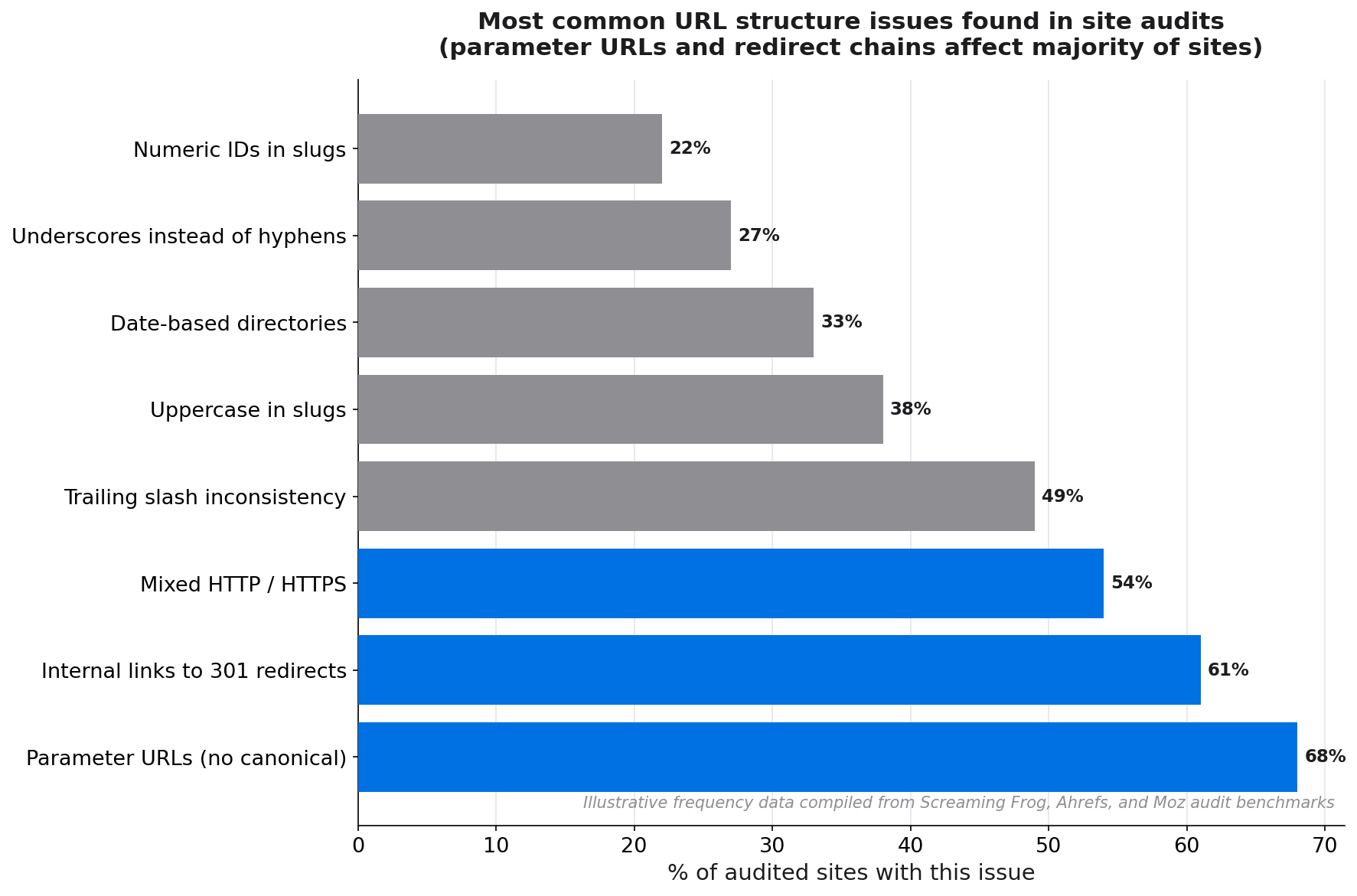
/blog/seo-urls and /blog/seo-urls/ can be treated as separate URLs by some servers. Pick one convention, enforce it at the server level with a redirect, and ensure all internal links use the same format. Inconsistency here creates duplicate content at scale across large sites.
Mixed case
As noted above, mixed-case URLs split link equity and create content duplication. A 301 redirect from the capitalised version to the lowercase canonical version resolves this, but prevention at the CMS level is far cleaner.
Dates in blog slugs
URLs like /blog/2019/04/15/seo-url-guide age poorly. A post published in 2019 with that URL looks old in search results even if the content is updated. Remove date-based directory structures from your blog slugs. If your CMS requires a migration, do it with careful 301 redirects and update all internal links immediately. A 61% majority of SEO professionals report that URL changes impact rankings,[6] so never change a URL without a proper redirect in place.
61%
of SEO professionals report URL structure changes impact rankings
Source: Koanthic SEO research
Dynamic URLs with multiple parameters
E-commerce sites commonly generate URLs like /products?category=shoes&colour=blue&size=10&sort=price-asc. Each unique parameter combination is a new URL. At scale, this can waste enormous amounts of crawl budget on low-value or identical pages. Use canonical tags on parameter variants to point to the clean root URL. Use robots.txt to block purely session-based parameters. Configure URL rewrites for faceted navigation to generate clean, indexable category paths for your most important filter combinations.
URL structure and internal linking
The relationship between URL structure and internal linking is closer than most teams realise. Your URLs are the addresses your internal links point to. If those addresses are messy, your internal link graph inherits that mess.
Consistent canonical URLs reduce linking errors
When a page has a single, predictable canonical URL, every team member (writer, developer, marketer) can add an internal link to it without checking for redirects first. When URLs vary (trailing slash sometimes present, HTTP and HTTPS coexisting, www vs non-www inconsistent), internal links inevitably point to redirect chains. Link equity leaks at every redirect hop. A clean URL structure makes it nearly impossible to add a broken or redirect-chain internal link by accident.
Directory structure maps naturally to topic clusters
A URL hierarchy like /blog/[topic]/[subtopic] creates a natural map for your topic cluster architecture. Your pillar pages live at /blog/[topic]. Your cluster articles live at /blog/[topic]/[subtopic]. Internal links between cluster and pillar pages follow the URL pattern intuitively. This makes it easier to audit gaps in your internal linking by comparing the URL hierarchy to the actual link graph. See: topic clusters and pillar pages.
Redirects break internal link equity
If you migrate URLs and update your XML sitemap but fail to update all internal links pointing to the old URLs, those old URLs continue to receive internal link equity that is then lost across a redirect hop. After any URL migration, run a full site crawl filtered for internal links pointing to 301-redirecting URLs and update them to point directly to the canonical destination. Linki surfaces these redirect-chain internal links automatically, so you can fix them before they drain authority. See: how to fix broken internal links.
Tools and audit checklist
You do not need expensive enterprise tools to audit your URL structure. This workflow uses widely available tools.
Step-by-step URL audit process
- Crawl your site with a tool like Screaming Frog or Sitebulb. Export the full URL list with status codes.
- Filter for non-canonical issues: identify URLs returning 200 that are also served via HTTP, without trailing slash, or with mixed case. These are duplicate content candidates.
- Check URL length. Sort by URL length descending. Any URL over 100 characters should be reviewed for potential slug trimming (with a proper redirect).
- Identify parameter URLs. Filter for any URL containing
?. Review whether each parameter type needs indexing, blocking, or canonicalisation. - Review internal links to 3xx URLs. In your crawl tool, filter for internal links that resolve to 301 or 302 redirects. Update these to point to the canonical destination.
- Check GSC for Coverage issues. Look for "Duplicate, submitted URL not selected as canonical" and "Alternate page with proper canonical tag" warnings. Both indicate canonical conflicts that a proper URL structure resolves.
- Validate with Linki. Linki's internal link analysis flags URLs receiving links through redirects and identifies pages under-linked relative to their position in the URL hierarchy.
"Use readable words rather than long ID numbers in your URLs."
Google Developers, URL structure guidelines
Before and after: URL optimisation examples
| Before | After | Issue fixed |
|---|---|---|
/blog/2019/03/15/seo_friendly_url_guide |
/blog/seo-friendly-url-guide |
Date removed, hyphens, shorter |
/products?id=83724&cat=shoes&colour=blue |
/shop/shoes/blue-leather-loafers |
Parameters replaced with descriptive path |
HTTP://www.example.com/Page-Title/ |
https://example.com/page-title |
HTTPS, lowercase, no trailing slash |
/resources/seo/technical-seo/on-page/url-optimisation-complete-guide-2024 |
/blog/url-optimisation-guide |
Deep hierarchy collapsed to flat |
Frequently asked questions
What makes a URL SEO-friendly?
An SEO-friendly URL is short, uses hyphens to separate words, contains the target keyword in the slug, uses HTTPS, is lowercase, avoids special characters and unnecessary parameters, and uses readable words rather than numeric IDs. It should accurately describe the page's content so that both users and crawlers understand the topic before visiting the page.
How long should a URL be for SEO?
Backlinko's analysis of 11.8 million SERPs found that top-ranking URLs average 66 characters, and first-position URLs are 9.2 characters shorter than tenth-position URLs. Aim for slugs of 3-5 words (roughly 20-50 characters for the slug alone). The full URL including protocol and domain should ideally stay under 100 characters, though Google has no hard limit.
Should URLs include keywords?
Yes. The URL slug should contain the primary target keyword for the page. Keywords in URLs appear bolded in search result snippets when they match the user's query, which Backlinko found improves CTR by 45%. Use the keyword naturally; do not stuff multiple variations or repetitions into the slug.
Are hyphens or underscores better for SEO URLs?
Hyphens are better. Google explicitly recommends hyphens over underscores because hyphens act as word separators, meaning Google reads seo-friendly-urls as three separate words. Underscores join words, so seo_friendly_urls is read as a single compound string. This affects how the page is matched to keyword queries.
Do URL changes affect rankings?
Yes. A 61% majority of SEO professionals report that URL changes impact rankings. Always implement a 301 redirect from the old URL to the new canonical URL whenever you change a slug. Update all internal links and your XML sitemap to point to the new URL. Monitor GSC for crawl errors and ranking fluctuations in the weeks following a migration.
Sources
- Backlinko, Google's 200 Ranking Factors: The Complete List (2024)
- Backlinko, Organic CTR Study
- Google Developers, Keep a simple URL structure
- Briskon, Best Practices for SEO-Friendly URL Structure
- Ahrefs, SEO-Friendly URLs: How to Create Them (John Mueller quote)
- Koanthic, URL Structure SEO research
- Moz, URLs and SEO: Moz Learn SEO
- Collaborada, URL Best Practices
- Neil Patel, How to Create SEO-Friendly URLs