
How to Run a Technical SEO Audit in 30 Minutes
Most technical SEO audits take days. They involve sprawling spreadsheets, multi-tool crawls, and reports that gather dust while real issues go unfixed. But the majority of sites have the same handful of critical problems, and a focussed 30-minute audit surfaces them faster than an exhaustive 200-point checklist ever will.
This guide gives you a structured, time-boxed process: the right tools, the right checks, and a priority framework so you know exactly what to fix first.
Definition
A technical SEO audit is a systematic review of a website's technical infrastructure to identify issues that affect how search engines crawl, render, and index its pages. It covers crawlability, indexability, site speed, Core Web Vitals, internal linking, and structured data. The goal is to remove barriers between your content and its search engine ranking potential.
Why Quick Technical Audits Matter
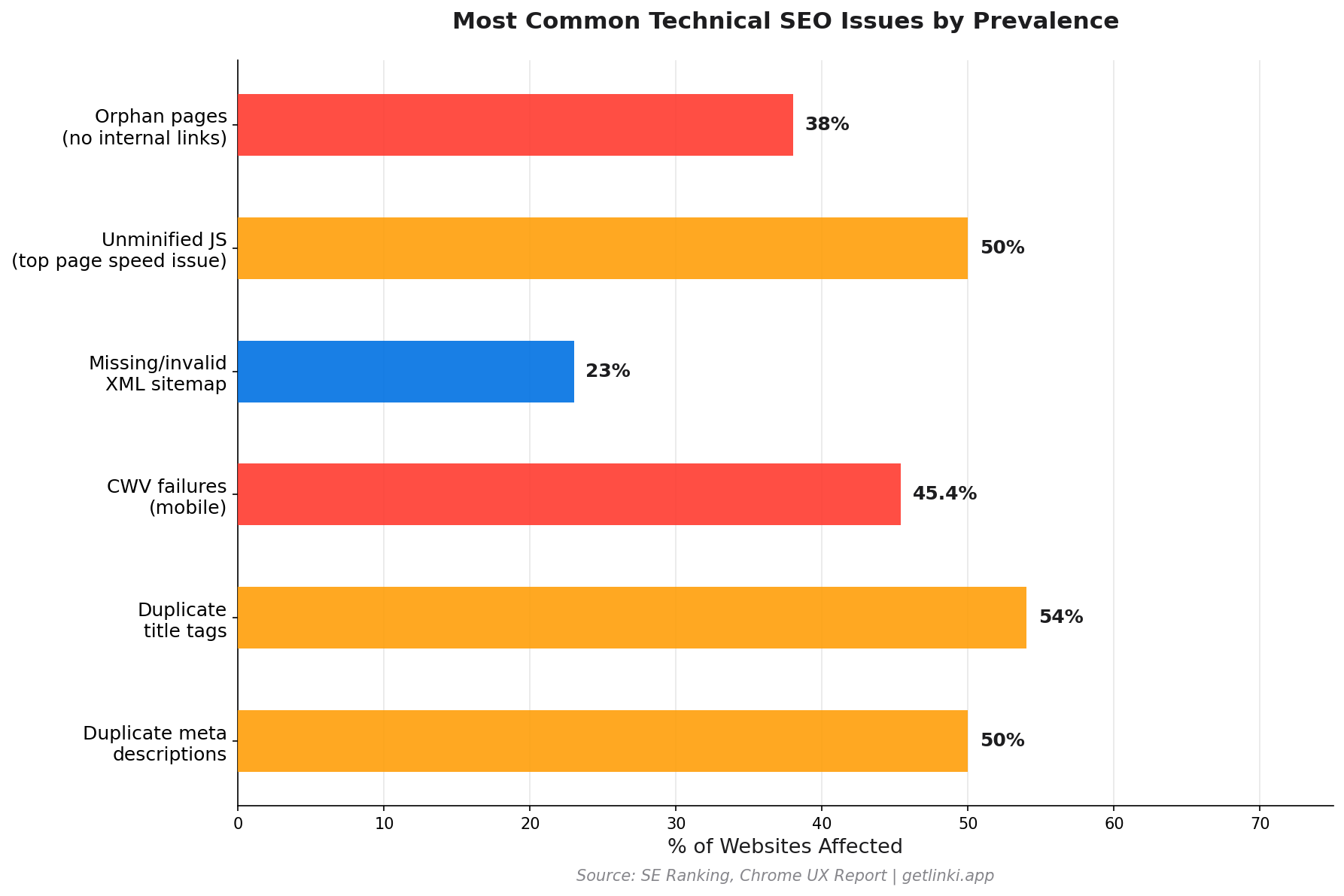
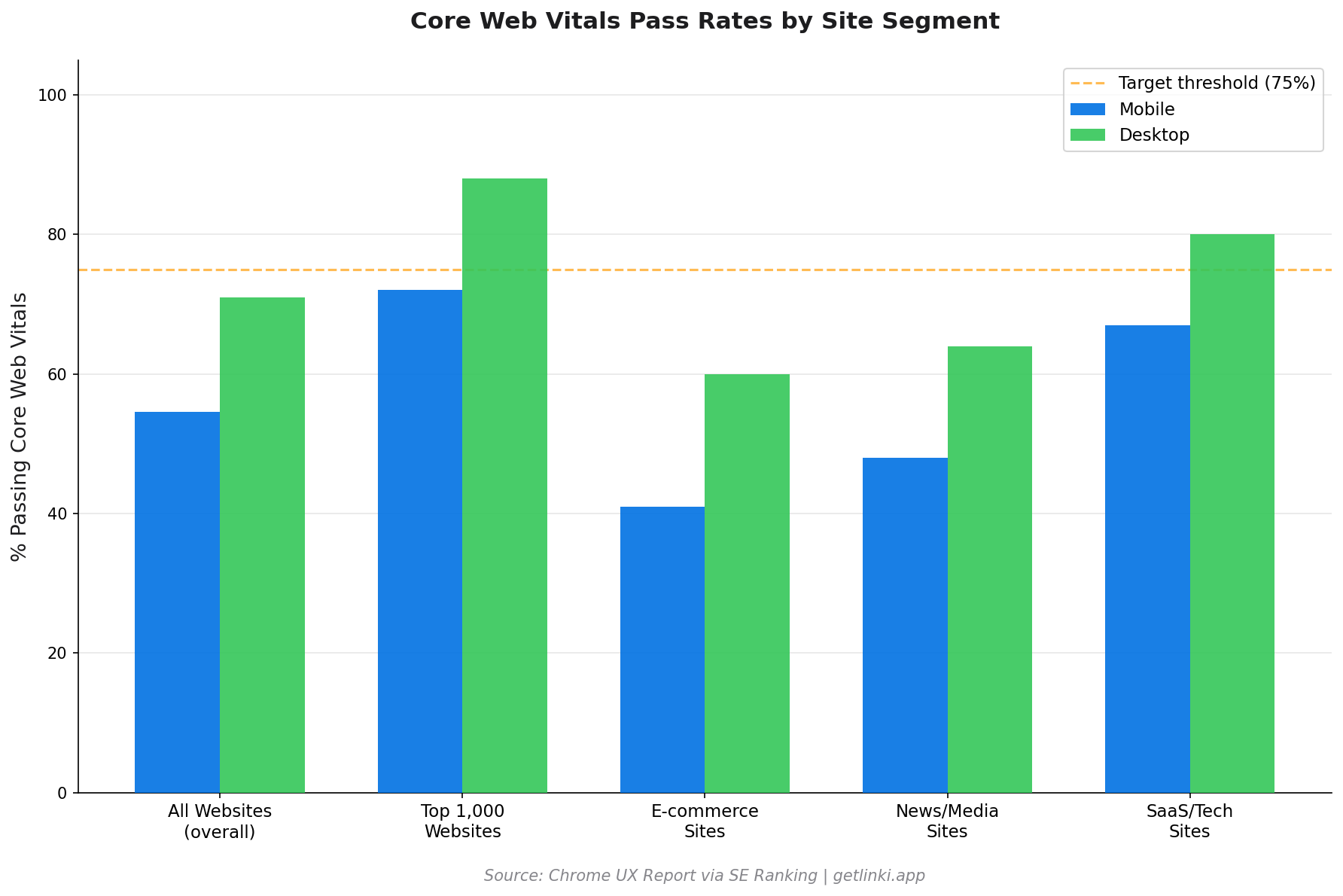
The data makes a sobering case for regular technical reviews. Just 54.6% of websites currently meet Core Web Vitals thresholds.[1] Half of all sites have duplicate meta descriptions. 54% have duplicate title tags.[1] These are not edge cases: they are industry norms.
54.6%
of websites currently meet Core Web Vitals thresholds
Source: Chrome UX Report via SE Ranking
The case for quick, regular audits rather than annual deep dives is strong. Sites change constantly: developers push updates, pages get added or deleted, redirects accumulate. A 30-minute audit run monthly catches issues before they compound into serious ranking problems.
"Most sites have at least a few unindexed pages, but all of your important pages should be indexed."
Google Search Central, Search Console Help
Tools You Will Need
This audit uses only free or freemium tools. No budget required.
| Tool | Purpose | Cost | URL |
|---|---|---|---|
| Google Search Console | Indexing, crawl errors, Core Web Vitals | Free | search.google.com |
| Screaming Frog SEO Spider | Site crawl, redirects, broken links, titles | Free up to 500 URLs | screamingfrog.co.uk |
| PageSpeed Insights | Core Web Vitals, speed opportunities | Free | pagespeed.web.dev |
| Linki | Internal link audit, orphan pages, link equity | Early access | getlinki.app |
The 30-Minute Technical SEO Audit: Step by Step
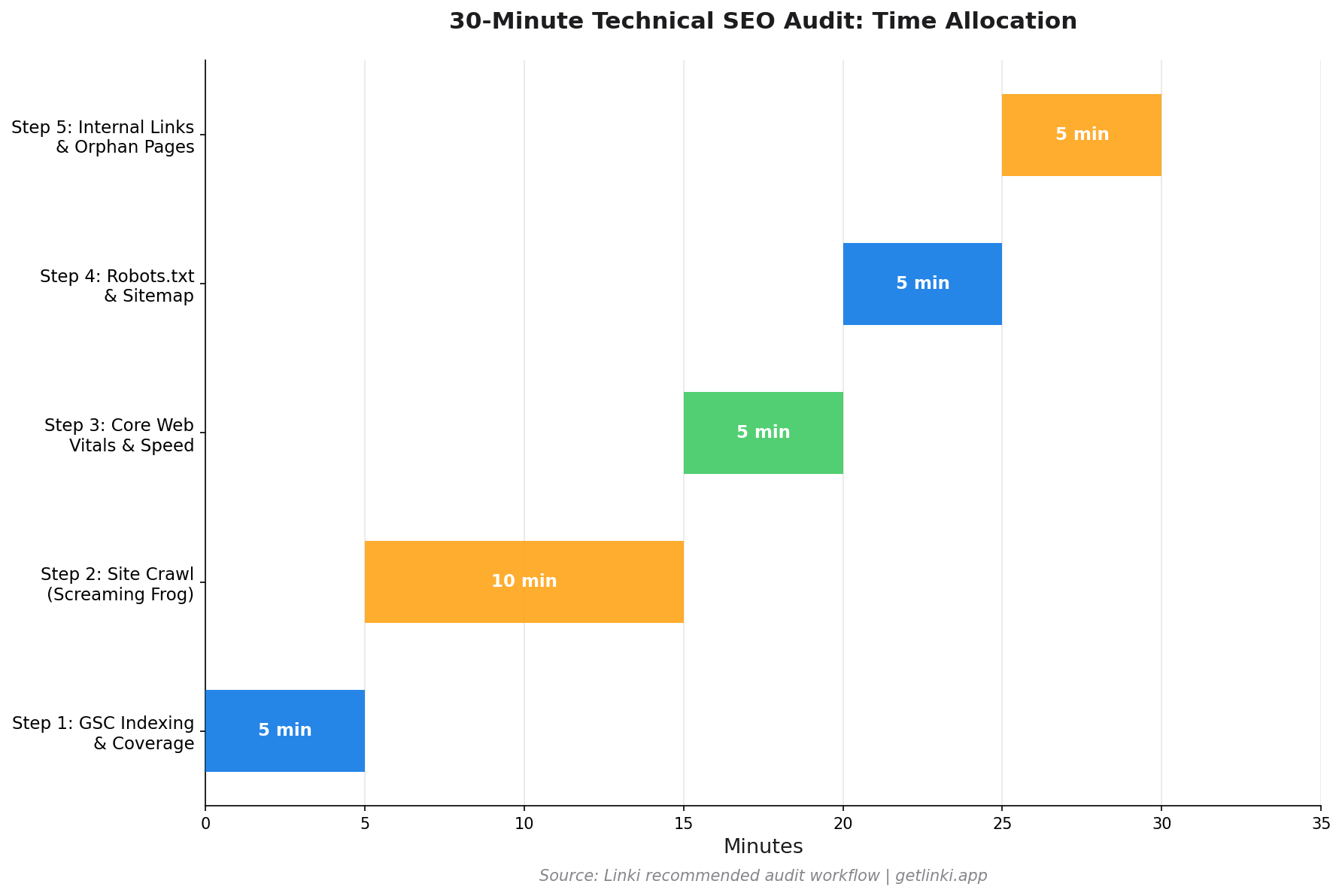
Each step is time-boxed. Work through them in order. Resist the urge to go deeper on any single issue during the audit: the goal is to surface all critical issues, then prioritise them afterwards.
Minutes 0-5: Indexing and Crawl Status in GSC
Open Google Search Console and go to Indexing > Pages. Look at the split between indexed and not-indexed pages.
Key things to check:
- Is the indexed count roughly what you would expect for your site?
- Are there pages listed under "Not indexed" with reasons like "Crawled - currently not indexed" or "Discovered - currently not indexed"? These are usually thin content or duplicate issues.
- Are any important pages unexpectedly absent from the index?
Then check Indexing > Sitemaps. Confirm your sitemap is submitted, has no errors, and the discovered URL count matches your expectations. A large gap between submitted and indexed URLs warrants investigation.
Minutes 5-15: Site Crawl with Screaming Frog
Start a Screaming Frog crawl on your domain. While it runs, switch to the Response Codes tab when URLs start populating. Sort by status code and look for:
- 4xx errors (especially 404s): Broken pages that users and crawlers hit
- 3xx redirects: Chains of more than one hop waste crawl budget
- 5xx errors: Server errors that block crawling entirely
When the crawl completes, check the Page Titles tab for duplicates and over-length titles (over 60 characters). Check Meta Description for missing or duplicate descriptions. Check H1 for missing or multiple H1 tags.
23% of websites lack a properly referenced XML sitemap in robots.txt,[1] and 15% have no sitemap at all. If your sitemap is missing from the crawl, note it.
Minutes 15-20: Core Web Vitals and Page Speed
Go to Google Search Console and open Experience > Core Web Vitals. Check the mobile and desktop reports. Any URLs in the "Poor" or "Needs Improvement" categories are priority fixes.
For the specific issues behind a failing URL, run it through PageSpeed Insights. The top recommendations show you exactly what is causing failures: Largest Contentful Paint (LCP) issues are often large unoptimised images or slow server responses; Cumulative Layout Shift (CLS) issues are usually unsized images or late-loading ads; Interaction to Next Paint (INP) issues are typically heavy JavaScript execution.
82%
higher click-through rate achieved by Nestlé using rich results via structured data
Source: Eesel AI citing Google case study
Minutes 20-25: Robots.txt and Sitemap Review
Fetch your robots.txt directly in a browser at yourdomain.com/robots.txt. Check:
- No important content pages are blocked
- CSS and JavaScript files are not blocked (a common mistake)
- Your sitemap is referenced with a
Sitemap:directive - Staging or admin paths are properly disallowed
Then check your sitemap directly. Are there pages listed that should not be there (noindex pages, redirects, 404s)? Cross-reference the sitemap against your GSC coverage report.
See our dedicated guide on robots.txt configuration and our guide to XML sitemap optimisation for full detail on these checks.
Minutes 25-30: Internal Links and Orphan Pages
This step catches issues that the other tools miss entirely. Internal linking is often the difference between pages that rank and pages that do not, yet most quick audits skip it.
In Screaming Frog, go to Reports > Crawl Tree Graph to see pages with very few incoming internal links. Any page with zero internal links pointing to it is an orphan page.
For a faster and more comprehensive analysis, Linki surfaces orphan pages, low-equity pages, and link distribution gaps across your site in a single view, without requiring you to manually sort through crawl exports. This is particularly useful for sites where the internal link structure has evolved organically and become inconsistent over time.
Prioritising Fixes: The P0-P3 Matrix
Not all issues have equal impact. Use this framework to triage what you find.
| Priority | Fix Within | Examples |
|---|---|---|
| P0 Critical | 24 hours | Entire site blocked in robots.txt, homepage returning 404, sitemap returning 5xx |
| P1 High | 1 week | Key pages not indexed, poor Core Web Vitals on main templates, redirect chains on top pages |
| P2 Medium | 2-4 weeks | Duplicate title tags, missing meta descriptions, orphan pages, duplicate content |
| P3 Low | Next sprint | Missing schema markup, sub-optimal image alt text, minor canonicalisation |
50%
of sites have duplicate meta descriptions; 54% have duplicate title tags
Source: SE Ranking
Common Pitfalls and Pro Tips
Several patterns trip up even experienced SEOs during a quick audit.
Confusing Coverage Issues with Penalties
A page appearing in GSC's "Not indexed" report is rarely a penalty. It is usually a crawl budget issue, thin content, or a misconfigured canonical. Start by understanding the reported reason before assuming the worst.
Fixing Redirect Chains Piecemeal
Redirect chains often exist because internal links point to the old URL, not the final destination. Updating the redirect without also updating the internal links that point to it means the chain disappears from the redirect report but the equity still flows through an unnecessary hop. See our guide to fixing redirect chains for the correct approach.
Ignoring Mobile Core Web Vitals
GSC shows both mobile and desktop CWV reports. Mobile scores are almost always worse and are the ones Google uses for ranking in mobile-first indexing. Focus your speed fixes on mobile metrics first.
Not Auditing Internal Links
Internal linking is consistently underweighted in quick audits. A page can have perfect meta tags, fast load times, and proper indexing, yet rank poorly because no other pages link to it. Allocating at least 5 minutes of every audit to internal link structure prevents this common oversight.
For the broader context of how these checks fit into your overall technical foundation, see our technical SEO beginner's guide. For an in-depth look at one of the most commonly found issues, our guide on fixing redirect chains and loops provides step-by-step fixes.
FAQ: Technical SEO Audits
What is a technical SEO audit?
A technical SEO audit is a systematic review of a website's technical infrastructure covering how search engines crawl, render, and index its pages. It typically examines indexability, crawlability, site speed, Core Web Vitals, internal linking, structured data, robots.txt, sitemaps, and redirect configuration. The output is a prioritised list of issues affecting organic search performance.
How long does a technical SEO audit take?
A focussed audit using the right tools takes 30 minutes for the critical checks and covers the issues affecting most sites. Comprehensive audits for large enterprise sites with complex architectures, multiple subdomains, or international configurations can take days or weeks. For most sites under 10,000 pages, a monthly 30-minute check supplemented by a deeper quarterly review is an effective maintenance cadence.
What tools are needed for a quick technical SEO audit?
The minimum toolkit is Google Search Console (free), Screaming Frog SEO Spider (free up to 500 URLs), and Google PageSpeed Insights (free). These three tools cover indexing, crawl errors, broken links, redirect issues, duplicate content, and Core Web Vitals. Adding Linki extends coverage to internal link analysis and orphan page detection, completing the audit picture.
What are the most common technical SEO issues to check first?
Prioritise in this order: pages that should be indexed but are not (check GSC Coverage report first), 4xx and 5xx errors surfaced by a site crawl, Core Web Vitals failures (check GSC Experience report), robot.txt misconfigurations blocking important content, and internal link gaps including orphan pages. These five categories cover the issues most likely to have an immediate ranking impact.
How often should I run a technical SEO audit?
A quick 30-minute audit monthly catches issues before they compound. A deeper audit covering structured data, international SEO, JavaScript rendering, and advanced crawl analysis should run quarterly. Additionally, run an audit immediately after any major site change: a CMS migration, URL restructure, new template launch, or significant content update.
Sources
- SE Ranking, SEO Statistics 2026
- Google Search Central, Search Console Help: Indexing
- Eesel AI, Technical SEO Audit Checklist
- Ahrefs, Technical SEO Audit
- Semrush, Technical SEO Audit: 10-Step Guide
- Spoclearn, Technical SEO Audit Checklist