
How to Submit and Optimise Your XML Sitemap
An XML sitemap is one of the simplest tools in technical SEO. It tells search engines which pages exist on your site, when they were last updated, and how to find them. Yet most guides stop at creation and submission, missing the optimisation work that actually moves the needle.
This guide covers everything: building a valid sitemap, submitting it to Google Search Console and Bing Webmaster Tools, optimising its contents, and integrating it with your internal linking strategy to maximise crawl efficiency.
Definition
An XML sitemap is a structured file in XML format that lists the URLs on a website along with optional metadata (last modification date, change frequency, priority). It acts as a roadmap for search engine crawlers, helping them discover and prioritise pages for indexing, particularly on large sites or those with poor internal linking.
What is an XML Sitemap?
Search engines discover pages primarily through links. But links are not perfect: new pages may not yet have incoming links, deep pages may be linked infrequently, and orphan pages have no links at all. The XML sitemap fills these gaps by providing a direct inventory of your site's pages to crawlers.
A basic sitemap entry looks like this:
<?xml version="1.0" encoding="UTF-8"?>
<urlset xmlns="http://www.sitemaps.org/schemas/sitemap/0.9">
  <url>
    <loc>https://example.com/about/</loc>
    <lastmod>2026-03-15</lastmod>
    <changefreq>monthly</changefreq>
    <priority>0.8</priority>
  </url>
</urlset>
The <loc> tag is the only required element. Everything else is optional metadata that crawlers may or may not use.
50,000
maximum URLs per sitemap file, with a 50MB uncompressed file size limit
Source: Google Developers
Why Submit and Optimise Your XML Sitemap?
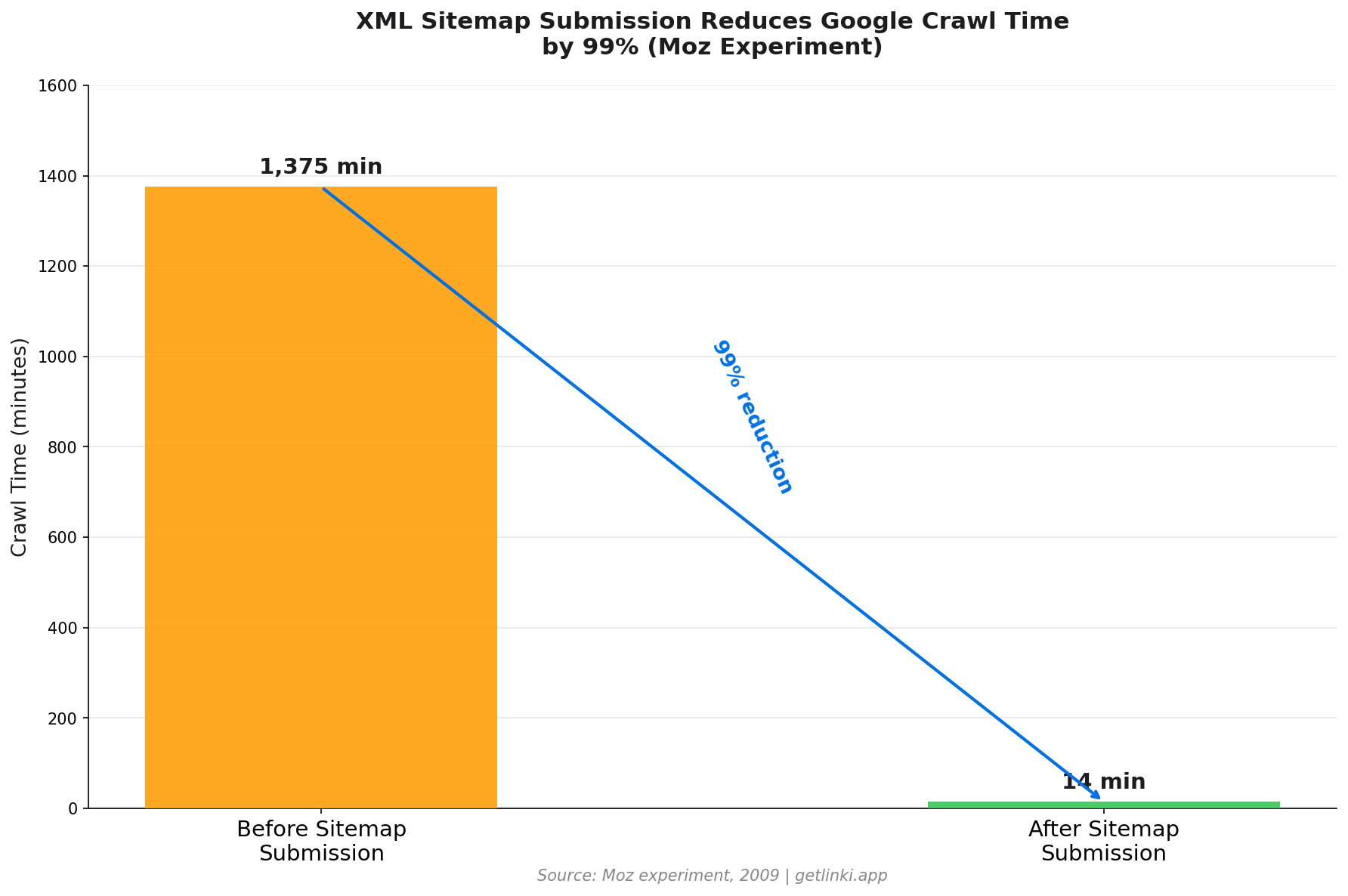
The evidence for sitemap efficacy is compelling. In a 2009 experiment, Moz found that sitemap submission reduced Google's crawl time from 1,375 minutes to 14 minutes for a test site.[1] That is a dramatic improvement in crawl efficiency.
Sitemaps are particularly valuable in these scenarios:
- Large sites: Thousands of pages that crawlers may not discover purely through link following
- New sites: Few incoming external links to drive discovery
- Sites with orphan pages: Pages with no internal links pointing to them
- Frequently updated content: News sites, blogs, or product catalogues where freshness signals matter
- Rich media content: Separate sitemaps for images and videos signal this content to crawlers
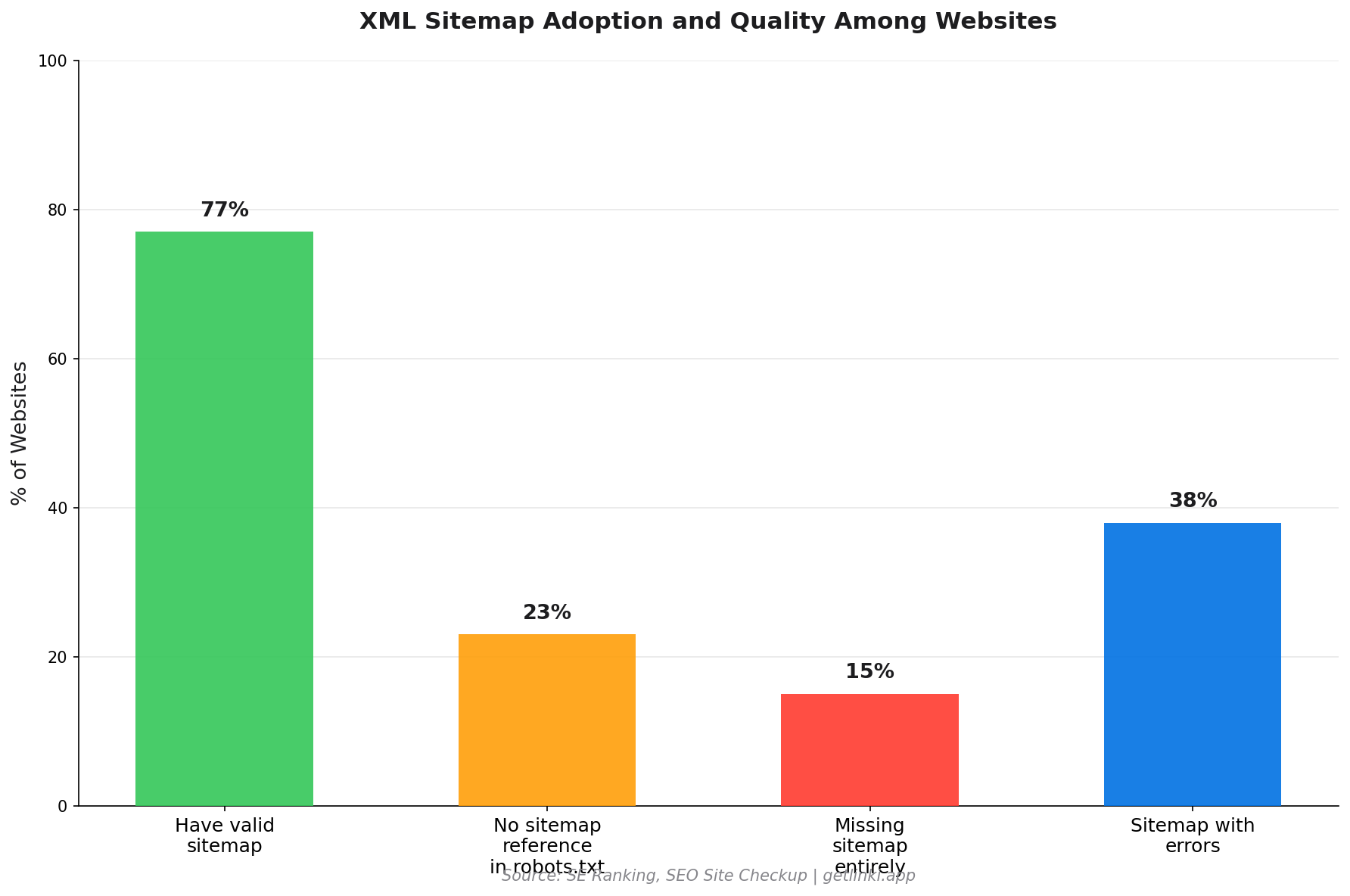
83% of the top 100 US websites pass basic sitemap tests,[2] yet 23% of all websites still lack a properly referenced sitemap.[3] There is a clear adoption gap among smaller sites that stand to benefit most.
How to Build an XML Sitemap
Most content management systems generate sitemaps automatically. Here is how to create one across the most common platforms.
WordPress
WordPress powers 34.5% of all websites,[4] so this covers a large portion of sites. The Yoast SEO plugin generates a dynamic sitemap at /sitemap_index.xml automatically. The Rank Math plugin does the same. Both exclude password-protected and noindexed pages by default, which is the correct behaviour.
Screaming Frog
For non-CMS sites or custom builds, Screaming Frog's SEO Spider can generate an XML sitemap after crawling your site. After running a crawl, go to Sitemaps in the top menu to generate and export. This approach is also useful for auditing what your existing sitemap includes versus what it should include.
Manual Creation
Small sites can create a sitemap manually using a text editor. Tools like xml-sitemaps.com generate one automatically by crawling up to 500 URLs on a free plan.
Sitemap Index Files
For large sites exceeding 50,000 URLs or 50MB, use a sitemap index file that references multiple child sitemaps:
<?xml version="1.0" encoding="UTF-8"?>
<sitemapindex xmlns="http://www.sitemaps.org/schemas/sitemap/0.9">
  <sitemap>
    <loc>https://example.com/sitemap-posts.xml</loc>
    <lastmod>2026-03-31</lastmod>
  </sitemap>
  <sitemap>
    <loc>https://example.com/sitemap-products.xml</loc>
    <lastmod>2026-03-31</lastmod>
  </sitemap>
</sitemapindex>
Submitting Your XML Sitemap
Google Search Console
- Open Google Search Console and select your property
- Navigate to Indexing > Sitemaps in the left sidebar
- Enter the sitemap URL in the "Add a new sitemap" field (e.g.
sitemap.xmlorsitemap_index.xml) - Click Submit
GSC shows the submission date, status, and a count of discovered and indexed URLs. If status shows an error, click through for details: common issues include URLs returning 404s, invalid XML, or blocked resources.
Bing Webmaster Tools
- Log in to Bing Webmaster Tools and select your site
- Go to Sitemaps in the left navigation
- Click Submit sitemap and enter your sitemap URL
- Click Submit
Also reference your sitemap in your robots.txt with a Sitemap: directive. This means every crawler that reads robots.txt also discovers your sitemap automatically, without requiring manual submission to each search engine.
Optimisation: What Actually Matters
Not all sitemap tags carry equal weight. Here is what Google actually uses, based on official guidance and expert input.
The Lastmod Tag: Use It Accurately or Not at All
"Webmasters are doing a horrible job keeping [lastmod] accurate."
Gary Illyes, Google, via Ahrefs
Google only trusts <lastmod> if it is "consistently and verifiably accurate."[5] If you set all pages to today's date to game freshness signals, Google ignores it. Set it only when a page genuinely changes, and update it accurately whenever content is modified.
Priority and Changefreq: Limited Value
"Priority and change frequency doesn't really play that much of a role with Sitemaps anymore."
John Mueller, Google, via Ahrefs
Do not spend time manually calibrating <priority> values. Include them for completeness if your CMS generates them automatically, but they will not materially influence which pages Google crawls first.
URL Inclusion: Keep Quality High
Only include pages in your sitemap that you actively want indexed. Exclude:
- Noindexed pages (including them sends a conflicting signal)
- Pages with canonical tags pointing to a different URL
- Paginated pages beyond page 1 (unless each page has distinct content)
- Admin, login, and utility pages
- Thin or duplicate content pages
- URL parameter variants (filter, sort, session pages)
34.5%
of all websites run on WordPress, which auto-generates XML sitemaps via SEO plugins
Source: Ahrefs
83%
of the top 100 US websites pass basic sitemap validation tests
Source: SEO Site Checkup
XML Sitemaps and Internal Linking: A Powerful Combination
A sitemap tells crawlers where pages are. Internal links tell crawlers how important they are and how they relate to each other. Both signals work together, and understanding their interplay is key to a strong site architecture.
A common scenario: a site has 500 product pages in its XML sitemap, but 80 of them have zero internal links pointing to them. These orphan pages appear in the sitemap, so Googlebot can discover them. But without any internal links, they carry no link equity and signal low importance. They may be crawled but rank poorly because the site's own structure does not endorse them.
The solution is two-directional:
- Use your sitemap to identify gaps in your internal linking. Any page in your sitemap with no incoming internal links is a candidate for orphan detection. Cross-reference your sitemap URLs against your internal link data to find these pages.
- Use your internal link data to prioritise sitemap quality. If a page has dozens of incoming internal links but is not in your sitemap, add it. If a page is in your sitemap but has neither internal links nor valuable content, consider removing it to concentrate crawl budget.
Tools like Linki analyse your internal link structure against your indexed pages, identifying orphan pages and link equity gaps that sitemap data alone cannot reveal. For a full picture of your site architecture, combining sitemap analysis with an internal link audit is the approach professionals use.
For the next step in building a technically sound site, see our guide to robots.txt configuration and how it complements your sitemap strategy. Our technical SEO beginner's guide covers both in the context of a complete technical foundation.
Common XML Sitemap Errors and How to Fix Them
| Error | Why It Matters | Fix |
|---|---|---|
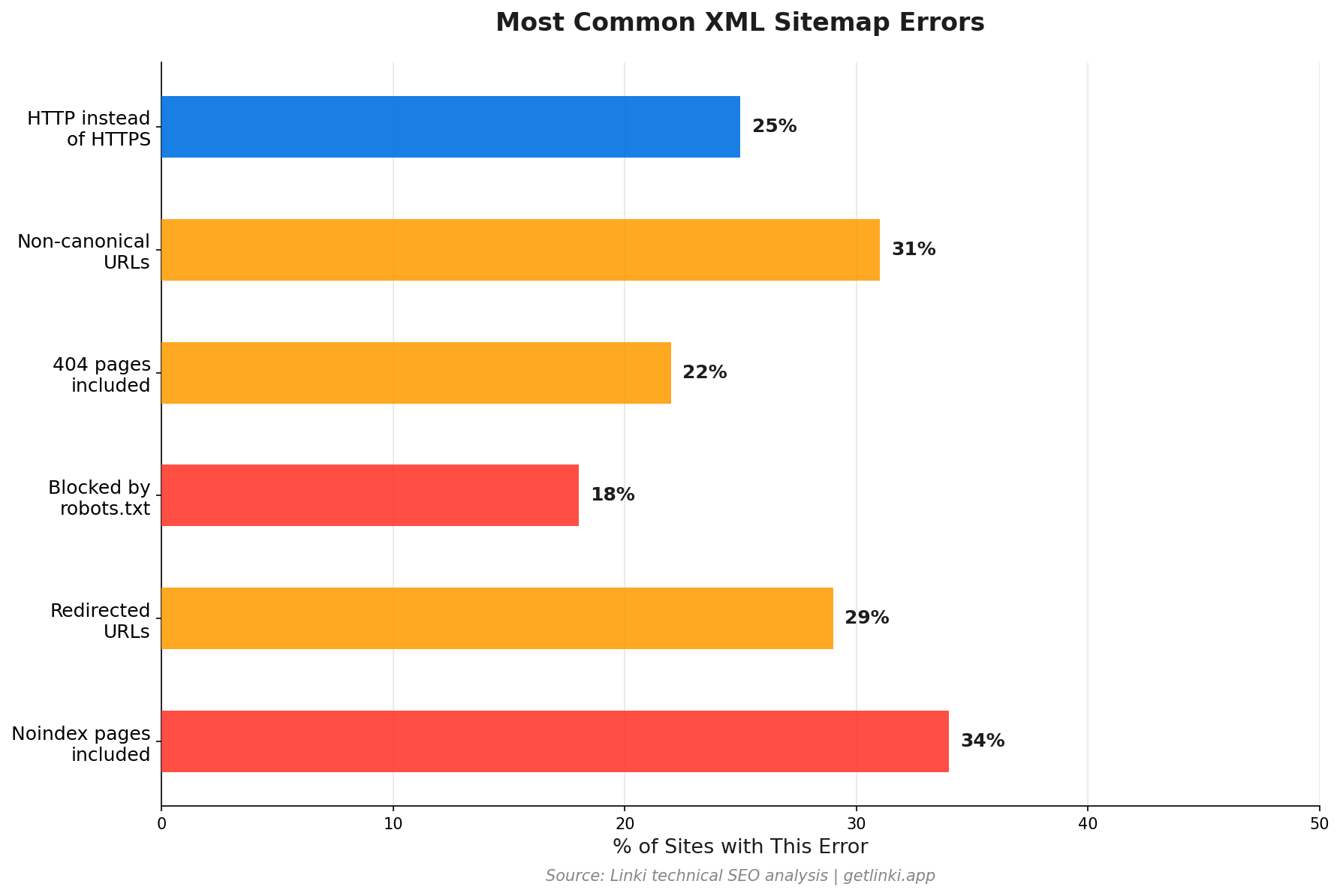
| Noindex pages included | Contradictory signals confuse crawlers | Exclude any page with a noindex directive |
| Redirected URLs | Wastes crawl budget on non-canonical URLs | Use only final destination URLs in sitemap |
| Blocked by robots.txt | Crawler cannot access the listed page | Remove from sitemap or update robots.txt |
| 404 pages included | Sends crawlers to dead ends | Remove deleted pages or restore them |
| Non-canonical URLs | Dilutes indexing signals across duplicate versions | Use only the canonical version in the sitemap |
| HTTP instead of HTTPS | Mismatches the served version if site uses HTTPS | Update all sitemap entries to use HTTPS URLs |
Google Search Console's Coverage report flags these issues automatically. After submitting your sitemap, monitor this report weekly for the first month to catch and resolve any errors quickly.
FAQ: XML Sitemaps
What is an XML sitemap?
An XML sitemap is a structured file that lists the URLs on your website, along with optional metadata such as the last modification date. It follows the Sitemaps Protocol standard and is submitted to search engines via Google Search Console and Bing Webmaster Tools. Its primary purpose is to help crawlers discover and prioritise your pages for indexing, particularly useful for large sites, new sites with few external links, and pages that cannot easily be reached through internal links alone.
How do I submit an XML sitemap to Google Search Console?
Log in to Google Search Console and select your property. Navigate to Indexing, then Sitemaps, in the left sidebar. In the "Add a new sitemap" field, enter the URL path to your sitemap (e.g. sitemap.xml). Click Submit. Google will then attempt to fetch and process your sitemap. The Sitemaps section will show the submission date, status, and URL counts within a few hours of processing.
Does an XML sitemap improve SEO?
An XML sitemap does not directly improve rankings, but it improves crawl efficiency, which enables faster and more complete indexing of your content. A Moz experiment found sitemap submission reduced crawl time from 1,375 to 14 minutes. The real SEO benefit is ensuring your important pages are discovered and indexed promptly, rather than waiting for crawlers to find them through link following alone.
What should I include and exclude in my XML sitemap?
Include all pages you want indexed: blog posts, product pages, category pages, landing pages, and service pages. Exclude pages with noindex directives, canonical tags pointing to different URLs, redirected pages (use the final destination URL instead), admin and login pages, thin or duplicate content pages, and URL parameter variants. The sitemap should be a curated list of your best, crawlable, indexable pages.
What is the maximum size for an XML sitemap?
Each sitemap file can contain a maximum of 50,000 URLs and must not exceed 50MB uncompressed. For larger sites, use a sitemap index file that references multiple child sitemap files. There is no limit to the number of child sitemaps a sitemap index can reference, and Google supports sitemap index files that themselves reference other sitemap index files.
Sources
- Moz, XML Sitemaps
- SEO Site Checkup, Sitemap Test
- SE Ranking, SEO Statistics
- Ahrefs, How to Create a Sitemap
- Search Engine Land, XML Sitemaps Guide
- Google Developers, Build and Submit a Sitemap
- Yoast, What is an XML Sitemap and Why Should You Have One?