
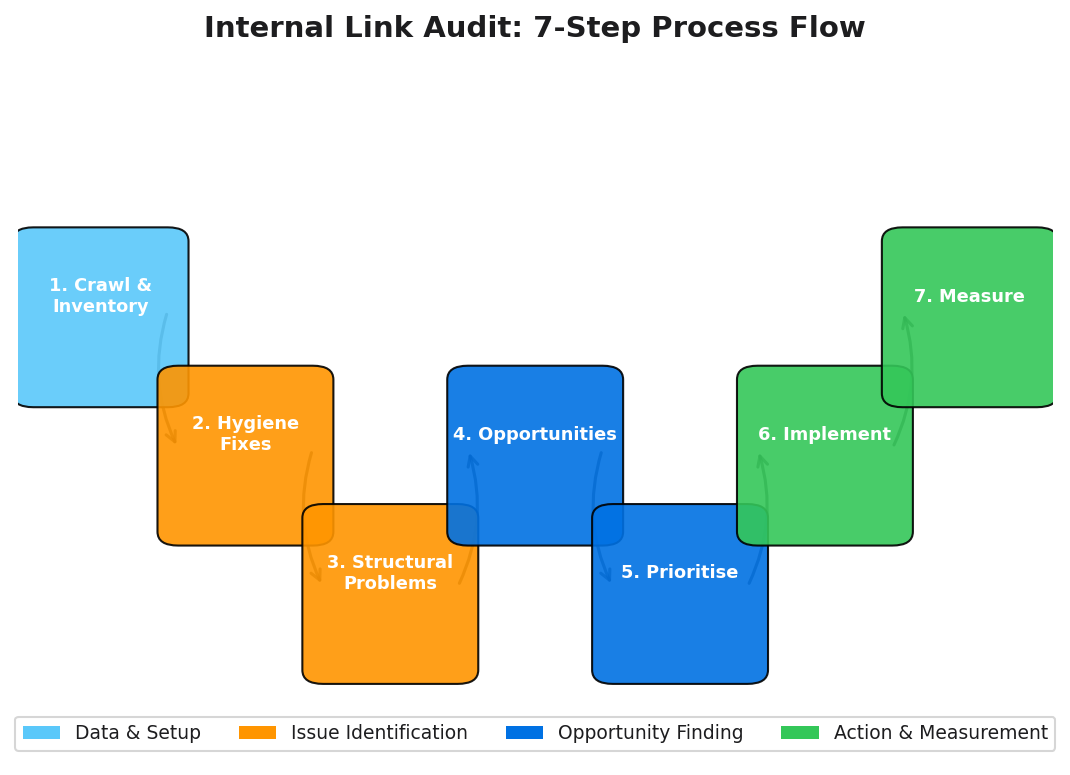
An internal link audit done properly produces three things: a clean list of technical issues to fix, a set of structural problems to resolve, and a prioritised backlog of linking opportunities to build out. Most guides give you the first list and stop there. This one gives you the full operating system: from crawl configuration through to measuring impact in Google Search Console eight weeks later.
The process works for any site, any CMS, and any team size. The tools you use will vary; the seven steps do not.
Key Takeaways
- A complete internal link audit covers seven stages: inventory, hygiene fixes, structural problems, opportunities, prioritisation, implementation, and measurement.
- Pages with 40-44 internal links receive approximately 4x more Google clicks than pages with 0-4 links.[1]
- An InLinks/SearchPilot test found a 25% organic traffic uplift across category pages after internal linking changes.[2]
- Prioritise by page value (GSC clicks, conversions, backlinks) multiplied by effort (template vs editorial vs dev).
Internal Link Audit: Definition and Deliverables
Definition
An internal link audit is a structured evaluation of all internal hyperlinks on a website, producing four distinct outputs: (1) an inventory of the site's current link graph, (2) a list of technical hygiene issues to fix (broken links, redirects, nofollow errors), (3) a list of structural problems to resolve (orphan pages, excessive depth, dilution), and (4) a prioritised list of linking opportunities (missing cluster connections, under-linked priority pages). The audit ends when each output has been addressed and the improvements have been measured.
The distinction between audit and strategy is worth keeping clear. A strategy decides how links should flow going forward. An audit diagnoses where the current state differs from the ideal. Both matter; they are not the same work.
When to Run an Internal Link Audit
Two scenarios require an immediate audit, regardless of your normal cadence.
After a Migration or Redesign
Any site migration carries risk for internal links. URL structure changes, CMS changes, and domain moves all break existing internal links at scale. Run a full audit before launching a migration (to establish a baseline) and immediately after (to catch anything the redirect mapping missed). Ahrefs found that 66.5% of all links created since 2013 have rotted, with most breakages caused by exactly these kinds of structural changes.[3]
Quarterly Structural Review and Monthly Hygiene
Quarterly reviews address the structural layer: orphan pages accumulated since the last review, priority pages that have slipped deeper in the site architecture, cluster links missing from recently published content. Monthly hygiene checks address the technical layer: new broken links, links to newly-redirected URLs, and any nofollow issues introduced by CMS updates or plugin changes.
This two-tier cadence prevents the backlog from building to a point where it becomes an overwhelming project rather than a manageable routine.
Step 1: Crawl the Site and Build an Internal Link Inventory
The inventory is the foundation of every subsequent step. Without an accurate, complete link graph, you are making decisions based on incomplete information.
Configure your crawler with these settings:
- Enable JavaScript rendering if your site uses a JS framework or headless CMS. Without this, pages rendered via JavaScript will not be discovered.
- Set the crawl to start from the root domain, not a subdirectory.
- Set crawl depth to 50 or higher to ensure no pages are missed.
- Include all internal URLs, not just those in the sitemap.
Export Fields to Capture
Your inventory export needs five fields at minimum:
| Field | Why It Matters |
|---|---|
| Source URL | Tells you which page contains the link; needed for edits and prioritisation |
| Target URL | The destination; identifies broken and redirect targets |
| Anchor text | Topical signal analysis; generic vs descriptive ratio |
| HTTP status code | Identifies broken (4xx) and redirected (3xx) destinations |
| Crawl depth (source) | Determines how accessible the source page is to Googlebot |
With this inventory, every subsequent check becomes a filter or sort operation on the same dataset.
Step 2: Fix Hygiene Issues That Block Equity Flow
Hygiene issues are binary: a link either works or it does not; it passes equity or it does not. Fix these before addressing structural or opportunity issues, because they can invalidate your structural analysis (a broken link to a page makes that page look like an orphan even if the intent was to link to it).
Internal 4xx (Broken Internal Links)
Filter your inventory for target URLs returning 4xx status codes. For each broken link: determine whether the destination content still exists at a different URL (update the link directly or add a 301 redirect), or whether the content has been removed (replace the link with an appropriate alternative or remove it).
66.5%
of links across the web have become dead over the past nine years, reinforcing why regular internal link hygiene checks are essential
Source: Ahrefs Link Rot Study (Patrick Stox)
Links to Redirects and Redirect Chains
Links pointing to 3xx URLs create unnecessary HTTP hops. Each hop adds latency for users and dilutes a small amount of equity compared to a direct link. Update all internal links pointing to redirects to link directly to the final destination URL. For redirect chains (redirect A pointing to redirect B), resolve the chain to a single hop first, then update internal links to point to the final URL.
Canonical Mismatches and Nofollow on Important Internal Links
A link to a page with a non-self-referential canonical tag is passing equity toward a URL that will not rank. Check your inventory for links to pages with canonical tags pointing elsewhere. Update these links to point to the canonical URL. For internal nofollow links: audit every instance and confirm it is intentional. Accidental internal nofollows are common in sites using certain WordPress plugins or page builders.
4x
More Google clicks for pages with 40-44 inbound internal links versus pages with 0-4 links, from Zyppy's study of 23 million internal links
Source: Zyppy (Cyrus Shepard), 23 Million Internal Links Study
Step 3: Find Structural Problems
Orphan Pages
Filter your inventory for pages with zero inbound internal links. These are your orphan pages. Cross-reference the orphan list against three data sources:
- Your sitemap: if an orphan page is in the sitemap, it may be indexed but receives no equity from the site structure.
- GSC performance: any orphan page with existing clicks or impressions is already getting some traffic despite its isolation; fixing it has immediate measurable value.
- Backlink data: an orphan page with external backlinks is receiving external equity that never gets distributed to other pages on your site. Connecting it to the site structure makes that equity useful.
"Treat broken internal pages (4xx) and orphan pages as high-priority internal link audit issues, and prioritise adding internal links to orphan pages receiving organic traffic."
Jenny Abouobaia, Ahrefs (How to Do a Technical SEO Audit)
Excessive Click Depth and Buried Priority Pages
Sort your inventory by crawl depth. Flag all pages targeting commercial keywords or receiving backlinks that sit at depth 4 or deeper. Pages this deep are crawled less frequently and receive less equity. The fix is adding direct links from pillar pages or high-traffic content to reduce their depth to 3 or less, without restructuring the entire site.
Over-Linked Pages
Check for pages with a high number of outbound internal links. The equity each individual link passes decreases as the outbound link count increases. Pages with hundreds of outbound links (common on category index pages or tag archives) are often diluting equity across too many destinations. Review whether all those links are necessary.
Step 4: Find Opportunities (The Money Part of the Audit)
This is where the audit shifts from diagnostic to generative. Opportunities are not problems; they are missing links that, if added, would improve rankings for specific pages.
Map Topic Clusters and Pick Pillar Pages
For each broad topic your site covers, identify:
- The pillar page (the comprehensive guide on the broad topic).
- The cluster posts (detailed articles on specific subtopics within that topic).
- The current linking state: which cluster posts link to the pillar, which do not; which pillar-to-cluster links exist, which are missing; which cluster posts cross-link with each other.
Dixon Jones of InLinks describes this as auditing the "link graph" and aligning contextual links to pillar pages: the pillar should be the most-linked page in any topic cluster, with equity flowing both directions between pillar and cluster content.[4]
Opportunity Discovery Methods
Two methods surface the most valuable opportunities:
Tool report method: Most SEO platforms (Ahrefs, Semrush, Linki) can identify page pairs that share topical overlap but lack a link between them. Export these suggestions, filter by page value, and add the most impactful ones.
GSC/SERP-led method: For each page you want to rank better, check what keywords it is currently ranking for in GSC. Find other pages on your site that cover related topics (search your own site with a site: query for those keywords). Add links from those pages using keyword-relevant anchor text.
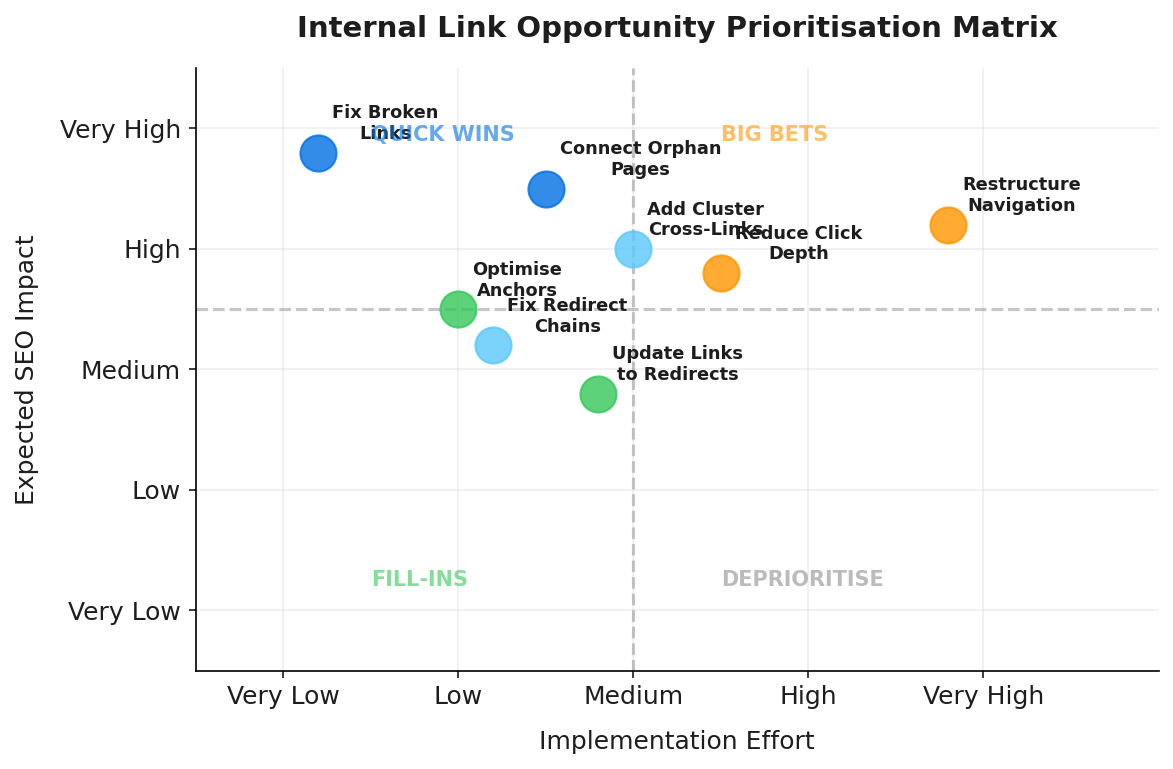
Step 5: Prioritise What to Do First
A comprehensive audit of a mid-size site will surface dozens or hundreds of issues and opportunities. Not all are equal.
Page Value Signals
Score each issue or opportunity by the commercial value of the affected page:
- GSC clicks and impressions: High-traffic pages that have broken links or are under-linked have more to gain immediately.
- Conversion value: Pages on the direct path to revenue (pricing, sign-up, product pages) get a priority multiplier regardless of current traffic.
- Inbound backlinks: A page with external backlinks that is an orphan is losing equity that could flow to other pages. Fix it first.
Effort Signals
+25%
Organic traffic uplift recorded across level 2 and level 3 category pages in an InLinks/SearchPilot controlled internal linking test
Source: InLinks Case Study (SearchPilot)
Categorise each fix by implementation effort:
- Template fix: The same broken link pattern appears on many pages generated by the same template. One CMS or template change fixes all instances. Lowest effort per fix.
- Editorial fix: Requires someone to edit a specific page's content. Moderate effort, but straightforward.
- Development fix: Requires code changes to navigation, sitemaps, or CMS architecture. Highest effort.
Prioritise template fixes first (high volume, low effort), then editorial fixes for high-value pages, then development fixes.
Step 6: Implement Safely
Anchor Text Rules
Use descriptive anchor text that naturally includes the target page's primary keyword. Vary the phrasing across different links to the same destination rather than using identical exact-match anchors everywhere. In UK English, ensure your anchor text reads naturally within its sentence context. Never use generic anchors like "click here" or "read more."
Placement Rules
Contextual links in body content carry more topical signal than navigational links. Place new links within relevant sentences, not as standalone lists at the end of articles. Early placement (within the first third of an article) tends to be treated with slightly more weight by Google, so lead with the most important cross-links.
Step 7: Measure Impact
Internal link improvements typically produce measurable results in Google Search Console within two to eight weeks. Faster for sites that get frequent crawls; slower for large sites with less frequent crawl schedules.
GSC: Clicks, Impressions, Average Position
Create a date-segmented comparison in GSC Performance. Select the pages you changed (or the topic cluster you worked on) and compare the 60 days before your changes against the 60 days after. Look for increases in clicks, impressions, and average position for target keywords. A page that moved from position 18 to position 9 after receiving additional internal links is a clear win. Document these results to justify future investment in the audit process.
Crawl Comparisons
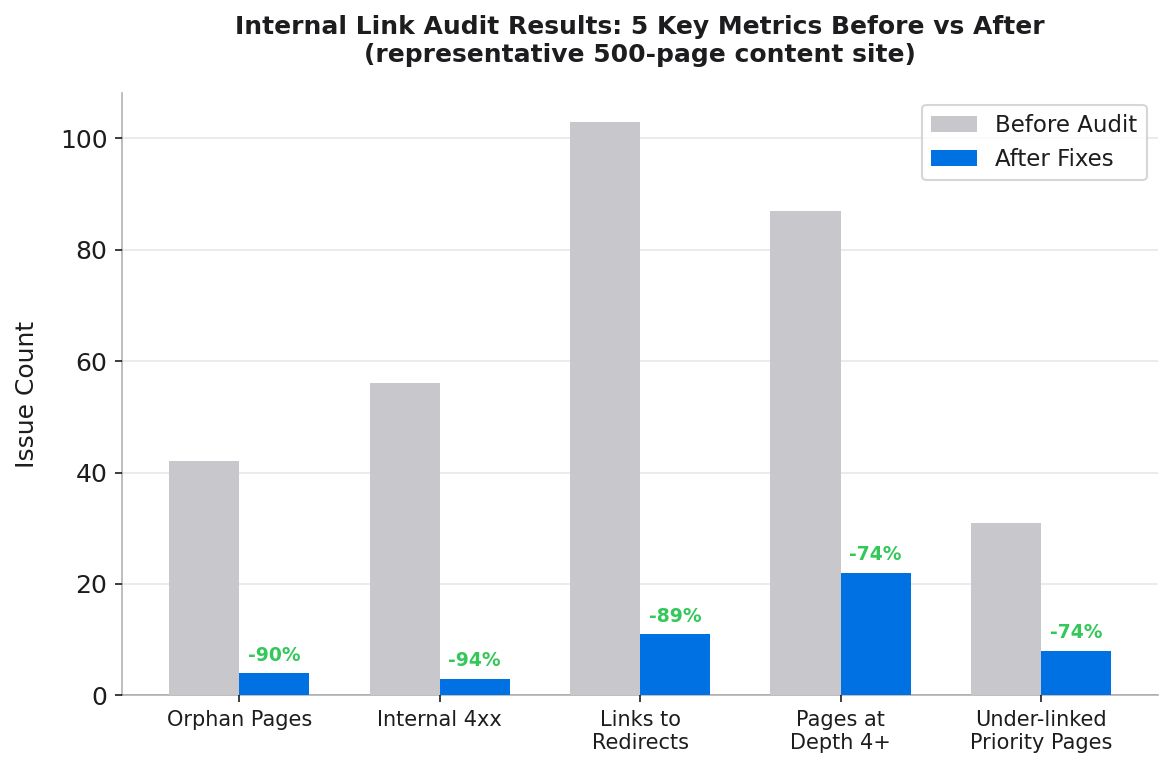
Run a crawl immediately after implementation and compare against your baseline crawl:
- Orphan page count: should decrease.
- Internal 4xx count: should decrease.
- Links-to-redirects count: should decrease.
- Pages at depth 4+: should decrease for pages you targeted.
GSC Crawl Stats (Settings > Crawl Stats) shows pages crawled per day. After improving internal link accessibility, you may see an increase in pages crawled as Googlebot follows more internal link paths.
Internal Link Audit Checklist (Copy and Paste)
Quick Reference Checklist
Setup
- Full site crawl with JS rendering (if needed)
- Export source, anchor, target, status, depth
- Cross-reference with GSC Links report
Technical hygiene
- Internal 4xx broken links
- Links to 3xx redirects
- Redirect chains
- Links to noindex/non-canonical pages
- Accidental internal nofollow links
Structure
- Orphan pages (0 inbound links)
- Under-linked priority pages
- Pages at depth 4+
- Over-linked pages (100+ outbound links)
Relevance and anchors
- Generic anchor text instances
- Over-optimised anchor repetition
- Missing cluster cross-links
Measurement
- GSC performance before/after comparison
- Crawl comparison (orphan count, 4xx count, depth distribution)
How Linki Fits: From Audit to Prioritised Actions
The seven-step process above is manual when done with tools like Screaming Frog, Ahrefs, or Semrush. Each step produces data that requires human interpretation, prioritisation, and implementation. For sites publishing new content regularly, this means the audit is perpetually out of date within weeks of completion.
Linki is being built to automate the repetitive parts of this process. Rather than requiring you to schedule a crawl and interpret a raw export, Linki maintains a continuous internal link graph, surfaces new issues as they are created (a new orphan page, a broken link from an edited post), and provides AI-generated opportunity recommendations ranked by impact and effort. The tool positions itself specifically as the bridge between finding issues and acting on them: not just an export, but a prioritised action list.
For teams managing active content programmes, this is the difference between internal link optimisation as an occasional project and internal link hygiene as a continuous background process. For context on how this fits into broader SEO work, see our 15-point internal link audit checklist, our internal linking strategy guide, and our Google Search Console guide.
Frequently Asked Questions
What is an internal link audit?
An internal link audit is a structured evaluation of all internal hyperlinks on a website, producing four outputs: an inventory of the current link graph, a list of technical hygiene issues to fix, a list of structural problems, and a prioritised list of linking opportunities. The goal is to improve crawlability, authority distribution, and rankings by ensuring the site's internal link structure is deliberate rather than accidental.
How do I find orphan pages and fix them?
Run a full site crawl and filter for pages with zero inbound internal links. Prioritise orphans that have GSC impressions or external backlinks. Fix them by identifying topically related pages already on your site and adding contextual links with descriptive anchor text. Each priority orphan page should receive at least two contextual inbound links from well-linked, topically relevant pages.
What should I prioritise first in an internal linking audit?
Fix broken internal links first (they actively block equity and are usually quick to resolve), then connect orphan pages (starting with those that have backlinks or GSC impressions), then update links to redirects. Anchor text improvements and cluster architecture building come after the hygiene layer is clean.
Which tools are best for an internal link audit?
For a free approach: Screaming Frog (up to 500 URLs) for the crawl and GSC for performance data. For paid: Ahrefs Site Audit provides the best internal link graph with URL Rating scores; Semrush Site Audit provides the best internal linking issue categorisation and link suggestion engine. Linki (pre-launch) is designed specifically for ongoing internal link monitoring and prioritised opportunity discovery.
How long does it take to see results from an internal link audit?
Most sites see measurable GSC changes within two to eight weeks after implementing internal link improvements. The timeline depends on how frequently Googlebot crawls the site and how significant the changes were. Pages that were previously orphaned and are now well-linked typically show the fastest response, as Google needs to recrawl and reassess them with their new link equity.
Sources
- Zyppy (Cyrus Shepard), 23 Million Internal Links Study
- InLinks (SearchPilot case study), Do Internal Links Improve Organic Search Traffic?
- Ahrefs (Patrick Stox), Link Rot Study
- InLinks (Dixon Jones), How to Do an Internal Link Audit for SEO
- Ahrefs (Jenny Abouobaia), How to Do a Technical SEO Audit
- Search Engine Land, Internal Linking for SEO: Types, Strategies and Tools
- LinkStorm, How to Do An Internal Link Audit
- Google Search Console, About Google Search Console
- Google Developers, Get Started with Google Search Console