
Definition
An internal linking strategy is a structured plan for connecting pages within your website using hyperlinks. Rather than adding links at random, it deliberately maps relationships between content, directs link equity to priority pages, and helps both users and search engines understand your site's architecture.
What Is an Internal Linking Strategy?
Every website has internal links. Your navigation menu, your footer, that "related posts" widget in the sidebar. They're everywhere. But here's the thing: having internal links and having an internal linking strategy are two very different things.
A strategy means you've thought about which pages deserve the most link equity, how your content fits together in topic clusters, and how search engines will crawl and make sense of your site. It's the difference between a handful of ad-hoc links scattered around your content and a deliberate architecture that works for you while you sleep. And unlike chasing backlinks (which, let's be honest, can feel like shouting into the void), internal linking is entirely within your control.
"It's one of the biggest things you can do on a website to guide Google and visitors to the pages that you think are important."
John Mueller, Google[1]
Internal Links vs. External Links: A Quick Primer
Before we get into the weeds, let's make sure we're on the same page about what we're actually talking about:
| Internal Links | External Links | |
|---|---|---|
| Destination | Another page on the same domain | A page on a different domain |
| Who controls them? | You, entirely | Partially (outbound); mostly others (inbound) |
| SEO function | Distributes equity; clarifies site structure and hierarchy | Builds domain authority; signals trust (inbound) or cites sources (outbound) |
| Control level | Full control; can be optimised any time | Limited; depends on third-party decisions |
Both types matter. But internal links are the lever you can pull right now, today, for free, at any scale. No outreach emails, no relationship-building, no waiting for someone to link back to you. That's why they're such a gift for solo SEOs and small teams working with limited budgets.
Why Internal Linking Matters More Than Ever in 2026
Most internal-linking guides stop at "helps Google crawl your site." And look, that's not wrong. But it's a bit like saying a Swiss Army knife is good for opening letters. Technically true. Wildly underselling the point.
In 2026, a solid internal linking strategy does three things at once:
4x
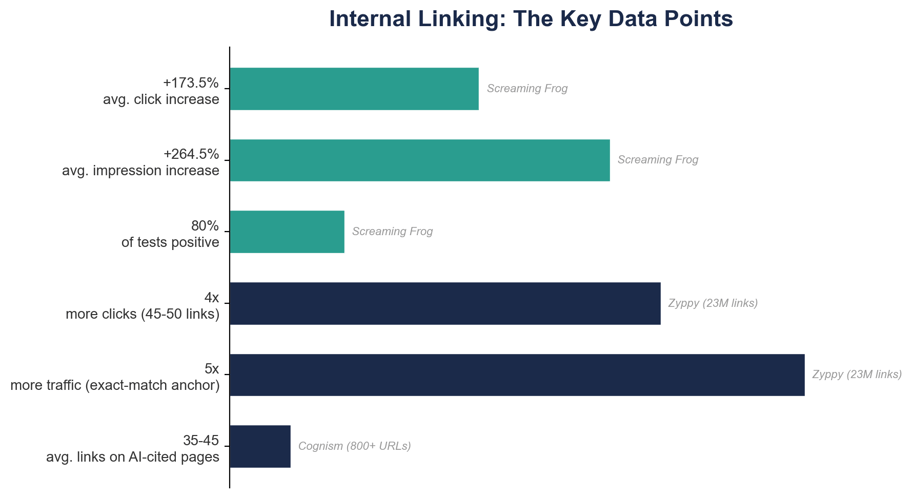
more Google clicks for pages with 45-50 internal links
Source: Zyppy, 23 million internal links study (2025)
1. Traditional SEO Value: Crawling, Indexing, and Equity Distribution
This is the bread and butter. Search engines discover pages by following links. If a page has zero internal links pointing to it (an orphan page), it might as well not exist. Google can't crawl what it can't find.[2]
Internal links also act as a plumbing system for link equity (you might know it as "link juice" or PageRank). When a page with strong backlinks links to a weaker page on your site, some of that authority flows through.[3] How much does this actually matter in practice? Cyrus Shepard's landmark study of 23 million internal links found that pages with 45-50 internal links received up to 4x more Google clicks than pages with just a handful. Though it's worth noting that returns diminished beyond that threshold (more on that later).[4]
2. Topical Authority and E-E-A-T Signalling
Google's ranking systems are getting better at spotting sites that genuinely know their stuff versus sites that just published one article and called it a day. When you interlink 15 articles about internal linking (from anchor-text tactics to e-commerce implementations), you're sending a clear message: "We've covered this topic from every angle."
This is the logic behind topic clusters: one pillar page linked to and from multiple supporting articles, creating a tightly connected content hub. If you're trying to build topical authority through site architecture, it's one of the most effective approaches available.[5]
3. AI Search Visibility: Internal Links as Knowledge-Graph Signals
This is the angle that barely anyone is talking about yet. Large language models (ChatGPT, Perplexity, Google's AI Overviews) don't just read your pages in isolation. They use your internal link structure to understand how concepts on your site relate to one another. Your internal links are, in effect, a knowledge graph that teaches AI systems which pages are connected and which carry the most weight.
Cognism ran an audit of over 800 URLs and found something striking: pages frequently cited by AI systems averaged 35-45 internal links, compared to a site-wide median of just 20-25. Adding 3-5 contextual internal links per 300 words turned out to be one of the strongest predictors of AI visibility.[6]
The takeaway? Optimising your internal links is no longer just about Google rankings. It's about making sure your content gets discovered, cited, and correctly understood by every search surface out there, both traditional and AI-powered.
How Internal Links Distribute Link Equity
Here's a quick refresher on the mechanics. PageRank, Google's original algorithm for evaluating page importance, treats links as votes of confidence. Page A links to Page B, and a share of A's authority flows through.[7] The catch? The more links Page A has, the more that authority gets diluted across all of them. Which is exactly why your link placement needs to be intentional, not a free-for-all.
In practice, you've got two main approaches:
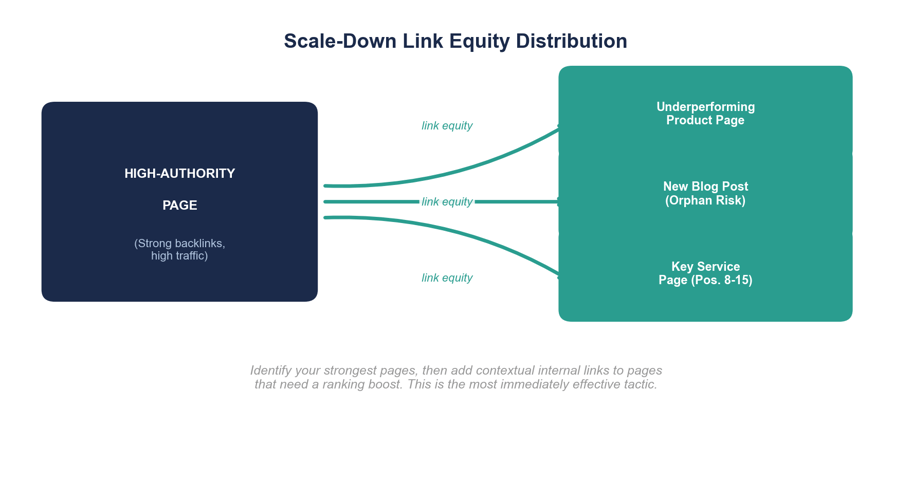
- Scale-down approach: Start with your highest-authority pages (homepage, popular blog posts with strong backlinks) and link from them down to pages that need a ranking boost. This is the approach most sites should start with, and it delivers the fastest results.
- Scale-up approach: Link between your already high-performing pages to concentrate authority around your most competitive keywords. This is more of an advanced move, useful when you're already ranking on page one and want to lock in your position.
If you're not sure where to start, go with scale-down. Find your power pages, then link from them to your underperformers. Simple, effective, and you'll see results within weeks.
The 7 Types of Internal Links (and When to Use Each)
Not every internal link is created equal. Some carry serious SEO weight; others are mostly there for usability. Knowing the difference helps you focus your effort where it actually counts.
| Link Type | Description | SEO Weight | Best Used For |
|---|---|---|---|
| Navigational | Links in main navigation menus and site-wide header | High | Guiding users to primary sections; establishing top-level hierarchy |
| Contextual | In-content links placed naturally within body text | Very High | SEO equity distribution; topical relevance; the most valuable link type for rankings |
| Footer | Links in the site-wide footer area | Low-Medium | Utility pages (privacy, terms); secondary navigation |
| Sidebar | Links in sidebar widgets (related posts, categories) | Medium | Blog archives; category browsing; related content discovery |
| Breadcrumb | Hierarchical path links (e.g., Home > Category > Page) | Medium-High | E-commerce and large sites; reinforcing hierarchy for crawlers |
| CTA | Buttons or styled links to conversion pages | Medium | Pricing pages, signup forms, demo requests, waitlists |
| Image-based | Clickable images or graphics linking to internal pages | Low-Medium | Visual content hubs; product galleries; infographics |
The headline here: contextual links (the ones woven naturally into your body copy) carry the most SEO value by a comfortable margin. Nav links and breadcrumbs support your overall structure, but if you want to move the needle on rankings, your in-content links are doing the heavy lifting.
How to Build an Internal Linking Strategy: A 7-Step Framework
Enough theory. Here's a practical, step-by-step process that works whether you're running a 50-page blog or a 10,000-page e-commerce site.
Step 1: Audit Your Existing Internal Link Structure
Before you start adding links everywhere, take stock of what you've already got. An internal link audit surfaces the problems you didn't know you had: orphan pages nobody can find, broken links leaking equity into 404s, redirect chains, and pages that are either drowning in links or completely starved of them.
Two free tools will get you most of the way there:
- Google Search Console: Head to Links > Internal Links and you'll see which pages get the most (and fewest) internal links. Export the data, sort by ascending link count, and look for important pages sitting near the bottom of the list. Those are your quick wins.
- Screaming Frog: Run a crawl and check the "Inlinks" column in the Internal tab. Any page targeting a valuable keyword with fewer than 5 internal links? That's a page you should be prioritising.[8]
For a full walkthrough of this process, see our guide to running an internal link audit.
Step 2: Map Your Site Hierarchy and Identify Pillar Pages
You need a map before you start building roads. Think of your site as a three-tier pyramid:
- Top level: Homepage and primary category or service pages. These should accumulate the most link equity.
- Middle level: Pillar pages and subcategory pages. These are your comprehensive guides covering a broad topic.
- Bottom level: Individual blog posts, product pages, and supporting content. Each one should link up to its pillar.
The golden rule: every page on your site should be reachable within three clicks of the homepage. If a user (or a crawler) needs to click more than three times to reach something important, it's buried too deep.[9]
Step 3: Build Topic Clusters Around Each Pillar
A topic cluster is a pillar page surrounded by 5-15 supporting articles, all interlinked. The pillar covers the broad topic (like "Internal Linking Strategy"), while the cluster pages go deeper into specifics ("Anchor Text for Internal Links," "How to Fix Orphan Pages," "Internal Linking for E-Commerce"). You get the idea.
The linking rules are dead simple:
- Every cluster page links up to the pillar page.
- The pillar page links down to every cluster page.
- Related cluster pages link to each other horizontally.
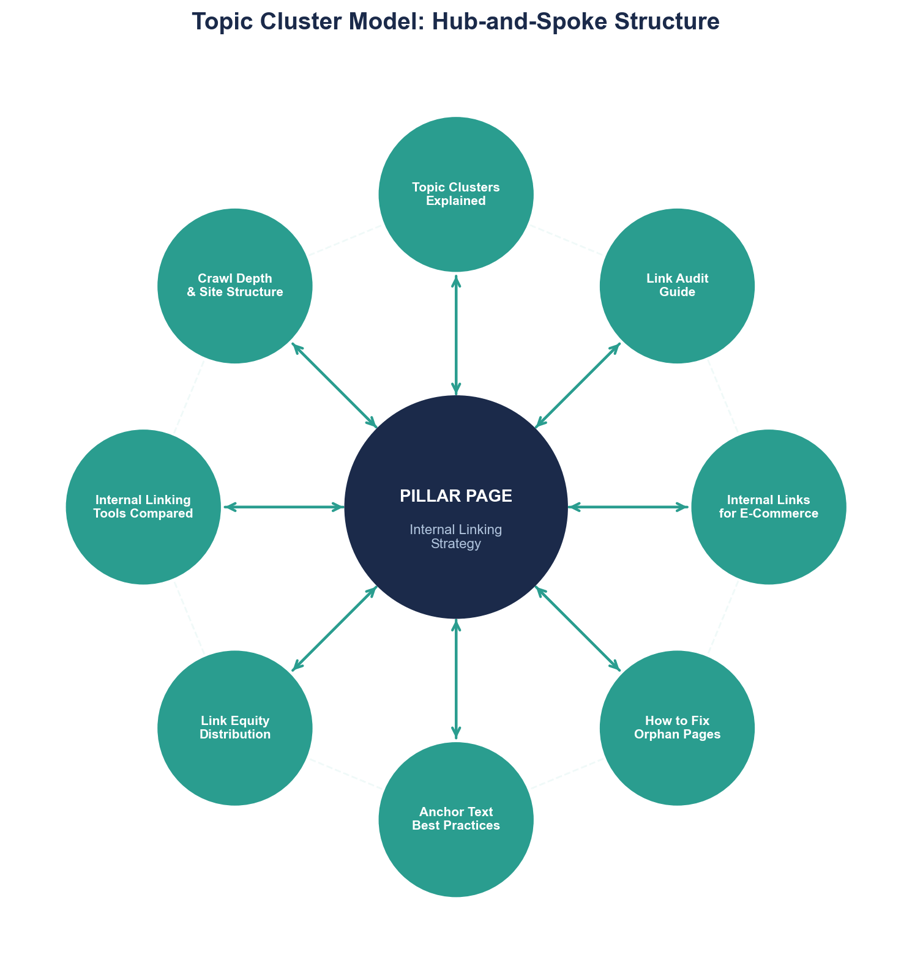
What you end up with is a tightly connected content hub that signals to search engines: "We don't just have one page on this topic. We've covered it comprehensively." If building topical authority is on your agenda (and it should be), this is one of the most effective ways to do it.[10]
Step 4: Add Contextual Links with Smart Anchor Text
Contextual links (the ones placed naturally within your body content) are where the real SEO magic happens. Here's how to get them right:
- Aim for 3-5 internal links per 1,000 words. Treat this as a guideline, not gospel. If a paragraph naturally calls for a link, add it. If you're cramming one in just to hit a number, don't.
- Vary your anchor text. Mix exact-match keywords with partial-match variations and natural phrases. Cyrus Shepard's study found that pages with greater anchor text variety from internal links correlated strongly with higher Google traffic. Pages with at least one exact-match anchor had 5x more traffic than those without.[11]
- Place links early in the content. Links in the first 30% of your page tend to carry more weight than those buried near the bottom.[12]
For a deeper look at how to handle anchor text, see our guide to anchor text best practices for internal links.
5x
more traffic for pages with at least one exact-match anchor
Source: Zyppy, 23 million internal links study (2025)
Step 5: Push Equity from High-Authority Pages to Underperformers
This is the "scale-down" approach in action, and it's probably the single most impactful thing you can do with internal links. Pull up Ahrefs, Semrush, or Moz and find which pages on your site have earned the most backlinks. Then add contextual internal links from those pages to the content that's struggling.
Does it actually work? The data says yes. Screaming Frog ran 15 controlled internal-link tests on their SEOTesting site and saw an average +173.5% improvement in clicks and +264.5% improvement in impressions. 80% of those tests delivered positive results.[13]
The sweet spot? Pages ranking in positions 5-20 for their target keywords. These are already close to page one (or sitting there with room to climb) and stand to benefit the most from an equity boost.
Step 6: Maintain Crawl Depth Within 3 Clicks
Crawl depth is simply the number of clicks it takes to reach a page from the homepage. And here's the uncomfortable truth: if your important pages are buried four, five, or six clicks deep, they're getting significantly less organic traffic and being crawled far less often.[14]
Check this in Screaming Frog's Link Score metric or Semrush's Site Audit Internal Linking report. If anything important is sitting at depth 4 or beyond, add contextual links from your top-level or second-level pages to bring it closer to the surface.
Step 7: Schedule Quarterly Internal Link Audits
Your internal link structure isn't something you set up once and forget about. Every time you publish a new post, remove an old page, or reorganise a section, the architecture shifts. Gaps appear. Links break. New orphan pages pop up without anyone noticing.
A quarterly audit keeps things healthy. Each time, you should:
- Find and link to any new orphan pages.
- Fix broken internal links returning 404 errors.
- Make sure recently published content is linked from relevant existing pages.
- Rebalance equity distribution as your priorities evolve.
Tools like Linki can automate the bulk of this work, flagging new opportunities and broken links so you're not manually crawling your entire site every three months.
Internal Linking for Different Website Types
Generic advice is fine up to a point, but the real world is messier. The right linking approach depends entirely on what kind of site you're working with.
Blog-Heavy Content Sites
If your site runs on content, the hub-and-spoke model is your best friend. Each topic cluster centres around a pillar article, with supporting posts linked to and from it. Here's how to put it into practice:
- Add 2-4 contextual internal links per blog post, prioritising your pillar pages.
- Use a table of contents with jump links at the top of long-form posts (like this one).
- Include a "Related Posts" block at the bottom of each article.
- Every time you publish something new, go back and add links from 3-5 relevant existing posts. This is the step most people skip, and it's arguably the most important one.
E-Commerce Sites
E-commerce sites live and die by hierarchy: homepage → category → subcategory → product. Get this wrong and your product pages become islands. Key tactics:
- Breadcrumb navigation: Structured breadcrumbs on every product and category page. These reinforce your hierarchy and push equity upward.
- Cross-sell and upsell links: "Customers also bought" and "Related products" sections create lateral links between products. Free equity distribution, and they help conversions too.
- Blog-to-product links: If you're running content marketing alongside your store, make sure your guides and how-to articles link naturally to relevant product and category pages. This is one of the most underused internal linking tactics in e-commerce.
For a deeper dive, see our guide to internal linking strategies for e-commerce product pages.
SaaS and Service Sites
SaaS sites have a chronic problem: the blog and the product pages feel like they exist in separate universes. Internal linking is the bridge.
- Link from blog posts to relevant feature pages using natural, benefit-oriented anchor text (not just "our product").
- Connect feature pages to one another. Your "Integrations" page should link to your "Reporting" page if there's a natural connection.
- Make sure your pricing page gets links from your highest-traffic content. It's often the most commercially important page on the entire site, yet it frequently has the fewest internal links pointing to it.
- Use comparison and "vs." articles to create cross-links between multiple feature pages and competitor content.
Common Internal Linking Mistakes (and How to Fix Them)
We've all made at least a few of these. Here are the mistakes that crop up most often, based on Semrush's analysis of internal linking errors across thousands of sites.[15]
- Orphan pages. Zero internal links pointing to them means they're invisible to crawlers. It's more common than you'd think, especially on larger sites. Fix: run a crawl with Screaming Frog or Linki, find the orphans, and link to them from relevant existing content.
- Broken internal links. Every 404 is equity leaking into the void. Fix: automate your audits so you catch these the moment they appear, not six months later.
- Over-linking. More is not always better. The Zyppy study found that traffic gains plateau around 45-50 internal links and actually decline beyond that.[16] Fix: prioritise quality and relevance over raw volume. If a page has 100+ internal links, it's time to trim.
- Generic anchor text. "Click here" and "read more" tell search engines absolutely nothing about what the linked page is about. Fix: use descriptive, keyword-relevant anchor text. Every link is a chance to send a topical signal.
- Nofollow on internal links. This one is surprisingly common, and it's almost always a mistake. Adding rel="nofollow" to internal links throws away equity for no reason. Fix: remove nofollow from all internal links unless you have a very specific reason to restrict equity flow.
- Redirect chains. Link A points to URL B, which redirects to URL C, which redirects to URL D. Every hop in that chain bleeds equity. Fix: update all internal links to point directly to the final destination URL.
- Duplicate anchor text causing cannibalisation. If you use the exact same anchor text to link to three different pages, you're confusing Google about which page should rank. Fix: vary your anchors so each target page has a distinct signal.
How to Measure Internal Linking Performance
So you've built your internal linking strategy. How do you know if it's actually working? Here are the metrics worth tracking:
- Crawl depth: Average clicks from homepage to your target pages. You want this at 3 or fewer.
- Indexation rate: The percentage of your submitted pages that Google has actually indexed. Check Google Search Console under Coverage. If you're below 70%, you've likely got orphan page or crawl-depth problems.
- Organic traffic to interlinked pages: The most straightforward metric. Compare before-and-after traffic to pages that received new internal links.
- Keyword ranking changes: Track positions for your target keywords on pages that received new links. This is where you'll see the most direct impact.
- Pages per session and bounce rate: If these improve, your internal links are genuinely helping users navigate your site (not just ticking an SEO box).
Running an Internal Link A/B Test
Want to be really rigorous about it? Borrow the methodology Ryan Jones used at Screaming Frog:[17]
- Identify 5-10 underperforming pages with fewer than 5 internal links.
- Add 3-5 contextual internal links from high-authority pages.
- Wait 3-4 weeks for Google to recrawl and reindex.
- Compare crawl data, Link Score, keyword positions, and traffic.
Across 15 such tests, the average result was a +173.5% increase in clicks and a +264.5% increase in impressions. 80% of tests came back positive. That's about as close to a guaranteed win as SEO gets.[18]
+173.5%
average click improvement from adding internal links
Source: Screaming Frog / SEOTesting, 15 controlled A/B tests (2025)
Internal Linking Impact: The Key Data
Here's a cheat sheet of the most important recent findings, all in one place:
| Finding | Study Scope | Source | Year |
|---|---|---|---|
| Pages with 45-50 internal links get up to 4x more clicks | 23M links, 1,800 sites | Zyppy (Cyrus Shepard) | 2025 |
| +173.5% avg. click improvement from adding internal links | 15 A/B tests | Screaming Frog / SEOTesting | 2025 |
| Pages with ≥1 exact-match anchor = 5x+ more traffic | 23M links, 1,800 sites | Zyppy (Cyrus Shepard) | 2025 |
| AI-cited pages avg. 35-45 internal links vs. 20-25 median | 800+ URLs audited | Cognism | 2025 |
| Anchor text variety strongly correlated with higher traffic | 23M links, 1,800 sites | Zyppy (Cyrus Shepard) | 2025 |
| 80% of internal link tests yielded positive ranking results | 15 A/B tests | Screaming Frog / SEOTesting | 2025 |
Internal Linking Tools Compared
The right tool depends on your budget, how technical you are, and whether you need internal linking analysis as part of a bigger SEO toolkit or as a standalone solution.
| Tool | Price | Key Strengths | Limitations | Best For |
|---|---|---|---|---|
| Google Search Console | Free | Internal link counts; top linked pages | No crawl-depth or audit features | Budget-conscious teams |
| Screaming Frog | £199/yr | Deep crawl data; Link Score; crawl-depth metrics | Desktop-only; steep learning curve | Technical SEOs |
| Ahrefs Site Audit | From $99/mo | Link opportunities; orphan detection | Expensive if used only for internal links | Existing Ahrefs users |
| Semrush Site Audit | From $130/mo | Internal linking report; issue priorities | Internal linking is one module of many | Existing Semrush users |
| Linki | TBA (waitlist) | Purpose-built for internal linking; automated audits; affordable | Pre-launch; feature set expanding | Solo SEOs; small agencies |
FAQ: Internal Linking Strategy
How many internal links should a page have?
There's no magic number, but the data gives us a useful range. Traffic benefits tend to peak at around 45-50 internal links per page, then decline beyond that.[19] As a working guideline, aim for 3-5 contextual links per 1,000 words of content, plus whatever navigational and structural links your site template naturally provides.
Does internal linking still matter for SEO in 2026?
Absolutely. It remains one of the few ranking factors you have complete control over. Controlled tests have shown an average +173.5% click improvement from adding internal links.[20] And it's not just traditional SEO any more. Internal links now play a direct role in AI search visibility, helping LLMs understand your content structure and decide which pages to cite.[21]
How do internal links affect AI search visibility?
LLMs use your internal links to map out how topics on your site relate to each other. Cognism's study found that pages with strong internal linking (35-45 links) were significantly more likely to be cited by AI systems than under-linked pages (20-25 links).[22] Adding 3-5 contextual internal links per 300 words was one of the strongest predictors of AI visibility. If you're not optimising for this yet, you're leaving citations on the table.
What's the difference between internal linking and link building?
Internal linking connects pages within your own site. Link building acquires links from other websites. Both contribute to SEO, but internal linking is faster, free, and entirely within your control. You don't need anyone's permission to do it.
How often should you audit your internal links?
At minimum, quarterly. If you're publishing new content regularly or have recently restructured sections of your site, more often than that. Each audit should check for orphan pages, broken links, redirect chains, and crawl-depth issues. It's one of those tasks that feels tedious but pays for itself every single time.
Sources
- John Mueller (Google), via Crimson Agility, Internal Linking Best Practices
- Google Search Central, Links Crawlable
- Moz, What Is PageRank?
- Zyppy (Cyrus Shepard), 23 Million Internal Links - SEO Case Study
- Moz, Internal Link
- Cognism, How To Create Content LLMs Actually Surface
- Moz, What Is PageRank?
- Screaming Frog (Ryan Jones), Finding and Testing Internal Link Changes
- Semrush, Internal Links - Ultimate Guide + Strategies
- Moz, Internal Link
- Zyppy (Cyrus Shepard), 23 Million Internal Links - SEO Case Study
- Exploding Topics, Internal Linking Guide
- Screaming Frog (Ryan Jones), Finding and Testing Internal Link Changes
- Semrush, Internal Links - Ultimate Guide + Strategies
- Semrush, 9 Common Internal Linking Mistakes
- Zyppy (Cyrus Shepard), 23 Million Internal Links - SEO Case Study
- Screaming Frog (Ryan Jones), Finding and Testing Internal Link Changes
- Screaming Frog (Ryan Jones), Finding and Testing Internal Link Changes
- Zyppy (Cyrus Shepard), 23 Million Internal Links - SEO Case Study
- Screaming Frog (Ryan Jones), Finding and Testing Internal Link Changes
- Cognism, How To Create Content LLMs Actually Surface
- Cognism, How To Create Content LLMs Actually Surface