
More than nine out of ten internal links on most websites are sending Google vague, irrelevant, or outright unhelpful signals about what the linked page is about. Anchor text for internal links is one of the few SEO levers where you have complete control. Yet the data shows most sites are getting it wrong.
This guide covers the practical side of anchor text for internal links: what the research says, how to choose the right type for each context, and how to audit and fix what you already have. Whether you manage a single blog or thirty client sites, the framework here works.
Definition
Anchor text for internal links is the visible, clickable text in a hyperlink that connects one page on your website to another page on the same domain. It tells both readers and search engines what the linked page is about. In HTML, it sits between the <a> tags: <a href="/blog/internal-linking-strategy">internal linking strategy</a>.
What Is Anchor Text for Internal Links?
Every internal link on your site has two parts: the URL (which tells the browser where to go) and the anchor text (which tells humans and search engines what they will find when they get there). If you are still getting clear on what internal links actually are, start there first. Unlike external backlinks, where someone else chooses the anchor text, you control every word of every internal anchor on your site. This is one of the key ways internal links differ from external links. That control makes it both easier and more consequential to get right.
Here is a quick comparison:
| Good Anchor Text | Bad Anchor Text |
|---|---|
| internal linking best practices for blog posts | click here |
| adding internal links to existing content | this article |
The good examples describe the destination page. The bad examples force the reader (and Google) to guess. That distinction drives measurable differences in rankings and traffic.
Why Internal Anchor Text Matters More Than You Think
Internal anchor text serves two functions simultaneously.
First, relevance signalling. Google uses internal link anchor text to understand what the linked page is about. John Mueller has confirmed this directly.
"We do use internal links to better understand the context of the content of your sites."
John Mueller, Google Search Advocate (via SEO Clarity / Hobo Web)
Second, link equity distribution. Internal links pass PageRank from one page to another. The anchor text adds directional context to that equity, telling Google not just that a page is important but what it is important for.
The data backs this up. In Cyrus Shepard's study of 23 million internal links, pages with at least one exact-match anchor from an internal link had 5x more traffic than pages without any exact-match anchors.[2] You do not need to overdo exact-match. But you need at least one.
5x More Traffic
Pages with at least one exact-match internal anchor had 5x more organic traffic than pages without
Source: Cyrus Shepard / Zyppy SEO, 23 Million Internal Links Study
The 7 Types of Anchor Text (and When to Use Each)
Not all anchor text is created equal. Each type has a different risk profile and a different best use case for internal links. The table below covers all seven types you will encounter. Refer back to it when choosing anchors for specific pages.
| Type | Definition | Example | Risk Level | When to Use for Internal Links |
|---|---|---|---|---|
| Exact-match | Mirrors the target page's primary keyword exactly | "anchor text optimisation" | Medium | Use sparingly for high-priority pages; max 1–2 per destination |
| Partial-match | Includes the keyword plus supporting words | "tips for anchor text optimisation" | Low | Most versatile; use freely in body content |
| Branded | Uses the brand name | "Linki's internal linking guide" | Low | Product/tool pages and citations |
| Related / LSI | Semantically related, not the keyword itself | "how to strengthen internal links" | Low | Adds variety; builds topical signals |
| Generic | Non-descriptive phrase | "click here", "read more" | High | Avoid where possible; only use when context makes the destination obvious |
| Naked URL | Raw URL as the anchor | https://getlinki.app | Medium | Use rarely; not harmful, but adds no topical signal |
| Image / Alt Text | The alt attribute of a linked image |
alt="internal linking diagram" |
Low | Ensure all linked images have descriptive alt text |
The key takeaway: partial-match anchors are your workhorse. They carry keyword relevance without triggering over-optimisation signals. Use exact-match anchors deliberately, on your most important pages, and limit them to one or two per destination. Avoid generic anchors entirely unless the surrounding sentence makes the link destination unmistakable.
How to Choose Anchor Text for Internal Links: A 5-Step Framework
Knowing the theory is useful. Having a repeatable process is better. Here is a five-step framework you can apply every time you add or update an internal link. It works whether you are writing a new blog post, updating a pillar page, or running a retroactive audit on existing content.
Step 1: Identify the target page's primary keyword
Before writing anchor text, know what the destination page is trying to rank for. Check the page's H1, title tag, and opening paragraph. That keyword is your reference point. If the page targets "how to run an internal link audit", your anchor text should relate to that phrase, not to a tangential topic the page also mentions.
Quick method: open the target page, read the H1, and ask yourself: "If I could only describe this page in 3–6 words, what would I say?" That phrase is your anchor text starting point.
Step 2: Write the anchor as a natural phrase from the source content
Good anchor text is found, not forced. Write your source content first, then identify where a natural reference to the destination page fits. The anchor should read as if it belongs in the sentence, not as if it was bolted on for SEO.
Google's own documentation puts it plainly: avoid cramming keywords into anchor text where they do not fit naturally.[4] The sentence context surrounding the anchor matters too. A well-placed partial-match anchor within a relevant paragraph sends a stronger signal than an exact-match anchor dropped into an unrelated sentence.
Step 3: Choose the right anchor type for the context
Refer to the types table above. Here are the general rules:
- New content linking to a pillar page: use a partial-match or related anchor (e.g., "our complete guide to internal linking strategy")
- Pillar linking to a cluster article: use exact-match sparingly, or partial-match (e.g., "learn more about how many internal links each page should have")
- Blog post to product or commercial page: use action-oriented partial-match or branded anchor
- Multiple pages linking to the same destination: vary the anchor text across each source page
The variety point is critical. If five blog posts all link to your pillar page with the exact same anchor text, you are missing an opportunity. Each source page should use a slightly different phrasing. This builds a richer topical signal and avoids the appearance of manipulation.
Step 4: Avoid these four common mistakes
- Same anchor text on every link to the same page. This confuses Google and misses the variety signal that correlates with higher rankings. Vary your phrasing across source pages.
- Same anchor text pointing to two different pages. If "internal linking strategy" points to both your pillar page and a cluster article, you are telling Google those pages are about the same topic. That creates cannibalisation risk. Map each anchor phrase to one destination.[5]
- Over-optimised exact-match at scale. A few exact-match anchors are valuable. Dozens look manipulative. Over-optimised exact-match anchors appear in 19% of manual penalty cases.[6]
- Generic anchors as the default. Many internal anchors are still generic phrases like "click here" or "read more". Every generic anchor is a wasted relevance signal.
Step 5: Check for anchor cannibalisation
If two different pages share the same internal anchor text, you are sending mixed signals about which page is the authority on that topic. This is more common than most teams realise, especially on sites with 100+ posts.
Quick audit: open Google Search Console, go to Links, then Top linking text. This shows the most common internal anchor text across your site. If you see the same phrase pointing to multiple destinations, pick one and update the others. You can also use internal link checker tools or Screaming Frog's inlinks report to surface repeated anchors at scale.
Anchor Text for Internal Links: Platform-Specific Tips
The principles above are universal. Implementation details vary by platform.
WordPress sites: Plugins like Link Whisper surface anchor text suggestions automatically. Yoast shows link density. But neither tool flags anchor quality. You still need to check that suggested anchors are descriptive and varied, not just present.
Content-heavy blogs: If you use a topic cluster model, every cluster post should link to its pillar page with a varied, partial-match anchor. Do not copy the same anchor text from post to post. Each cluster article covers a different angle; let the anchor text reflect that.
E-commerce sites: Product pages need descriptive anchors from category pages and blog content. "Shop now" is a CTA for buttons on the page itself, not for internal links to product pages. Use product-name partial-match anchors instead: "the Nike Air Max 270 in black" rather than "view product".
New sites with low authority: Concentrate your best anchor text (and most internal links) on your 5–10 most important pages. Spreading effort evenly across 200 pages dilutes impact. Focus builds compounding returns.
How to Audit Your Internal Anchor Text
Knowing best practices is only useful if you can identify where your site falls short. Here is a tool-agnostic audit process that works for solo SEOs and small teams.
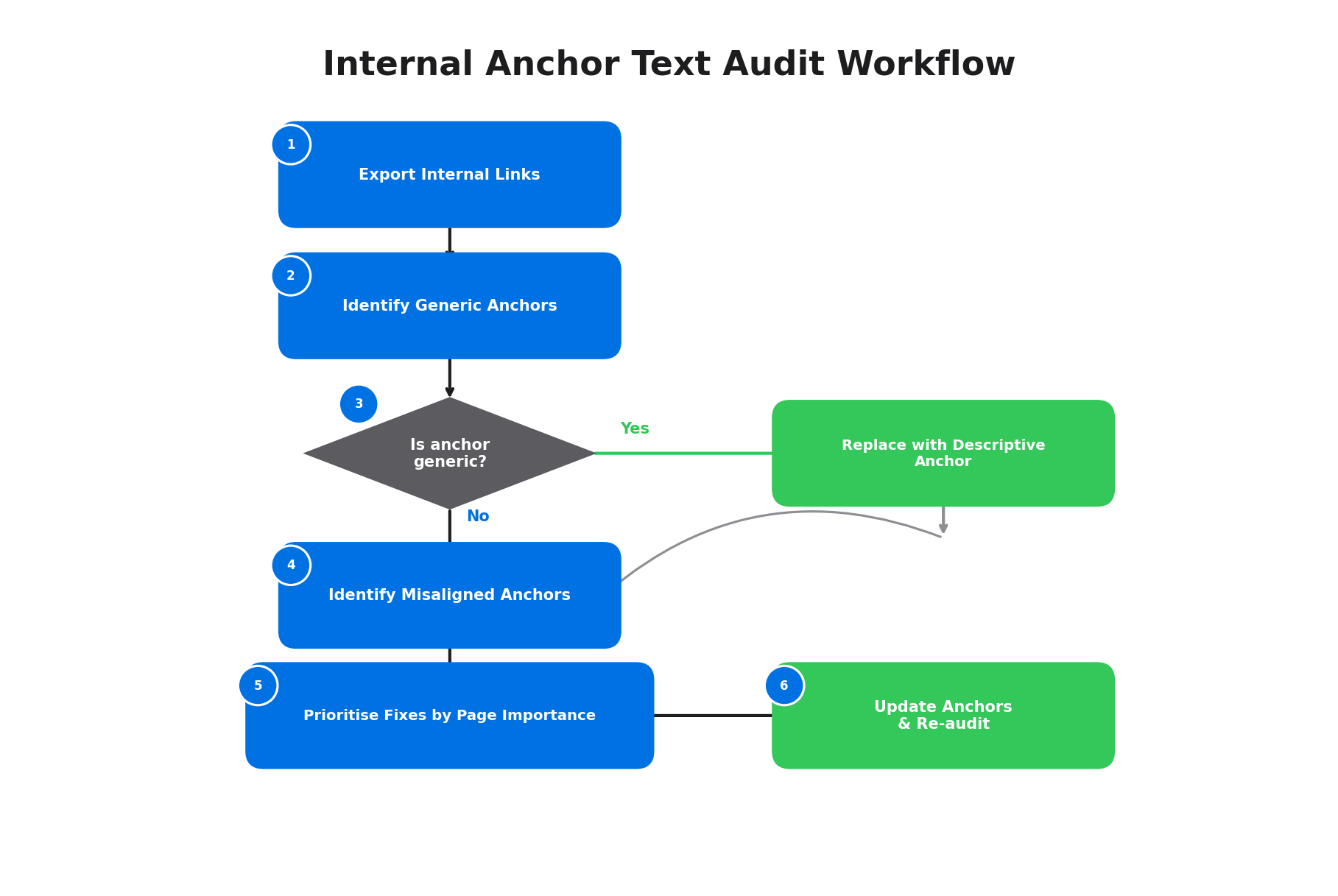
Step 1: Export your internal links
Google Search Console (free): Go to Links, then Internal links, then Top linking text. This shows your most common anchor phrases site-wide. It is a good starting point but lacks page-level detail.
Screaming Frog (free up to 500 URLs): Run a crawl, then Bulk Export, then All Inlinks. Filter by the anchor text column to find generic or empty anchors across your site.
Step 2: Identify generic anchors
Search your export for "click here", "read more", "learn more", "this article", and "here". These are the quick wins. Each one can be replaced with a descriptive phrase in minutes.
Step 3: Identify misaligned anchors
For each anchor, compare it to the target page's H1 or title tag. If the anchor text has no obvious relationship to the destination page's topic, flag it for rewriting.
Step 4: Prioritise by page importance
Fix anchors pointing to your highest-value pages first. Pages with strong commercial intent, high search volume targets, or pillar content status should get the most attention.
If you are managing multiple sites or want a faster way to surface anchor text problems at scale, Linki's internal link analysis flags generic, over-optimised, and semantically misaligned anchors automatically, so you can focus on fixing rather than finding.
Step 5: Update and re-audit
Make the changes, then re-crawl after 2–4 weeks to confirm Google has picked up the new anchors. Track rankings for the target pages to see whether the updated anchor text moves the needle. Internal link changes typically take 2–6 weeks to show measurable impact in Google Search Console.
For a more detailed walkthrough of the full audit process (not just anchor text), see our guide to running an internal link audit.
Anchor Text, AI Search, and What Is Changing
Anchor text is not just a Google ranking factor. It is increasingly important for how AI-powered search engines understand your site's content relationships.
Structured, descriptive internal links help AI systems (Google AI Overviews, Perplexity, ChatGPT with browsing) understand what each page on your site is about and how pages relate to each other. Research from AirOps found that structured pages with clear anchor text earn 2.8x more AI citations than unstructured pages.[7]
Anchor text reinforces entity relationships. When your anchor says "anchor text optimisation guide" and links to a page about that topic, you are explicitly mapping a concept to a URL. AI models use these mappings to build their understanding of your site's topical structure.
The practical takeaway is straightforward: if your anchor text helps a human reader understand what they will find at the destination, it will help an AI system too. The bar is the same. Write for clarity, and you optimise for both.
Frequently Asked Questions
What is the best anchor text for internal links?
Partial-match anchor text is the best default for internal links. It includes the target page's keyword along with supporting words, making it both descriptive and natural-sounding. For example, "tips for optimising anchor text" is better than the exact-match "anchor text optimisation" in most contexts. Use partial-match as your primary strategy and reserve exact-match for your 1–2 most important destination pages.
Can I use exact-match anchor text for internal links?
Yes, but sparingly. Cyrus Shepard's study of 23 million internal links found that pages with at least one exact-match anchor had 5x more traffic.[2] The key word is "at least one". You do not need exact-match on every link pointing to a page. One or two exact-match anchors combined with several varied partial-match anchors from other source pages is the ideal mix.
How many words should anchor text be?
Aim for 3–8 words. The sweet spot is a phrase long enough to be descriptive but short enough to read naturally within a sentence.
What happens if all my internal anchors say "click here"?
You are wasting every internal link's ability to send relevance signals to Google. Generic anchors pass link equity but carry zero topical information. Replacing these with descriptive phrases is one of the fastest, highest-impact SEO improvements you can make. Start with your highest-value destination pages.
How do I check my internal anchor text in Google Search Console?
Open Google Search Console, click Links in the left sidebar, then scroll to "Top linking text" under the Internal links section. This shows the most common anchor text phrases used across your internal links. Look for generic phrases, repeated exact-match anchors, and any phrases that do not match the topic of their destination page. For page-level anchor detail, use Screaming Frog's inlinks export or a dedicated tool like Linki.
Start Here: Three Actions for This Week
You do not need to overhaul your entire site's anchor text in one sitting. Start with three actions:
- Audit your current anchors for generic and misaligned text. Use Google Search Console's Top linking text report as a starting point.
- Use varied, partial-match anchors as your default for all new content. Stop defaulting to "read more" or "click here".
- Ensure at least one exact-match anchor points to each of your most important pages. Check your top 5–10 pages first.
Anchor text is the most underused internal linking lever on most websites. The data is clear: variety matters, alignment matters, and even one well-chosen exact-match anchor per target page can move the needle. If you want to understand the broader strategy behind internal linking, start with our complete guide to internal linking strategy. If you want to see your anchor text data today, give Linki a try.
Sources
- Cyrus Shepard / Zyppy SEO, 23 Million Internal Links Study
- SEO.ai (referencing AuthorityHacker), Internal Linking Anchor Texts: Text Variety is Key
- Google Search Central, SEO Link Best Practices: Anchor Text Guidance
- Brian Dean / Backlinko, Internal Linking for SEO: The Complete Guide
- SHNO (referencing Semrush data), Backlink Statistics for 2026
- AirOps, How to Optimise Anchor Text for Internal Links
- Cyrus Shepard / Wix SEO Hub, Internal Linking Webinar Recap