
Pages with at least one exact-match anchor internal link receive five times more Google traffic than pages without one.[1] That single finding, drawn from Cyrus Shepard's study of 23 million internal links, explains why internal linking best practices matter so much for blog-focussed sites. Yet most blogs still get this wrong. Not because the SEOs behind them lack knowledge, but because they lack a system.
One blog that implemented a structured internal linking overhaul saw a 43% increase in organic traffic within three months, with previously orphaned content jumping 298%.[2] The difference between blogs that rank and blogs that stagnate often comes down to how well their pages are connected.
This guide covers the nine internal linking best practices that matter most for blog posts, backed by real data and built around a repeatable workflow you can start using today. Whether you run a solo content operation or manage a small editorial team, every section is designed to give you something you can act on immediately.
For a broader view of how internal linking fits into your overall SEO approach, see our complete guide to internal linking strategy.
Key Takeaways
- Build every blog post into a topic cluster with bidirectional links between pillar and cluster content.
- Use keyword-rich, descriptive anchor text. Pages with exact-match anchors get 5x more traffic.[1]
- Place your most important internal link in the first 25-30% of the article body.
- Link from high-traffic posts to underperforming ones to distribute authority where it is needed.
- Eliminate orphan pages. Every published post needs at least one inbound internal link.
- After every new publish, update 2-3 existing posts to link to the new content.
- Keep important pages within 3 clicks of the homepage.
- Aim for 3-10 contextual internal links per 1,500-2,500 words. Diminishing returns begin above ~50 links per page.[1]
- Never use nofollow on internal links.
Why Internal Linking Matters More Than You Think
Internal links do three things that directly affect whether your blog posts rank. Understanding the mechanisms turns best practices from arbitrary rules into strategic decisions.
Crawlability and indexation
Google discovers new pages by following links. If a blog post has no internal links pointing to it, Googlebot may never find it. Google's own documentation states it plainly: every page you care about should have a link from at least one other page on your site.[3] No link, no crawl, no index, no traffic.
+150,000
additional annual organic visits achieved within 3 weeks of completing a structured internal linking project
Source: seoClarity, "5 Internal Linking Case Studies"
Link equity distribution
Authority flows through internal links. Your homepage and top-performing posts accumulate the most equity from backlinks. Internal links are the mechanism for distributing that authority to newer or weaker pages. One seoClarity case study found that an ecommerce brand increased organic traffic by 24% simply by adding internal links from top-level pages to deeper content.[4] The same principle applies to blogs: your strongest posts should be lifting up the rest.
Topical authority signals
When you link a cluster of related blog posts together, you signal to Google (and to AI answer engines like Perplexity and ChatGPT) that your site covers a topic in depth. This is the foundation of the topic cluster model. A pillar page on "internal linking strategy" linked to supporting posts on anchor text, link audits, and orphan pages creates a topical web that is greater than the sum of its parts.
The 9 Internal Linking Best Practices for Blog Posts
These nine practices form a complete internal linking system for blog-focussed sites. Each one includes a practical instruction, a concrete example, and the data behind it.
1. Build every blog post into a topic cluster
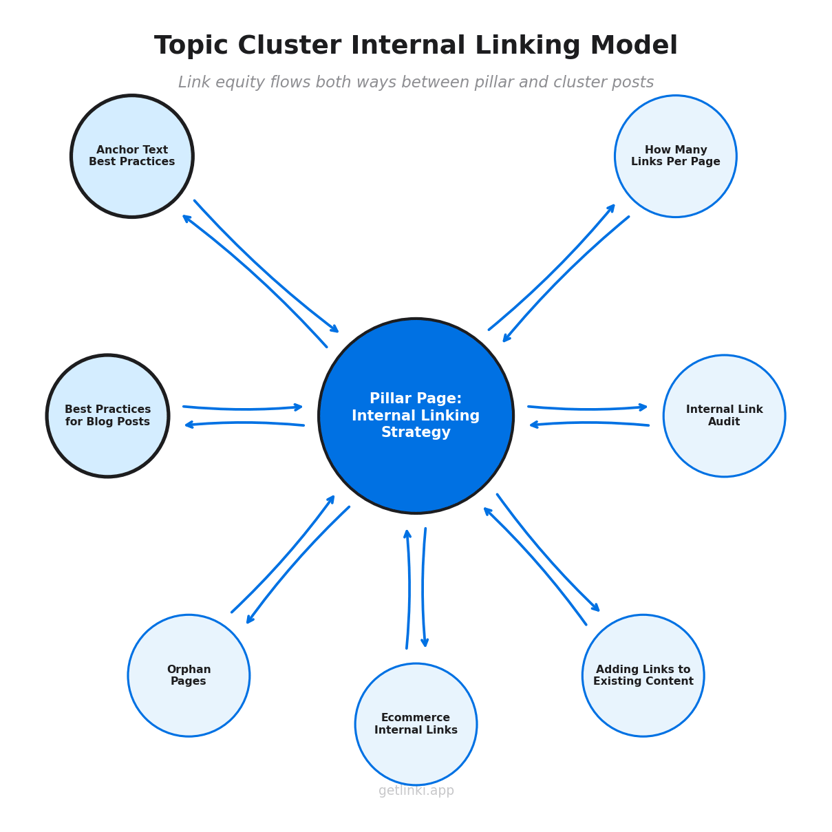
A topic cluster is a pillar page (a comprehensive guide on a broad topic) supported by 5-10 cluster posts that cover specific subtopics in depth. Each cluster post links back to the pillar. The pillar links down to each cluster post. Link equity flows both directions.
This is the hub-and-spoke model that Moz and Yoast have long advocated,[5] and it works especially well for blogs because blogs are naturally organised around topics. If you publish a pillar on "internal linking strategy," your cluster posts might cover anchor text for internal links, link audits, orphan pages, and best practices (this article).
The key: every post you publish should belong to a cluster. Standalone, unlinked posts waste their ranking potential.
2. Use keyword-rich, descriptive anchor text
Anchor text tells Google what the destination page is about. Generic text like "click here" or "read more" wastes that signal entirely. Descriptive, keyword-rich anchors perform dramatically better.
5x
more Google traffic to pages with at least one exact-match anchor internal link, compared to pages without
Source: Zyppy (Cyrus Shepard), 23 Million Internal Links Study
Despite this, a study of 2.5 million internal links found that 15% of anchors are still generic ("click here," "learn more"), and only 8% have strong semantic alignment with their target page.[6] That gap is your opportunity.
The practical rule: use the target page's primary keyword or a close variant as your anchor text. Mix between exact-match (sparingly, 5-10% of your links), partial-match, and descriptive anchors to keep things natural. For a deeper treatment, see our guide on anchor text for internal links.
3. Place your most important links early in the content
Google and readers both give more weight to content that appears earlier on a page. This applies to internal links as well. Brian Dean at Backlinko has noted the "first-link priority" principle: when you link to the same URL twice on a page, Google may prioritise the anchor text from the first instance.[7]
Place your primary contextual internal link (typically to your pillar page or most important related post) within the first 25-30% of the article body. Do not save all your links for a "related reading" section at the bottom. By then, many readers have already left, and the signal strength is weaker.
4. Prioritise linking from high-traffic posts to underperforming ones
Not all internal links are equal. A link from a post that receives 10,000 monthly visits carries more equity than one from a post that gets 50. Identify your top 5-10 traffic pages using Google Search Console, then audit which pages they currently link to. Add strategic contextual links from those high-traffic posts to pillar content or new posts that need a boost.
seoClarity documented a case where this approach drove a 23% traffic increase to targeted product pages.[4] The same logic applies to blog posts: your strongest pages should actively support your weaker ones.
5. Eliminate orphan pages: every post needs at least one inbound link
An orphan page is a page with no internal links pointing to it. It receives no crawl priority, no link equity, and often fails to index consistently. In one blog audit, 22% of posts were completely orphaned, compared to a competitor average of just 4%.[2]
Definition
Orphan page: A page on your site that has no internal links pointing to it. Without inbound links, search engines may never discover or prioritise the page for indexing.
The fix is simple but requires discipline. After every publish, link from 2-3 existing relevant posts to the new one. And periodically audit your full site to catch any posts that have slipped through the cracks. For the full audit process, see our guide on how to run an internal link audit.
6. Link old posts to new posts (and vice versa)
Publishing a new blog post should trigger a retroactive linking pass. Search your site for related existing content and add a contextual link from those older posts to the new one. Then link from the new post back to the most relevant existing content.
This two-directional approach does three things: it speeds up indexing of the new post (Google discovers it faster through existing crawl paths), it passes link equity to fresh content immediately, and it keeps older posts updated with relevant resources.[3]
For a step-by-step process on retroactive linking, read adding internal links to existing content.
7. Control crawl depth: keep important pages within 3 clicks
Crawl depth is the number of clicks it takes to reach a page from the homepage. Google's John Mueller has stated that if a page is several clicks away from important pages like the homepage, Google might assume the content is not that critical.[8]
71%
of contextual internal links appear within the first two levels of site hierarchy
Source: LinkStorm, 2.5 Million Internal Links Study (2026)
For blogs, the practical implication: ensure your pillar content is accessible from the main navigation or the blog homepage. Cluster posts should link back up to their pillar, keeping them within 2-3 clicks of the homepage. If a post is buried four or five clicks deep, it is structurally disadvantaged regardless of its content quality.
8. Match link quantity to content length, and do not overdo it
For most blog posts, aim for 3-10 contextual internal links per 1,500-2,500 words. A pillar page might justify 8-15 or more, given its role as a hub. Shorter posts (under 1,000 words) typically need 2-5.
There is a ceiling, however. Shepard's 23-million-link study found that after approximately 45-50 internal links on a single page, Google traffic begins to decline.[1] Quality matters more than quantity. Every link should add genuine context or navigation value for the reader. If a link does not help someone understand or explore the topic further, remove it.
For a deeper analysis of link-per-page thresholds, see how many internal links per page.
9. Use dofollow links exclusively for internal linking
This one is simple. Never add a nofollow attribute to an internal link. Nofollow prevents link equity transfer, and there is no legitimate reason to block equity flow between your own pages.
The most common cause of accidental nofollows on internal links is plugins. Some WordPress SEO and affiliate plugins add nofollow attributes broadly without distinguishing between internal and external links. Run a quick check: search for "nofollow" in your internal link report using Screaming Frog, Sitebulb, or your preferred internal link checker tool. Fix any instances immediately.
How Many Internal Links Should a Blog Post Have?
For most blog posts, aim for 3-10 contextual internal links per 1,500-2,500 words. This range balances thorough cross-linking with readability. But the right number depends on the post's role in your site architecture.
| Post Type | Recommended Internal Links | Rationale |
|---|---|---|
| Pillar page (3,000+ words) | 8-15+ | Hub for the topic cluster; links to every cluster post and related pillars |
| Standard cluster post (1,500-2,500 words) | 3-10 | Links to pillar, 2-3 sibling cluster posts, and 1-2 external-facing pages |
| Short post or news update (under 1,000 words) | 2-5 | Fewer words, fewer natural linking opportunities; keep links highly relevant |
| Roundup or listicle (2,000+ words) | 10-20 | Each list item is a natural linking opportunity; link to detailed posts per item |
The upper bound matters too. Shepard's research shows diminishing returns above approximately 45-50 internal links per page.[1] Beyond that threshold, Google traffic to the page tends to decline. The takeaway: link with purpose, not volume.
For the full analysis and page-type breakdowns, see how many internal links per page.
Anchor Text Best Practices for Internal Links
Anchor text is the visible, clickable text of a link. For internal links, you have full control over this text, which makes it one of the most powerful (and most neglected) levers in blog SEO. Here is how to use it effectively.
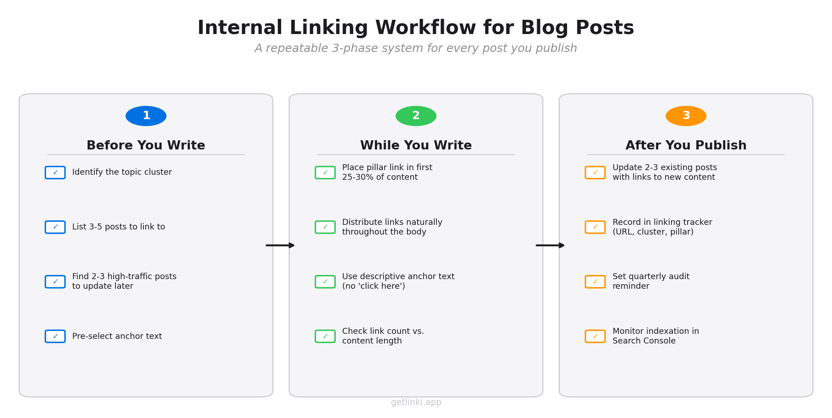
| Anchor Type | SEO Impact | Recommended Usage | Example | Risk |
|---|---|---|---|---|
| Exact match | High | 5-10% of total links | "internal linking best practices" | Over-optimisation if overused |
| Partial match | High | 30-40% of total links | "best practices for linking blog posts" | Low risk; preferred default |
| Descriptive / broad | Medium | 30-40% of total links | "our guide to blog linking strategy" | Minimal risk; good for variety |
| Generic | Low | Under 5% | "click here" / "read more" | Wastes SEO signal entirely |
| Naked URL | Low | Avoid | "https://getlinki.app/blog/post" | No keyword signal; poor UX |
The data backs this up. LinkStorm's analysis of 2.5 million internal links found that 61% of anchor texts are 1-3 words long, 81% use descriptive keywords, but 15% remain generic, and only 8% have strong semantic alignment with their target page.[6] The gap between intention and execution is where most blogs lose ranking potential.
One more principle to remember: first-link priority. If you link to the same URL twice on a page, Google may only count the anchor text from the first link.[7] Make that first anchor text count.
For the complete deep-dive on this topic, read anchor text for internal links.
Internal Linking Workflow for Blog Posts: A Simple System
The best practices above are only useful if you can apply them consistently. That requires a system. Here is a three-phase workflow you can follow for every blog post you publish.
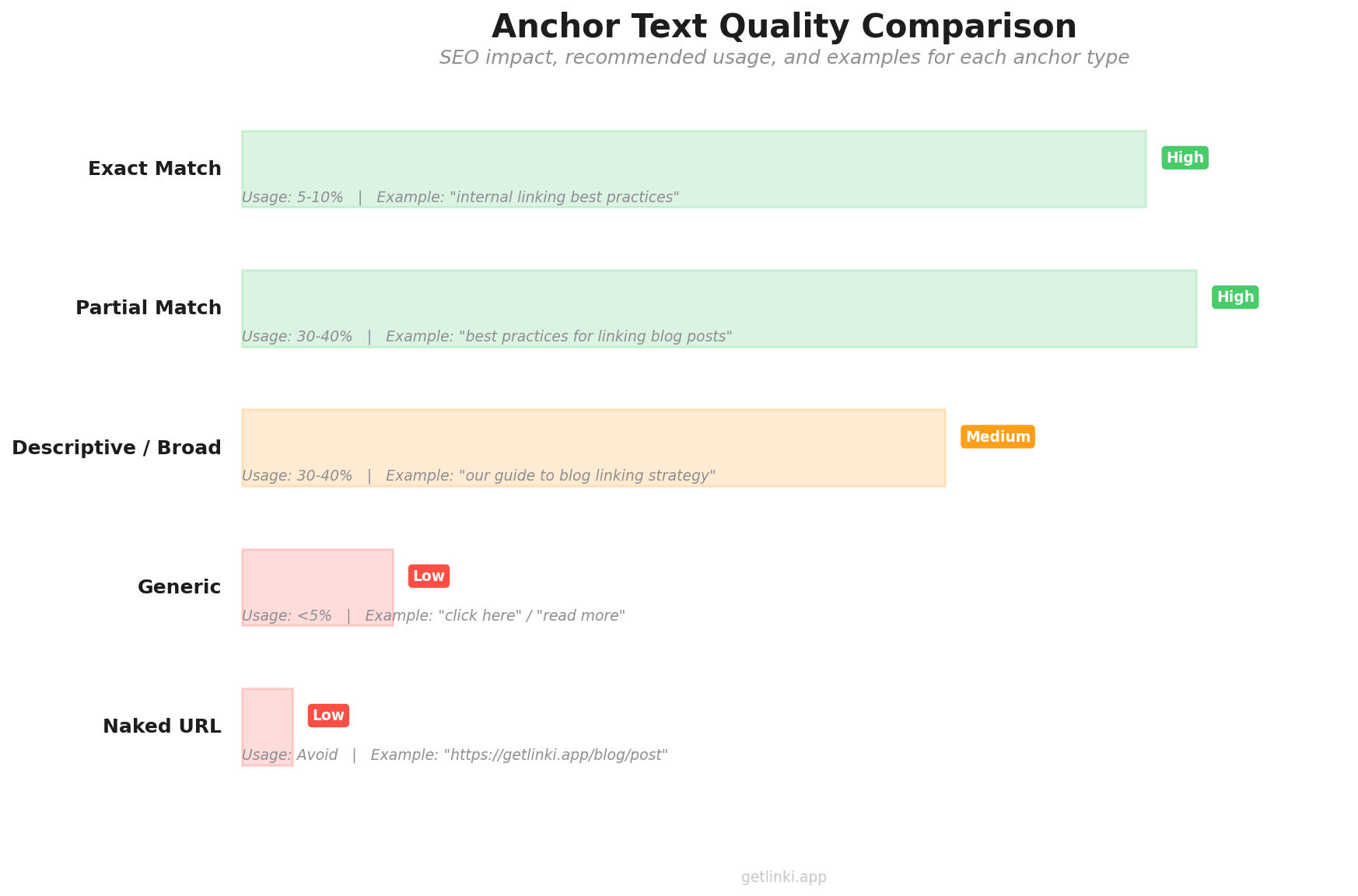
Before you write
- Identify the topic cluster. Which pillar page does this post support? If it does not fit an existing cluster, consider whether it should start a new one or be deprioritised.
- Pull a list of 3-5 existing posts to link to. Search your own site for related content. These are the posts you will link to from the new article.
- Identify 2-3 high-traffic posts that should link back. These are existing posts you will update after publishing to include a link to the new content.
- Choose your anchor text in advance. Decide the primary anchor text for your pillar link and your top 2-3 outbound internal links before you start writing.
While you write
- Place your pillar link in the first 25-30% of the article. This is your highest-priority internal link. Give it the best position.
- Integrate contextual links at natural moments. Do not cluster all links at the bottom. Distribute them throughout the body wherever a reference genuinely helps the reader.
- Use descriptive anchor text. No "click here." No "read more." Describe the destination using the target page's primary keyword or a close variant.
- Check your link count against content length. For a 2,000-word post, 5-8 contextual internal links is a solid target.
After you publish
- Update 2-3 existing posts. Add a contextual link from each to the new post. Target high-traffic posts for maximum equity transfer.
- Record the new post in your linking tracker. A simple spreadsheet works. Note the post URL, its cluster, the pillar it supports, and which posts now link to it.
- Set a quarterly audit reminder. Every three months, review your internal link structure for orphan pages, broken links, and distribution gaps.
This workflow turns internal linking from an afterthought into a consistent part of your publishing process. Tools like Linki are built to make this workflow repeatable at scale: tracking new posts, flagging unlinked content, and maintaining a clean link architecture as your blog grows.
5 Common Internal Linking Mistakes to Avoid
Even experienced content teams make these errors. Each one quietly undermines your linking structure.
1. Using generic anchor text
"Click here," "learn more," and "this article" communicate nothing to search engines about the destination page. LinkStorm's data shows 15% of internal anchors across the web are still generic.[6] Replace every generic anchor with a descriptive phrase that includes the target page's primary keyword or topic.
2. Over-linking to the homepage or navigation pages
Your homepage already accumulates the most authority on your site through external backlinks and sitewide navigation. Adding more body-content links to it from blog posts is wasted equity. Instead, direct those links to pillar pages, underperforming posts, or new content that needs a crawl and ranking boost.
3. Creating nofollow internal links accidentally
Certain WordPress plugins (particularly affiliate and sponsored-content plugins) apply nofollow attributes broadly without distinguishing between internal and external links. This silently blocks equity transfer between your own pages. Run a periodic check using your crawl tool of choice and remove any unnecessary nofollow attributes from internal links.
4. Never updating old posts with new links
If you only add internal links when writing new content, your older posts gradually lose relevance and connectivity. Every new post published is an opportunity to strengthen your existing library by adding backward links. Make retroactive linking a standard part of your publishing checklist, not a once-a-year audit task.
5. Pointing the same anchor text to different pages
If you use the phrase "internal linking strategy" as anchor text linking to three different URLs across your site, you send mixed signals about which page should rank for that term. Each anchor phrase should consistently point to one destination. Audit your anchors periodically to catch and resolve conflicts.
How to Audit Your Blog's Internal Links
A linking strategy is only as good as your last audit. Here is a straightforward process for checking the health of your blog's internal link structure.
Use Google Search Console for a quick orphan check
Go to the Links report in Google Search Console and review the "Internal Links" section. Pages with very few or zero internal links pointing to them are likely orphaned. Sort by link count (ascending) to find the weakest spots first.
Run a full crawl for deeper analysis
Tools like Screaming Frog and Sitebulb provide detailed crawl data including link distribution, crawl depth, broken internal links, and anchor text reports. For content-heavy blogs, a purpose-built tool like Linki can surface orphan pages, highlight link distribution gaps, and flag overused anchor text across your entire site without requiring a full technical crawl setup.
For a comparison of available tools, see our roundup of internal link checker tools.
Set an audit cadence
For most blogs, a quarterly audit is sufficient. If you publish more than 10 posts per month, consider monthly checks. After any major content restructure (new pillar pages, topic cluster reorganisation, URL migrations), run an immediate audit.
For the complete audit walkthrough, read our guide on how to run an internal link audit.
"Essentially, internal linking helps us on the one hand to find pages... It also helps us to get a bit of context about that specific page."
John Mueller, Search Advocate at Google (Google Webmaster Central Hangout, 2020)
Frequently Asked Questions
What are internal links in a blog post?
Internal links are hyperlinks that point from one page on your website to another page on the same website. In a blog post, these are typically contextual links within the body text that connect the reader to related articles, pillar pages, or resource pages on your site. They help search engines discover and understand the relationship between your content, and they help readers find relevant information without leaving your domain.
How often should I audit my blog's internal links?
For most blogs, a quarterly audit is the right cadence. If you publish more than 10 posts per month, consider monthly reviews. You should also run an immediate audit after any major structural changes to your site, such as launching new pillar pages, reorganising topic clusters, or migrating URLs. Between full audits, make retroactive linking part of your standard publishing workflow by updating 2-3 existing posts every time you publish something new.
Should internal links open in a new tab?
No. Internal links should open in the same tab. Opening internal links in new tabs (using target="_blank") creates a confusing user experience with multiple open tabs. It is a pattern designed for external links, where you want to keep the reader on your site. For internal navigation, same-tab linking is the standard practice recommended by most UX guidelines.
Do internal links help with Google rankings?
Yes. Internal links help Google discover your pages, understand their context through anchor text, and distribute ranking authority (link equity) across your site. Google's John Mueller has described internal linking as "super critical for SEO."[8] Research supports this: pages with at least one exact-match anchor internal link receive 5x more Google traffic than pages without, according to Zyppy's study of 23 million internal links.[1]
Can too many internal links hurt my SEO?
Yes, beyond a certain point. Zyppy's 23-million-link study found that after approximately 45-50 internal links on a single page, Google traffic to that page begins to decline.[1] This does not mean you need to count links obsessively. For most blog posts of 1,500-2,500 words, 3-10 contextual internal links is the appropriate range. The principle is that every link should add genuine value for the reader, not just exist for SEO purposes.
What is the difference between contextual and navigational internal links?
Contextual internal links are placed within the body content of a page and use descriptive anchor text relevant to the linked content. They carry the strongest SEO signal because they provide topical context. Navigational internal links appear in menus, sidebars, footers, and breadcrumbs. They help users move around your site but carry less topical relevance because they appear on every page. A strong internal linking strategy uses both types, but contextual links within blog content are where you have the most control and the most opportunity to influence rankings.
Build Internal Linking Into Your Process
Internal linking is not a one-time project. It is a workflow. The blogs that rank consistently are the ones that treat every new post as an opportunity to strengthen their entire content library: linking forward, linking backward, and maintaining the architecture as the site grows.
Start with the nine practices in this guide. Build the three-phase workflow into your publishing process. Audit quarterly. The data is clear: structured internal linking drives measurable traffic gains, from the 5x traffic advantage of keyword-rich anchors[1] to the 43% organic traffic increase achieved by one blog through linking improvements alone.[2]
For the broader strategic picture, explore our complete guide to internal linking strategy. And if you manage a content-heavy blog with dozens or hundreds of posts, see how internal linking for e-commerce pages applies similar principles at scale.
Sources
- Zyppy (Cyrus Shepard), 23 Million Internal Links: SEO Case Study
- Linkify Plugin Blog, Case Study: How a Blog Increased Organic Traffic by 43% with Improved Internal Links
- Google Search Central, SEO Link Best Practices for Google
- seoClarity, 5 Internal Linking Case Studies of Increased Visibility and Opportunity
- Moz, Internal Links SEO Best Practices
- LinkStorm, 2.5 Million Internal Links Study: How Websites Link Their Content (2026)
- Backlinko (Brian Dean), Internal Linking for SEO: The Complete Guide
- Google Search Central, John Mueller on Internal Linking and Crawl Context (Google Webmaster Central Hangout, 2020)