
JavaScript SEO: How Search Engines Render JS Sites
Most websites now run on JavaScript frameworks. React, Next.js, Vue, Angular: they power fast, interactive experiences that users love. But search engines are not users, and the gap between what a browser renders and what a crawler sees has cost countless businesses their rankings.
This guide explains exactly how search engines handle JavaScript, where the process breaks down, and what you can do to ensure your JS-rendered content gets indexed properly.
Definition
JavaScript SEO is the practice of optimising JavaScript-heavy websites so that search engine crawlers can fully crawl, render, and index their content. It covers rendering strategies, internal link structures, Core Web Vitals, and the technical configurations that ensure JS-generated content is visible to Googlebot and other crawlers.
What is JavaScript SEO?
Traditional HTML pages serve content directly in the source code. A crawler fetches the URL, reads the HTML, and indexes the page. Simple.
JavaScript changes this fundamentally. With client-side rendering, the server delivers a near-empty HTML shell. The browser then downloads, parses, and executes JavaScript bundles to generate the actual page content. If a crawler cannot execute that JavaScript, it sees nothing.
JavaScript SEO is the discipline of bridging that gap. It means ensuring your JS-generated content, links, meta tags, and structured data are accessible to search engines, whether by serving pre-rendered HTML, using server-side rendering, or configuring your application to degrade gracefully.
98.7%
of websites rely on JavaScript in some form
Source: Sitebulb, 2024
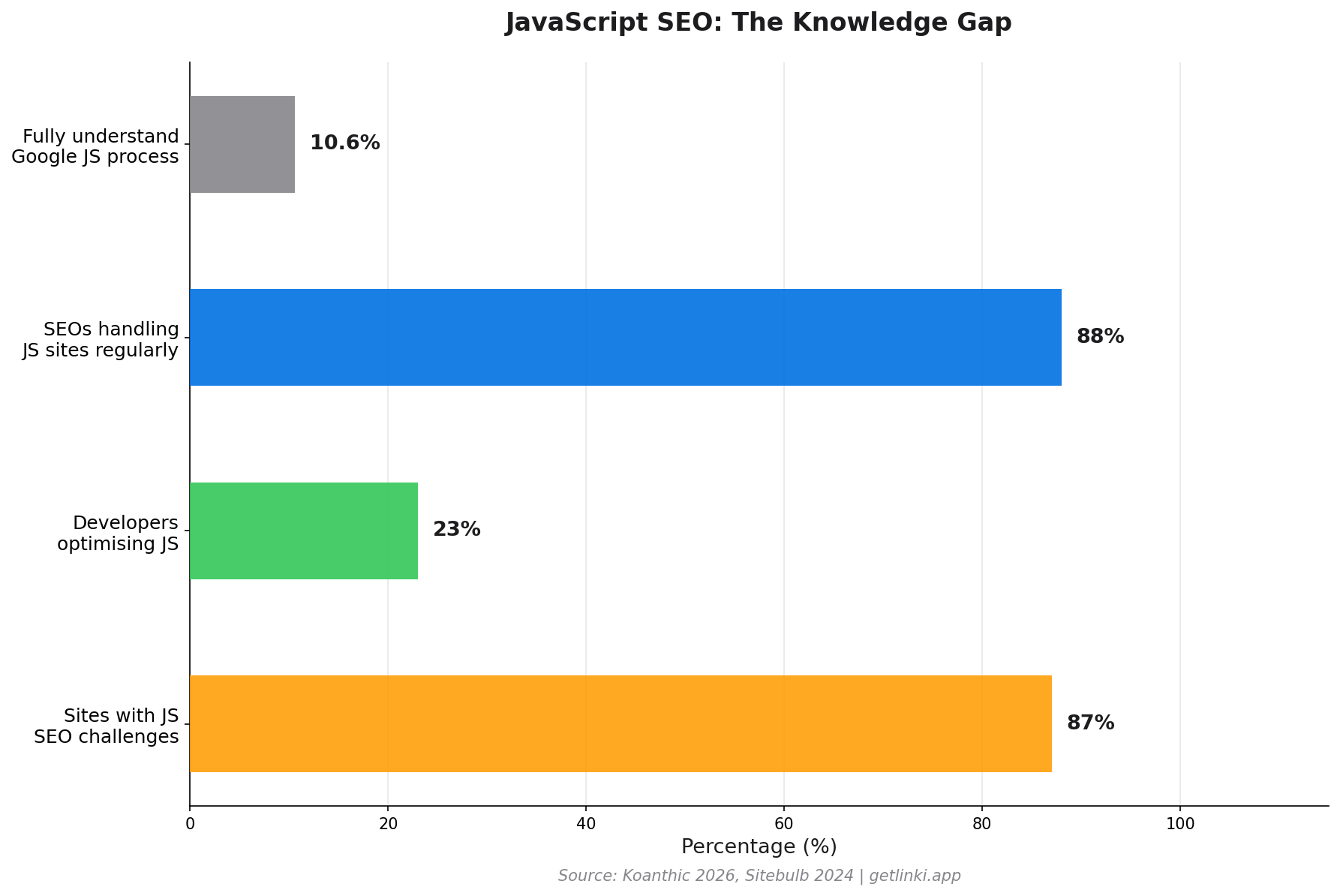
The scale of the problem is significant. Only 10.6% of SEO professionals fully understand how Google processes JavaScript,[1] and 88% of SEOs regularly work on JS-heavy sites. The knowledge gap is wide. This guide closes it.
How Google Crawls, Renders, and Indexes JavaScript Sites
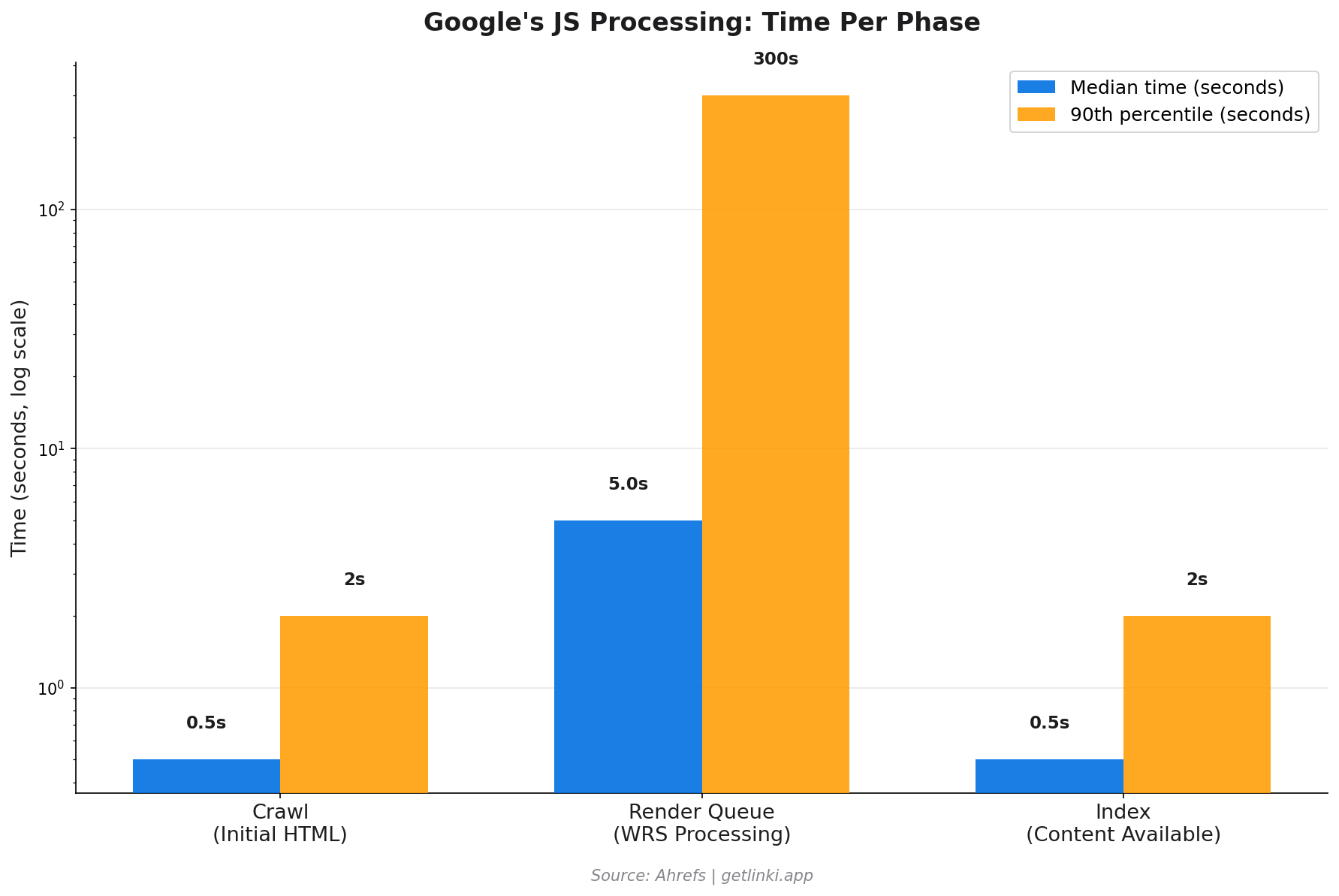
Google processes JavaScript sites in three distinct phases. Understanding each phase explains where problems arise.
Phase 1: Crawling
Googlebot discovers your URL through links, sitemaps, or direct submission. It fetches the raw HTML response from your server. At this stage, it receives whatever your server sends before any JavaScript executes. For a client-side rendered site, that is typically a minimal HTML document with a single <div id="root"></div> and several script tags.
Google notes the page but cannot index it yet. It is queued for rendering.
Phase 2: Rendering
Google's Web Rendering Service (WRS) processes the queued page using a version of headless Chromium. It executes your JavaScript, waits for the DOM to populate, and then captures the rendered HTML. This is computationally expensive, which is why rendering is not instant.
"We don't really care about the pixels... We want to process the semantic information."
Martin Splitt, Google Developer Advocate, via Ahrefs
The rendering queue can create significant delays. The median rendering time is around 5 seconds, but the 90th percentile stretches into minutes, and for very large or complex applications, hours or days.[2] Most pages complete rendering in under 20 seconds,[3] but the delay itself means your content may not be indexed immediately after publication.
5s median
Google render queue wait time, with 90th percentile stretching to minutes
Source: Ahrefs
Phase 3: Indexing
Once rendered, Googlebot extracts content, meta tags, links, and structured data from the rendered HTML. It then evaluates the page for indexing. Any content that only appears after a user interaction (a click, a scroll past a certain point, or form submission) may still be missed, because Googlebot does not simulate user behaviour beyond the initial page load.
Google does queue all discovered pages for rendering unless they carry a noindex directive, but resource constraints mean lower-priority or deeply nested pages may wait much longer.[4]
JS Rendering Methods: SSR vs CSR vs SSG
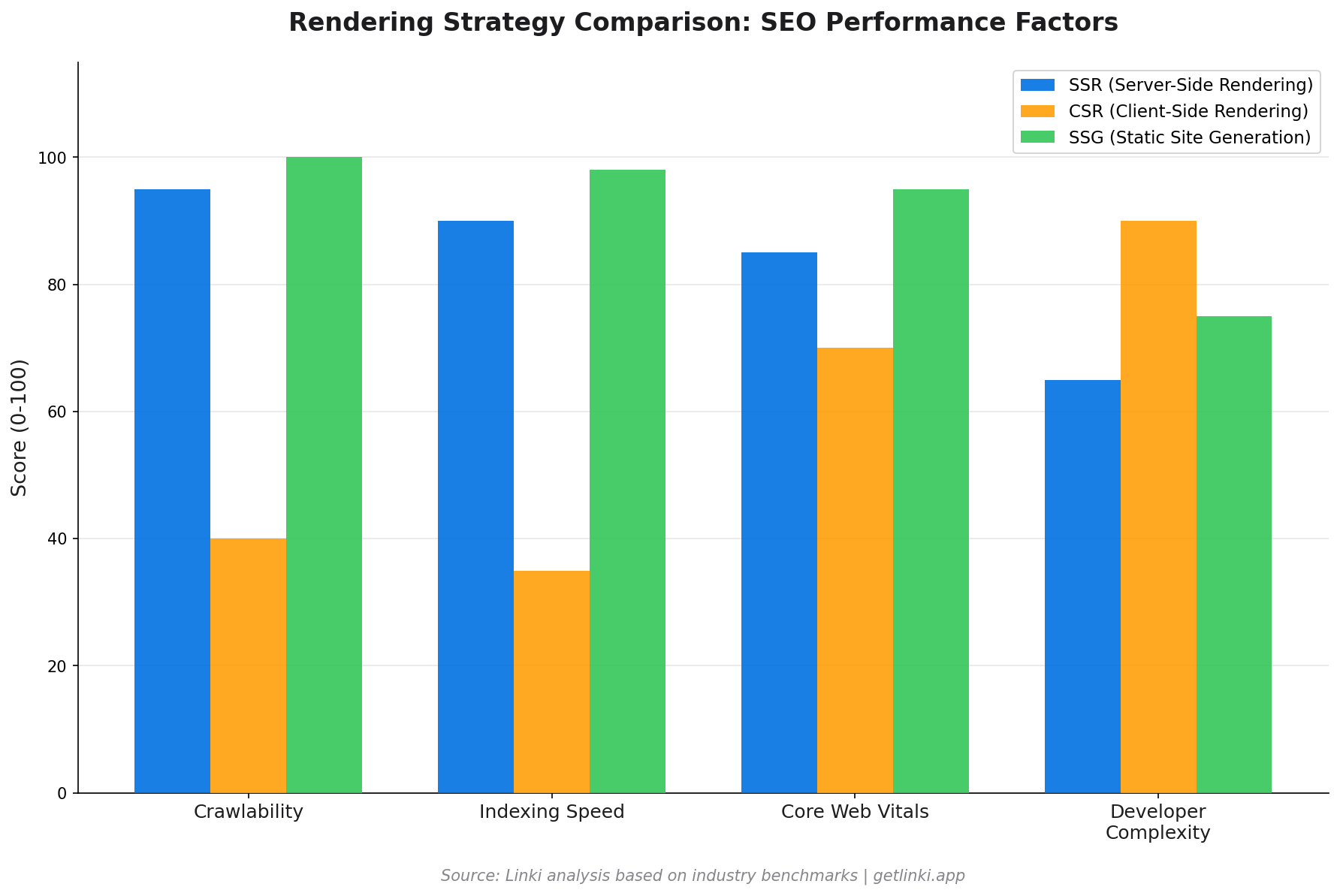
Your choice of rendering architecture is the single biggest factor in your JS SEO performance. Each approach has different trade-offs.
| Method | What It Does | SEO Impact | Best For |
|---|---|---|---|
| SSR (Server-Side Rendering) | Server generates full HTML on each request | High Crawler sees full content immediately | Dynamic content, news, e-commerce |
| CSR (Client-Side Rendering) | Browser runs JS to build the DOM | Low Content invisible until WRS renders it | Logged-in apps, dashboards |
| SSG (Static Site Generation) | Pre-builds HTML at deploy time | High Fastest possible crawl and index | Blogs, documentation, marketing |
| ISR (Incremental Static Regeneration) | Regenerates static pages on demand or schedule | Medium Good for most content types | Large sites with mixed update frequency |
Next.js and Nuxt both support all of these modes. React alone is CSR by default. The framework choice matters less than configuring the right rendering strategy for each page type within your app.
Common JS SEO Issues
Most JS SEO failures fall into a handful of recurring patterns.
Content Not in Initial HTML
If your page content only exists after JavaScript executes, there is a window where Googlebot sees an empty page. The content will eventually be indexed once WRS renders it, but ranking timelines extend significantly. Pages with important content hidden behind fetch calls or lazy-load triggers are particularly vulnerable.
Meta Tags Generated by JavaScript
When your <title> and meta description are set dynamically via JavaScript, crawlers that do not execute JS will see no title at all. Even Googlebot may index the wrong title during the window between crawl and render. Always include a static fallback title in your server response.
Broken Internal Links
This is one of the most overlooked JS SEO issues. Standard HTML anchor tags (<a href="...">) work reliably for crawlers. JavaScript-based navigation, such as onClick handlers that update the URL via the History API, router links that do not render proper anchor elements, and event-driven navigation without corresponding anchors, all create links that Googlebot cannot follow.
60%+
of content can be invisible on unoptimised JS sites
Source: Koanthic, 2026
Infinite Scroll and Pagination
Infinite scroll is user-friendly but crawler-hostile. Googlebot cannot trigger the scroll events that load additional content. If your product catalogue or content feed relies on infinite scroll without a paginated fallback, everything below the initial load is effectively unindexed.
Structured Data in JavaScript
JSON-LD injected via JavaScript may not be processed in Google's first crawl pass. Inline JSON-LD in the server-sent HTML is far more reliable. If you use a library that injects schema markup client-side, verify it appears in the rendered source, not just the pre-render source.
Best Practices for JS Sites
There is no single fix for JS SEO. It requires a layered approach across architecture, content delivery, and technical configuration.
- Use SSR or SSG for content pages. Reserve CSR for logged-in interfaces, dashboards, and tools where indexing is not the goal.
- Serve critical content in the initial HTML response. Even if you use CSR, include the core content (at minimum, the H1, first paragraph, and meta tags) in the server-rendered HTML.
- Pre-render for crawlers. If a full architectural change is not possible, services like Prerender.io can serve static HTML snapshots to crawlers while users get the full JS experience.
- Keep JavaScript bundles small. Googlebot has resource limits. Huge JS bundles can cause the WRS to time out before rendering completes.
- Test with Google Search Console's URL Inspection Tool. Use the "Test Live URL" feature to see exactly what Googlebot sees after rendering.
- Use
rel="canonical"in server-side HTML. Do not rely on JavaScript to set canonical tags.
Internal Linking in JS Apps
Internal linking deserves special attention in JavaScript applications. This is an area where most guides fall short, and where sites lose significant crawl equity without realising it.
The core rule: always use genuine <a href="..."> anchor elements for navigation. Modern JS routers (React Router, Next.js Link, Vue Router) render proper anchor tags by default, but configuration errors or custom implementations often do not. Verify this in your rendered HTML, not just your component code.
Several patterns create invisible internal links:
- Router links that render as
<span>or<div>elements rather than<a>tags - Navigation menus loaded asynchronously after the initial page render, so they are absent from the first crawl
- Infinite scroll product grids where only the first page of links is discoverable
- Client-side redirects handled with
window.locationorrouter.push()instead of proper HTTP redirects or anchor tags
Once you have fixed the structural issues, auditing the quality of your internal link network becomes the next priority. Tools like Linki analyse your internal linking patterns across JS-rendered pages, identifying orphan pages, weak anchor text distributions, and link equity gaps that standard crawlers miss when they cannot execute JavaScript.
For sites with hundreds or thousands of pages, a systematic internal link audit often uncovers significant issues: product pages with no incoming internal links, category pages with far fewer links than their importance warrants, and navigation gaps that fragment your topical authority.
See our guide to internal linking best practices for a full walkthrough of how to build a strong internal link structure.Tools for Auditing JavaScript SEO
Several tools help diagnose JS SEO issues, though they vary significantly in how well they simulate real rendering.
| Tool | JS Rendering | Best For | Cost |
|---|---|---|---|
| Google Search Console | Full (Googlebot exact) | Checking what Google sees per URL | Free |
| Screaming Frog | Optional (Chromium mode) | Site-wide JS link audits | Free up to 500 URLs |
| Sitebulb | Full headless Chrome | Visual link structure analysis | Paid |
| Linki | JS-rendered internal links | Internal link equity and orphan detection | Early access |
| PageSpeed Insights | Full | Core Web Vitals diagnostics | Free |
When crawling a JS site with Screaming Frog, enable JavaScript rendering under Configuration > Spider > Rendering > Chrome. Compare the rendered crawl against a non-rendered crawl: any URLs that disappear from the rendered version have a JS link problem.
2026 Trends: AI Crawlers and Edge Rendering
Two developments are reshaping JS SEO this year.
AI Search Crawlers
GPTBot (OpenAI), ClaudeBot (Anthropic), and Google's AI crawler for Gemini now index your content for use in AI-generated responses. These crawlers have varying JS rendering capabilities. Many process only initial HTML, meaning CSR content is largely invisible to AI overviews. As AI search grows, the rendering gap becomes a visibility gap in AI results too.
Edge Rendering
Edge rendering executes JavaScript at CDN edge nodes close to the user, delivering pre-rendered HTML with minimal latency. Platforms like Cloudflare Workers and Vercel Edge Runtime make this accessible. For SEO, edge rendering offers SSR-quality indexability with performance close to SSG.
The combination of edge rendering and modern JS frameworks like Next.js App Router represents the current best-practice architecture for large-scale sites that need both speed and full indexability. See our technical SEO guide for how rendering choices fit into your broader technical stack.
The Data: How JS SEO Problems Show Up in Practice
The statistics make the business case for getting this right.
87% of modern websites face JS SEO challenges, but only 23% of developers address them properly.[5] JavaScript framework sites with no rendering optimisation see 40% higher bounce rates, not because users dislike the content, but because slower load times and poor Core Web Vitals scores push the pages down in rankings, attracting lower-quality traffic.[5]
The path forward is not to avoid JavaScript. It is to use it correctly. Sites built on Next.js with SSR or ISR, proper anchor-based navigation, and server-side meta tags consistently outperform their CSR counterparts on organic search visibility, even with identical content quality.
For a deeper look at how crawl budget interacts with JS rendering on large sites, see our crawl budget optimisation guide.
Conclusion
JavaScript SEO is not a niche concern. It affects any site built on a modern JS framework. The three-phase process of crawl, render, and index introduces delays and failure points that do not exist for plain HTML sites. Internal links built with JS-only navigation go undiscovered. Content rendered client-side waits in a queue. Meta tags set dynamically may not be seen on first crawl.
The fix is architectural: choose SSR or SSG for content pages, use proper anchor tags for all navigation, serve critical content in initial HTML, and audit your internal link structure against the rendered DOM.
If you are unsure which of your pages are losing links or content to JS rendering issues, start with an audit. The sooner you find the gaps, the sooner your rankings can recover.
FAQ: JavaScript SEO
Does Google index JavaScript content?
Yes, Google indexes JavaScript content, but not immediately. Googlebot crawls the initial HTML first, then queues the page for rendering via its Web Rendering Service using headless Chromium. The rendered content is indexed after that second pass. The delay between crawl and render can range from seconds to days depending on your site's crawl priority and the complexity of your JavaScript.
Is JavaScript bad for SEO?
JavaScript is not inherently bad for SEO, but it introduces risk if not implemented correctly. Client-side rendered sites that depend entirely on JavaScript to generate their content, meta tags, and internal links create a two-stage indexing process with delays and potential gaps. Sites using server-side rendering or static site generation alongside JavaScript avoid most of these issues and perform just as well as traditional HTML sites.
How long does Google take to render JavaScript?
The median rendering time in Google's Web Rendering Service is approximately 5 seconds. However, the 90th percentile extends to minutes or longer. Most pages are rendered within 20 seconds, according to Contentful's research. The practical implication is that newly published content on a JavaScript site may take hours or days to be fully indexed, compared to minutes for SSR or static pages.
Can Google crawl JavaScript links?
Google can follow JavaScript-based navigation, but only if it renders properly as standard HTML anchor elements (<a href="...">) in the rendered DOM. Navigation implemented via event handlers, window.location manipulation, or custom router implementations that do not output anchor tags will not be followed. Modern JS frameworks like Next.js and Vue Router render proper anchor tags by default, but this should always be verified in the rendered source.
What is the best rendering strategy for JS SEO?
For content pages that need to be indexed (blog posts, product pages, landing pages, category pages), server-side rendering (SSR) or static site generation (SSG) are both excellent choices. SSG is faster and cheaper to serve; SSR is necessary for dynamic, personalised, or frequently updated content. Reserve client-side rendering for pages where indexing is not required, such as logged-in dashboards, user account pages, and internal tools.
Sources
- Sitebulb, 10 New JavaScript SEO Statistics for 2024
- Ahrefs, JavaScript SEO: Everything You Need to Know
- Contentful, JavaScript SEO Best Practices
- Google Developers, JavaScript SEO Basics
- Koanthic, JavaScript SEO Guide: Best Practices for 2026
- Moz, JavaScript SEO Guide