
Most sites have two kinds of internal links working at once, and they serve completely different purposes. One type tells users where they are and how to get around. The other tells search engines what a page is actually about. Mixing up their roles, or relying too heavily on one at the expense of the other, is one of the most common and least discussed reasons a broader internal linking strategy fails to move rankings.
This guide covers the distinction between contextual links and navigational links in full, examines how search engines treat them differently, and gives you a clear framework for knowing which to use and when.
Definition
A contextual link is an internal link placed within the body text of a page, surrounded by relevant content. It connects two topically related pages and passes semantic meaning alongside link equity. Example: a sentence reading "learn more about optimising anchor text for internal links" is a contextual link.
Definition
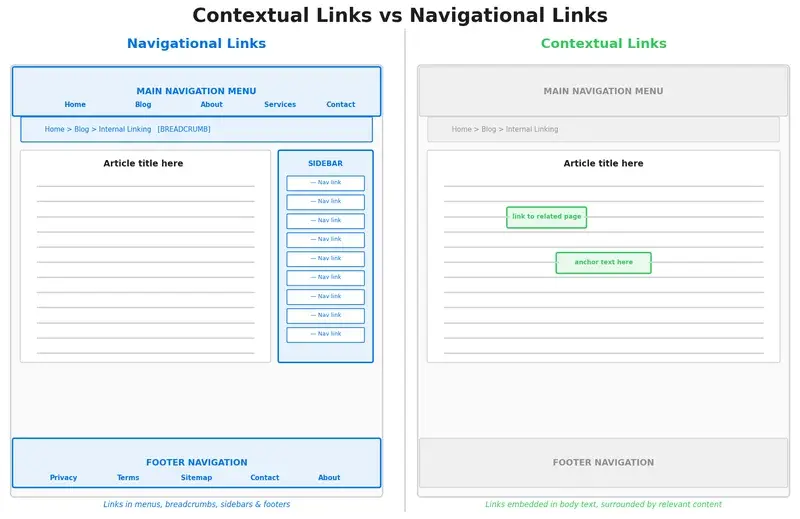
A navigational link is a structural link that appears in repeated site elements: main menus, breadcrumbs, sidebars, or footers. Its primary purpose is to help users understand and move through a site's layout, not to signal topical relevance between pages.
What Are Navigational Links?
Navigational links are the scaffolding of a website. They appear in global headers, footer menus, sidebar widgets, and breadcrumb trails. Because they sit in template areas, the same navigational link can appear on hundreds or even thousands of pages simultaneously.
Their core function is structural. A main navigation menu tells a user: "These are the main sections of this site." A breadcrumb trail tells them: "You are here, and here is the path back." Footer links surface key pages, such as the privacy policy, contact page, and popular categories, that need to be accessible from anywhere.
From an SEO standpoint, navigational links ensure critical pages are consistently crawlable. If a page exists only in the site header, Google's crawler will encounter it on every page it visits. That consistency is genuinely valuable, particularly for new pages that have not yet accumulated editorial links from content.
Types of navigational links
| Link Type | Location | Primary Purpose |
|---|---|---|
| Main menu | Global header | Site-wide navigation and top-level category access |
| Breadcrumbs | Above page title | Hierarchy signalling and UX orientation |
| Sidebar widgets | Right or left column | Supplementary pages, recent posts, categories |
| Footer links | Global footer | Legal pages, contact, secondary navigation |
What Are Contextual Links?
Contextual links live inside the body of a page, woven into the prose. A reader encounters them while absorbing the content around them. That surrounding content is the key difference: it provides the signal that tells a search engine what the destination page is about.
When a paragraph about site architecture ends with a link to a page on breadcrumb implementation, the words surrounding that link act like a description. Google reads that surrounding text to understand the linked page's topic, even if the anchor text alone is ambiguous. This is why contextual links carry significantly more semantic weight than navigational ones placed in isolation.
Contextual links also reflect genuine editorial judgement. Someone, usually a writer or SEO, decided that this particular page was relevant enough to mention in this particular piece of content. That editorial signal matters.
What makes a good contextual link?
- It sits within a sentence that is topically related to the destination page
- The anchor text describes the destination accurately without being forced
- The linked page expands on something the current page introduces but does not fully cover
- The link appears naturally, not as a list of related posts bolted on at the end
Contextual Links vs Navigational Links: The Key Differences
Both link types move users and equity around a site, but they do so in very different ways. The distinction matters because conflating them leads to poor decisions, such as stuffing the navigation menu with every important page, or never building a proper site structure because you trust content links to handle everything.
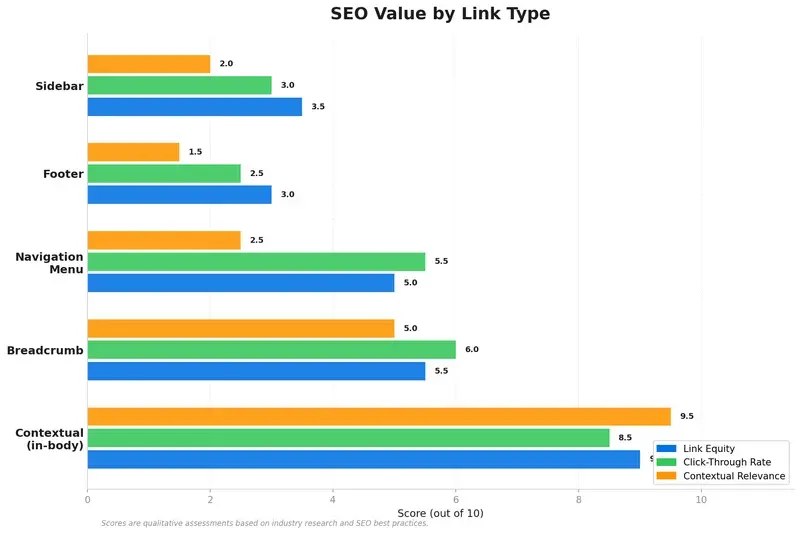
Are contextual links better than navigational links? Neither type is inherently superior. Contextual links pass stronger topical signals and tend to earn more clicks because they appear when a user is already engaged with relevant content. Navigational links provide structural consistency and crawlability, ensuring key pages are always accessible. A well-optimised site needs both, used intentionally for their distinct strengths.
| Dimension | Contextual Links | Navigational Links |
|---|---|---|
| Location | Body text, within content | Menus, sidebars, breadcrumbs, footers |
| Semantic value | High | Low |
| Link equity per link | High | Medium (diluted across many pages) |
| Crawl consistency | Medium (only on relevant pages) | High (sitewide) |
| Topical clustering | High | Low |
| Click-through rate | High (engaged reader context) | Medium |
| Implementation effort | Manual, content-by-content | Template-based, update once |
| GEO / AI interpretation | High | Low |
How Search Engines Treat Different Link Types
Google does not treat all internal links equally. This is not a theory; it is documented behaviour confirmed at the highest levels.
"Essentially, internal linking helps us on the one hand to find pages... It also helps us to get a bit of context about that specific page."
John Mueller, Google Search Advocate, via Search Engine Journal
Mueller's point has two parts. First, links help with discovery. Second, links supply context. Navigational links excel at the first; contextual links excel at both.
Do navigation links pass SEO link equity? Yes, navigational links do pass link equity, but that equity is diluted significantly because the same link appears on every page of a site. Google is aware that a footer link to "About Us" appears on 500 pages; it does not interpret that as 500 editorial endorsements. Contextual links, appearing selectively in relevant content, carry a stronger individual signal precisely because they are not automatically repeated everywhere.
How Generative Engine Optimisation (GEO) changes the picture
AI-powered search and answer engines, including Google's AI Overviews, Bing Copilot, and others, build their understanding of a site's knowledge graph partly by reading the relationships between pages. Contextual links, surrounded by topical content, are far more useful for this process than navigational links. A link in a footer tells an AI system very little about why two pages are related. A link in a paragraph that discusses content clustering tells it a great deal.
This is why strong contextual linking has become even more valuable as search engines evolve. Sites that want to appear in AI-generated answers need to signal their topical expertise clearly, and contextual links are one of the clearest signals available.
3.8x
More backlinks at position one than positions two through ten
Source: Backlinko / PostAffiliatePro
The same principle applies internally. The pages that receive the most contextual internal links, from the most topically relevant sources, tend to rank higher because they accumulate both equity and semantic authority. Navigational links provide the base; contextual links build the advantage.
Best Practices for Navigational Linking
Navigational links are the easiest to misuse because they scale automatically. Add one link to the main menu and it appears on every page instantly. That convenience makes discipline essential.
Keep menus focussed on top-tier pages
A navigation menu crowded with 20 links is not helpful to users, and it dilutes the equity those links pass. The main menu should represent your site's most important categories and nothing else. If a page is important, it should earn contextual links in content, not rely on a menu entry for all its internal authority.
Use breadcrumbs as both UX and schema
Breadcrumbs are the most SEO-friendly form of navigational linking. They reinforce site hierarchy for users, and they support BreadcrumbList structured data for search engines. Implement them on every page below the homepage and mark them up with schema.org vocabulary.
Audit footers regularly
Footer links are often set and forgotten. Over time they can accumulate links to pages that have been deprecated, merged, or redirected. A footer pointing to 404 errors or thin pages wastes equity. Audit your footer quarterly and strip out anything that should not be there.
Avoid sidebar overload
Dynamic sidebar widgets that show "recent posts" or "related posts" can unintentionally create hundreds of navigational links per page. If every blog post sidebar shows the same 10 recent posts, those 10 pages receive thousands of structural links. That looks unnatural and concentrates equity in the wrong places. Use sidebars selectively, or disable them on content pages entirely.
Best Practices for Contextual Linking
Contextual links require editorial effort and deliberate strategy. The payoff, in terms of SEO value and user experience, is proportionally higher.
The "high and tight" rule
Cyrus Shepard of Zyppy, drawing on analysis of over 23 million internal links,[5] identified a clear pattern: internal links placed higher in the body text of a page, in the first few paragraphs rather than the final section, receive more clicks and carry more weight with search engines. He described this as placing links "high and tight" in the content. Get your most important contextual links into the upper portion of a page, within the first two or three sections, not buried in a "further reading" list at the bottom.
Use descriptive, natural anchor text
The anchor text of a contextual link is a direct signal to Google about the destination page's topic. Avoid generic anchors like "click here" or "read more." Use descriptive phrases that accurately describe the linked content. At the same time, avoid over-optimisation. If your anchor text always matches the exact target keyword, it can read unnaturally and trigger scrutiny. For more detail on getting this right, see our guide to optimising anchor text for internal links.
Link to pages that genuinely extend the topic
Every contextual link should serve a reader who wants to know more about a specific point. If you mention breadcrumb schema in an article about site structure, linking to a dedicated breadcrumbs guide serves the reader. Linking to your homepage does not. The test is simple: would a reader who clicked this link find the next logical piece of content they need?
How many contextual links should be on a page?
There is no fixed number, but practical guidelines are available. In most blog posts, aim for one contextual link per 200 to 300 words of body content. For a 2,500-word article, that suggests roughly eight to twelve contextual links. Prioritise quality over quantity: three well-placed links to genuinely relevant pages will outperform ten links scattered through loosely related mentions. Keep total page links, navigational and contextual combined, below 100 to maintain a good user experience, as Moz recommends.
Using Linki, you can quickly spot orphaned pages and find contextual linking opportunities within your existing content, so you do not have to audit each article manually.
How Contextual and Navigational Links Work Together
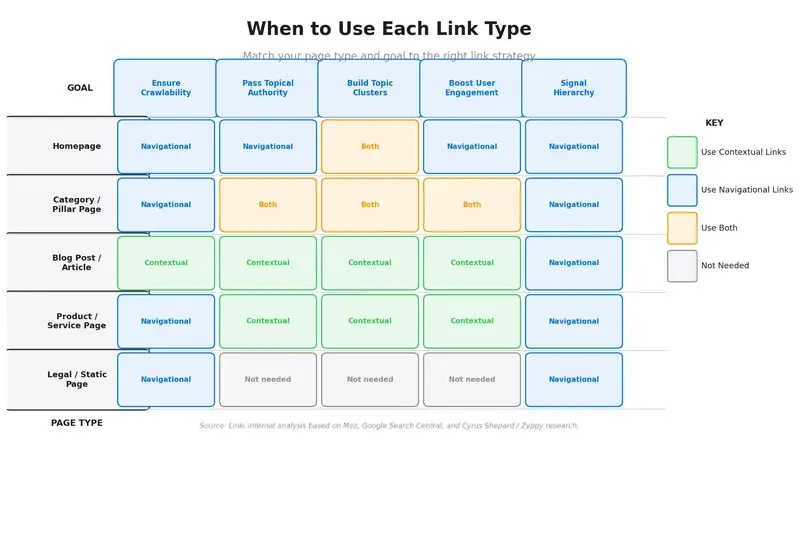
The most effective internal linking strategies do not choose between these two types. They assign each type a clear role and use both with intention.
Think of navigational links as the roads on a map. They ensure every destination is reachable and that the overall structure of the site is clear to both users and crawlers. Contextual links are the signposts within the content: they tell a reader, and a search engine, which nearby destinations are worth visiting given where they are right now.
Topic clusters depend on both
A hub and spoke content model requires both link types to function correctly. The hub page (say, a pillar page on internal linking) should appear in the main navigation if it is a primary content category. Each spoke article, published to support the hub, links back to the hub and to relevant sibling spokes using contextual links. Without the navigation entry, the hub might not be consistently crawled. Without the contextual links from spokes, the hub does not accumulate the topical authority it needs to rank for broad terms.
"Proper site architecture relies on structural links, but contextual links are what group related content into topic clusters."
Chima Mmeje, Senior Content Marketing Manager, Moz
Sites that rely only on navigational links tend to rank for a handful of top-level category terms but struggle with long-tail and mid-funnel queries. Sites that have strong contextual linking but weak navigation can have crawlability gaps, particularly for new content that has not yet been linked editorially. The combination covers both failure modes.
How to Audit Your Internal Linking Structure
Knowing the theory is one thing. Knowing whether your own site is implementing it correctly requires a structured audit.
Step 1: Map your navigational links
Start by listing every link in your global header, footer, breadcrumb trail, and sidebar. Count the total and identify any pages that appear in more than one navigational location. Duplicate entries in the nav and footer are fine; duplication across three or four placements with different anchor texts can send conflicting signals.
Step 2: Identify pages with no contextual links (orphaned pages)
A page that receives links only from navigation, and zero contextual links from body content, is structurally present but semantically isolated. Search engines can reach it, but they receive little information about what it is for or how it relates to the rest of your content. These are your highest-priority contextual linking opportunities.
Step 3: Check for contextual link concentration
The inverse problem is just as common: a few pages receive dozens of contextual links while others receive none. This often happens because popular hub pages are easy to link to, while newer or less prominent pages get ignored. A healthy distribution means most pages receive at least a few contextual links from topically relevant content.
Step 4: Review anchor text diversity
Pull the anchor texts for your ten most-linked pages. If a single anchor phrase accounts for more than 60% of the links to a given page, diversify. Natural editorial linking produces varied anchor text. Exact-match repetition can appear manipulative even when it is entirely organic.
Step 5: Prioritise and implement
Based on the above, build a short list of the ten pages most in need of new contextual links, and identify the five to ten existing articles that cover related topics and could naturally host those links. Update those articles first. Then set a process for reviewing new content before publication to ensure contextual links are built in from day one.
Linki can show you the ratio of contextual to navigational links across your entire site, identify the pages most reliant on structural links alone, and surface the contextual linking opportunities you are missing. For a complete walkthrough, see the guide to how to run a comprehensive internal link audit.
Conclusion
Navigational links and contextual links are not competing strategies. They are complementary tools with distinct jobs. Navigation provides the structure that keeps a site crawlable, consistent, and easy to use. Contextual links provide the semantic depth that tells search engines which pages are authoritative on which topics.
Sites that over-invest in navigation look organised but lack depth. Sites that skip proper navigation can have crawlability gaps and a fragmented user experience. The goal is a structure where every important page is reachable via navigation and every important topic relationship is expressed through editorial, in-body links.
Start with an audit of your current balance, identify the pages that depend entirely on structural links, and build a targeted programme of contextual linking for those pages first. The results tend to compound quickly once the foundations are in place.
Frequently Asked Questions
What is the difference between contextual and navigational links?
Contextual links appear within the body text of a page, surrounded by topically relevant content. Navigational links appear in structural site elements such as menus, breadcrumbs, sidebars, and footers. Contextual links carry more semantic value; navigational links provide consistent crawlability.
Do navigational links count for SEO?
Yes, but with important caveats. Navigational links help search engines discover pages and establish a baseline of authority. However, because the same navigational link appears on every page of a site, the equity each instance passes is diluted significantly. They should not be relied upon as the primary source of link authority for important pages.
How many internal links should a blog post have?
As a practical guideline, aim for one contextual link per 200 to 300 words of body content. For a 2,500-word article, that is roughly eight to twelve contextual links. Keep the total number of links on the page, including navigational and contextual combined, below around 100 for optimal user experience. Prioritise relevance over volume.
Can I use both link types on the same page?
Yes, and you should. Every page on a well-structured site will already have navigational links in the header and footer. The goal is to also include contextual links within the body content of that page. The two types serve different purposes and do not interfere with each other when used correctly.
What happens if a page only has navigational links?
A page that receives only navigational links is structurally accessible but semantically isolated. Search engines can crawl it, but they receive very little topical context about what that page covers or how it relates to the rest of the site. These pages typically rank poorly for anything beyond branded or exact-match queries. Adding contextual links from topically related content is the most effective way to improve their performance.
Sources
- Google Search Central, Links that Google can crawl
- Moz, Internal Links: SEO Best Practices
- Search Engine Land, The Complete Guide to Internal Linking
- Search Engine Journal, John Mueller on Internal Anchor Text
- Clearscope / Zyppy (Cyrus Shepard), Why Your Internal Links Aren't Actually Optimised
- Yoast, Internal Linking for SEO: Why and How
- seoClarity, Internal Linking Strategies to Build Site Authority
- PostAffiliatePro / Backlinko, Why Is Contextual Link Building Important?
- Lillian Purge, Contextual Links vs Navigation Links for SEO